

At its core, lead scraping software is a tool designed to automatically find and extract contact information—like names, emails, and job titles—directly from websites. For anyone in sales, recruiting, or marketing, this technology is a game-changer. It transforms the tedious, multi-day process of building prospect lists into a task that can be completed in minutes, freeing up valuable time for outreach and relationship-building.
This article is part of our broader guide to lead scraping. If you want the complete end-to-end workflow—including lead sources, scraping methods, enrichment, data quality, CRM activation, and compliance—see: Lead Scraping Guide: How to Scrape, Enrich, and Convert Leads at Scale.
What Is Lead Scraping and How Does It Work?
Picture this: you're a recruiter tasked with finding 50 qualified software engineers in New York. The traditional method involves hours, or even days, of manual labor. You'd dig through LinkedIn profiles, company "About Us" pages, and industry blogs, painstakingly copying each candidate's name, title, and company into a spreadsheet. This process is not only slow and mind-numbing but also highly susceptible to typos and errors.
Lead scraping software acts as an automated research assistant, eliminating this manual drudgery. Instead of you clicking, highlighting, and copying, the software scans a webpage, instantly recognizes the patterns that indicate a person or company profile, and extracts that data into a clean, organized list.
Think of it as a smart filter for the web. You point it to a source rich with potential leads, and it sifts through the underlying code and text to pull out the precise contact details you need.
From Manual Drudgery to Automated Efficiency
The biggest problem lead scraping solves is the massive bottleneck created by manual data collection. Every hour spent on basic data entry is an hour not spent on meaningful outreach, closing deals, or interviewing top-tier candidates.
Switching to an automated approach provides an immediate competitive advantage:
- Speed: You can extract hundreds of profiles in the time it would take to manually copy just a handful.
- Accuracy: It eliminates human error, ensuring no more typos or missed details from hours of copy-pasting.
- Scalability: Building large, targeted lead lists from across the web becomes feasible without hiring a team of data entry specialists.
Let's put this into perspective. Here's a quick look at how the two methods stack up.
Manual Prospecting vs Automated Lead Scraping
| Aspect | Manual Prospecting | Automated Lead Scraping |
|---|---|---|
| Process | Manually visiting websites, copying, and pasting data into a spreadsheet. | Software automatically scans sources and extracts structured data in one click. |
| Time | Extremely time-consuming. Can take days or weeks for a large list. | Incredibly fast. Extracts hundreds of leads in minutes. |
| Accuracy | Prone to human errors like typos, formatting issues, and missed data. | Highly accurate. Eliminates copy-paste mistakes for clean, reliable data. |
| Scalability | Very difficult to scale. Requires more people and more hours. | Highly scalable. Build massive, targeted lists without additional manpower. |
As you can see, the difference isn't just minor—it's transformative. This is why the global market for lead generation tools is expected to explode from USD 5.59 billion in 2025 to USD 32.1 billion by 2035. That kind of growth tells you just how essential these tools have become for any modern business that wants to stay competitive.
The Modern, No-Code Approach
Not long ago, web scraping was a technical skill reserved for developers who knew how to write code. It was completely out of reach for the average sales rep or recruiter.
But today, modern tools like ProfileSpider have completely changed the game. It’s a one-click AI profile extraction tool designed for non-technical users. It works on any website you can think of, from LinkedIn and Twitter to specific company team pages. You don’t need any technical background. You simply click a button, and the AI intelligently finds and organizes all the profiles on the page for you.
Lead scraping has become a cornerstone of modern automated lead generation strategies that keep your sales or recruiting pipeline consistently full. If you want to see a direct comparison of how different tools handle this, check out our guide on ProfileSpider vs. the Instant Data Scraper.
Core Features Every Lead Scraping Tool Needs
Choosing the right lead scraping software can feel overwhelming. Every tool claims to be the fastest, the most accurate, the best. To cut through the noise, you need to focus on the core features that actually deliver business value—the ones that save you real time, improve data quality, and allow you to scale your efforts without hitting a wall.
Forget the long, confusing checklists for a second. Let's zero in on the foundational features that truly matter for anyone in sales, recruiting, or marketing.
This flowchart breaks down the simple but powerful workflow you should expect from a good tool, turning a messy process into just a few clicks.
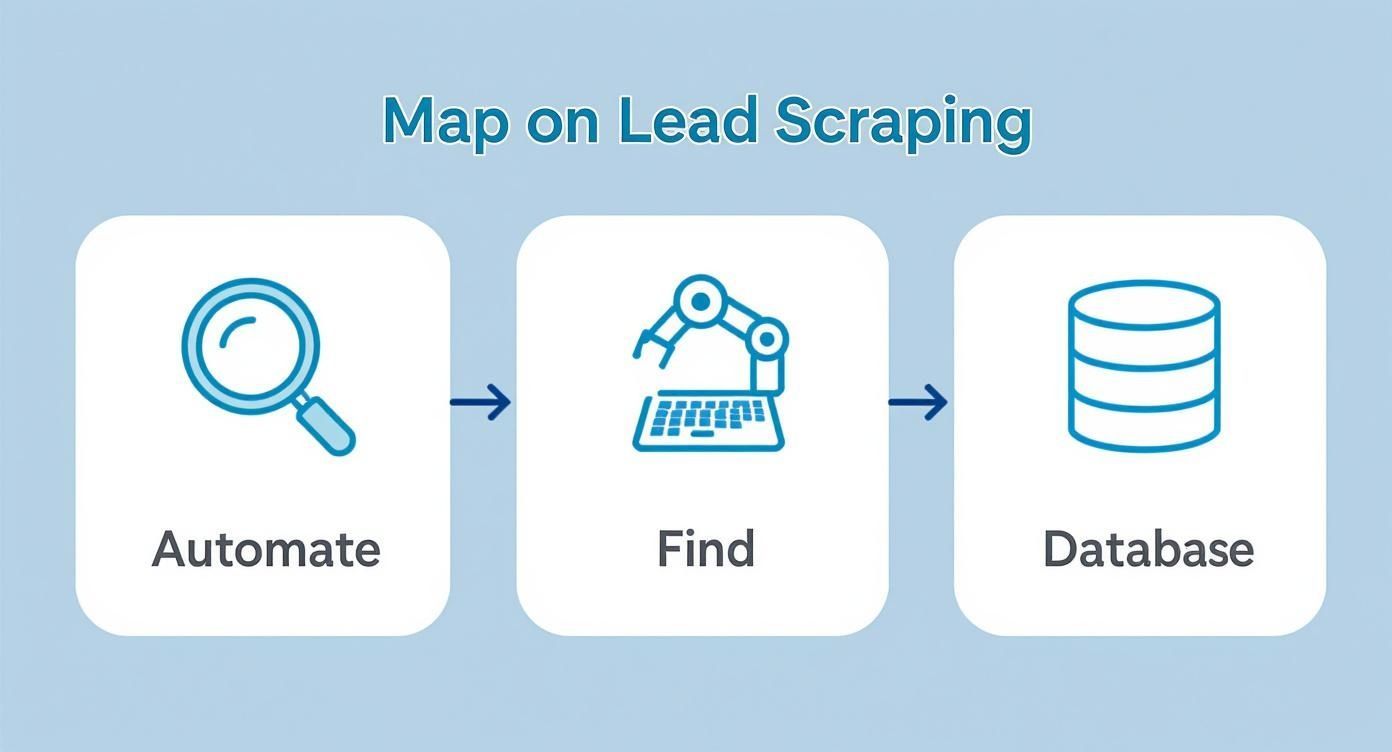
As you can see, the whole point is to find, automate, and organize lead data seamlessly. That only happens when a tool is built on the right technology.
One-Click AI Profile Extraction
The most critical feature is how the tool actually finds and extracts data. Older scrapers relied on rigid templates that would break the moment a website changed its layout. Modern tools, however, use AI-powered extraction to intelligently identify and capture profile information like names, job titles, and companies, regardless of the page structure.
This is a massive leap forward. It means you don’t need to be a developer to get clean, reliable data. A tool like ProfileSpider uses its AI to identify both individual and company profiles with a single click. This instantly eliminates hours of manual copy-pasting and gives you a solid, accurate foundation for your outreach campaigns.
The real magic of AI in lead scraping isn't just about speed; it's about adaptability. An AI-driven tool can land on a website it's never seen before and still figure out how to extract profile data. That's something a template-based scraper just can't do.
Universal Website Compatibility
Let's be real: your best leads aren't only on LinkedIn. They’re on industry blogs, conference speaker lists, company "About Us" pages, and all sorts of niche online communities. A top-tier lead scraper must have universal website compatibility. You can't afford to be locked into just one or two major platforms.
This flexibility is essential for building deep, comprehensive lead lists. A recruiter hunting for a specialized developer might find gold on GitHub or a niche forum. A sales rep could uncover key decision-makers on a "Meet the Team" page that most people overlook.
ProfileSpider was built for this reality. Its smart extraction engine works on any website with profile or contact information, automatically adapting to different layouts without any setup or configuration. This means you can find prospects wherever they are online, not just where it’s most convenient for the software.
Bulk Extraction and Data Enrichment
To really get ahead, you need to work in volume. Bulk extraction is the feature that lets you capture every single profile from a page at once—often up to 200 profiles per click. This turns lead generation from a tedious, one-by-one chore into a high-speed workflow, allowing you to build massive, targeted lists in minutes, not days.
But collecting profiles is only half the battle. The data you find is often incomplete. A name and a company are a start, but they aren't actionable without an email or phone number. This is where contact enrichment becomes your secret weapon.
This feature takes a partial profile—like a name and a LinkedIn URL—and automatically searches for missing contact details. ProfileSpider’s “Enrich” function does exactly that, visiting profile URLs in the background to fill in those crucial gaps. It transforms a simple list of names into a database of actionable, outreach-ready leads, making your data infinitely more valuable.
How Sales and Recruiting Teams Use Lead Scraping
Knowing the features of lead scraping software is one thing; seeing it in action is another. For sales professionals and recruiters, these tools aren't just a nice-to-have—they are central to a modern, efficient workflow. They bridge the gap between a sea of potential opportunities and a list of real people you can contact, transforming hours of manual work into a few simple clicks.
Let's walk through some practical, real-world scenarios where this software becomes a total game-changer.
Use Case for Sales Prospecting
Imagine a sales rep who needs to build a list of marketing managers at mid-sized tech companies. The traditional approach is painfully slow. They would spend their day bouncing between LinkedIn, company websites, and a spreadsheet, manually copying and pasting every name, title, and company they find.
Now, let's see how that process is upgraded with a modern tool.
The Old Way: Spend hours on LinkedIn or company "Team" pages, clicking on profile after profile. Copy a name, paste it. Copy a title, paste it. Repeat hundreds of times, burning through valuable hours that should be spent talking to prospects.
The ProfileSpider Way: The sales rep finds a list of top tech companies on a single webpage. They open ProfileSpider and click "Extract Profiles." The AI instantly pulls all company profiles from the page. Next, they use the “Enrich” function to find key contacts within those companies. In minutes, they have a hyper-targeted prospect list ready for outreach.
This fundamental shift from manual data entry to one-click extraction lets sales teams focus on what they do best: building relationships and closing deals.
Use Case for Talent Sourcing
For recruiters, the pressure to find great candidates is constant. Sourcing top talent today means going beyond job boards to dig into niche online communities, professional networks, and industry forums where the best people—often those not actively looking—congregate.
A recruiter's most valuable asset is time. Lead scraping software multiplies that asset by automating the most time-consuming part of the job—finding and organizing potential candidates—so they can invest more in human interaction and evaluation.
Let's look at the difference in workflow.
The Old Way: A recruiter discovers a list of speakers from a recent industry conference—a goldmine of talent. They start clicking each speaker's profile, copying their name, company, and social links, then manually searching for an email address. This could easily consume an entire afternoon for just one event.
The ProfileSpider Way: The recruiter navigates to the conference speaker page. With a single click, ProfileSpider extracts every speaker's profile, capturing their name, job title, company, and available social links. The recruiter can then add these candidates to a "Conference Leads" list and use the bulk "Enrich" feature to automatically find their contact information.
This automated approach turns talent sourcing from a reactive, time-consuming chore into a proactive, efficient strategy for building a robust candidate pipeline.
The Growing Market for Efficient Tools
The shift toward these automated solutions is not a minor trend. The web scraping software market, which powers these lead generation tools, was valued at roughly USD 718.86 million in 2024. Projections show it rocketing to nearly USD 2.2 billion by 2033, driven by the exploding demand for smart, efficient data collection. You can dig into the numbers yourself in this comprehensive market analysis.
This growth tells a clear story: professionals need tools that get the job done without a steep learning curve or technical headaches. Whether you're building a sales pipeline or sourcing talent, the goal is always the same—get accurate, actionable data as fast as possible. That's exactly where a no-code tool like ProfileSpider comes in, making powerful AI extraction accessible to everyone.
Navigating Data Scraping Ethics and Compliance
Using lead scraping software is a massive efficiency booster, but it also raises important questions about data privacy and responsible use. There's a fine line between smart, ethical prospecting and intrusive data harvesting, and it's a line you must understand. This isn't about memorizing dense legal texts; it’s about adopting a practical, respectful mindset when collecting data.
At its core, ethical lead scraping follows one simple rule: stick to publicly available information. This includes data people and companies have willingly shared, such as professional profiles on LinkedIn, speaker bios on conference websites, or contact emails on corporate pages. The goal is to efficiently gather what's already in the public domain, not to access private data behind a login or paywall.
Getting this distinction right is crucial for building trust and protecting your brand's reputation.
The Pillars of Responsible Data Collection
To ensure your lead generation efforts are both effective and ethical, a few core principles should guide your actions. Following these isn't just about staying compliant; it's about making sure the data you collect is relevant and gathered with respect.
Sticking to these rules protects your business and, just as importantly, respects the privacy of the people whose information you're collecting. Here are the non-negotiables:
- Respect Website Terms of Service: Before scraping, always check the site's Terms of Service (ToS). Many websites have clear rules about automated data collection. Adhering to them helps you avoid getting blocked or facing legal issues.
- Scrape Only Public Data: This one is simple. Never attempt to capture information that requires a login, is behind a paywall, or is otherwise not intended for public consumption. Ethical scraping is about organizing public information efficiently, not breaking into private spaces.
- Adhere to Privacy Regulations: You must be mindful of major regulations like the General Data Protection Regulation (GDPR). This means being transparent about how you use data and having a legitimate reason for processing it. Learning about GDPR compliant AI integration strategies is a smart move to keep your entire workflow secure.
For a deeper look into the nuts and bolts of this, check out our guide on whether website scraping is legal.
How ProfileSpider Prioritizes Your Privacy and Compliance
The way your software handles data is just as critical as how you collect it. Many tools process and store your scraped leads on their own cloud servers. While this may sound convenient, it can create significant privacy and compliance headaches, as you effectively hand over control of the data.
ProfileSpider was built from the ground up with a completely different, privacy-first design. All the profiles and data you extract are stored locally, right in your browser's IndexedDB storage. No data is ever sent to or stored on our servers without your explicit consent.
This local-first approach means you have 100% ownership and control over your data. You are the sole custodian of the information you collect, which massively simplifies GDPR compliance and provides total peace of mind. You can export or delete your data anytime, knowing it only ever exists on your machine.
This makes ProfileSpider more than just a powerful lead scraping tool—it makes it a secure partner in responsible data collection.
Integrating Scraped Leads into Your Workflow
Collecting high-quality lead data is a fantastic start, but it’s only half the battle. The real value is unlocked when that information flows smoothly into the tools your team already uses every day. If your scraped leads just sit in a spreadsheet, they quickly become stale data points instead of active opportunities.
This is where seamless integration becomes a game-changer. For any sales or recruiting team, the goal is to get new prospects out of the scraping tool and into a CRM (like Salesforce) or an Applicant Tracking System (ATS) with zero friction. A clunky, manual transfer process creates bottlenecks, invites human error, and slows your entire operation down.
That's why modern lead scraping software is built to bridge this gap, turning raw data into an actionable part of your workflow almost instantly.
From Data Collection to Actionable Pipeline
The key to a smooth handoff is having flexible and professional export options. You need to be able to shape the data to fit the exact requirements of your destination system, and that’s where different file formats and custom field mapping come into play.
Most professional tools offer a few standard export formats, each with a specific purpose:
- CSV (Comma-Separated Values): This is the universal translator for data. A CSV file is a simple, lightweight text file that can be opened by virtually any spreadsheet program or imported into any CRM or ATS. It’s your go-to for maximum compatibility.
- Excel (.xlsx): Perfect for teams that live in Microsoft Excel. This format preserves more complex formatting and is ideal for creating reports, pivot tables, or doing deeper data analysis before uploading to another system.
- JSON (JavaScript Object Notation): A structured format used for automated, machine-to-machine data transfers between different software platforms, often via APIs.
Being able to choose your format is the first step. The second, and arguably more crucial step, is customizing what data gets exported.
The Power of Custom Field Mapping
Think about your CRM—it doesn't have one generic "contact" field. It has specific, organized fields like "First Name," "Last Name," "Company," and "Job Title." Great lead scraping software lets you map the data you've extracted directly to these specific fields.
A one-click export feature with custom field selection completely eliminates the most painful part of data integration—manually reformatting spreadsheets. It ensures your data arrives in the CRM or ATS perfectly structured and ready for your team to use.
This is a core strength of ProfileSpider. It was designed for non-technical users who need results without the usual tech headaches. You can select exactly which fields you want to include in your export—like name, email, company, and social links—and generate a clean file in CSV, Excel, or JSON format.
Common Data Export Options and Their Uses
To help you visualize how this works in practice, here’s a quick breakdown of common export formats and where they fit best in a business workflow.
| Export Format | Best For | Common Use Case |
|---|---|---|
| CSV | Universal compatibility with nearly all platforms. | Importing a new prospect list into a CRM like HubSpot or an email marketing tool like Mailchimp. |
| Excel (.xlsx) | Internal analysis, reporting, and manual data review. | A sales manager creates a pivot table to analyze lead sources before uploading the finalized list to the company's CRM. |
| JSON | Automated workflows and developer-led integrations. | Setting up an API connection that automatically sends new scraped leads from the software directly into a custom-built internal database. |
Ultimately, having these options at your fingertips transforms lead scraping from a simple data-gathering task into a strategic part of your growth engine.
A recruiter can scrape a list of qualified candidates and have it in their ATS in minutes. A sales team can build a targeted prospect list and push it directly to their CRM, ready for an immediate outreach campaign. This kind of smooth, efficient workflow is exactly why the web scraping software market is growing so rapidly. By 2025, it is expected to be worth over USD 1 billion, driven by businesses that rely on this real-time data intelligence. For a deeper dive into the market's trajectory, you can read the full research on web scraping software growth.
Frequently Asked Questions About Lead Scraping
Even after understanding what lead scraping software can do, it's normal to have a few questions. This technology touches on efficiency, data privacy, and daily workflows, so getting clear answers is important. We’ve rounded up the most common questions from sales professionals, recruiters, and marketers to provide practical insights.
Is Lead Scraping Software Legal and Ethical to Use?
This is often the first question, and for good reason. The short answer is yes, lead scraping is legal and ethical when done responsibly.
The golden rule is to only collect publicly available information. This includes data that people and companies have chosen to share publicly, such as contact information on a company’s team page, professional details on a LinkedIn profile, or speaker bios on a conference website.
The line is crossed when a tool attempts to access private data behind a login, paywall, or other restriction. Responsible use also means respecting a website's Terms of Service, which often outline rules on automated data collection. Modern, no-code tools like ProfileSpider are designed for this ethical approach, focusing only on public data and keeping you in full control.
Do I Need to Be a Developer to Use These Tools?
Absolutely not. While web scraping was once a domain reserved for developers writing complex code, today's best lead scraping software is built for everyone else—the sales reps, recruiters, and marketers who need the data.
Modern tools have replaced coding with simple, intuitive interfaces. ProfileSpider, for instance, is a one-click operation. You navigate to a webpage, click the "Extract Profiles" button, and its AI engine handles the heavy lifting of finding and organizing the data. No setup, configuration, or technical knowledge is required.
The move to no-code solutions has democratized data collection. Powerful AI now handles the technical grunt work, letting professionals focus on strategy and outreach instead of writing scripts.
What Kind of Data Can I Actually Scrape?
The data you can collect is broad but is always centered on professional, business-related information that is publicly visible. A good AI profile extraction tool is smart enough to identify and pull a range of valuable data points from a single webpage.
This typically includes:
- Personal Details: Full names, job titles, and current locations.
- Company Information: The company name, its industry, and size.
- Contact Details: Business email addresses and phone numbers.
- Professional Links: Profiles on sites like LinkedIn, Twitter, or GitHub.
ProfileSpider even detects both individual and company profiles on the same page, giving you a more complete picture for your prospecting or recruiting efforts.
How Is My Data Stored and Is It Secure?
This is a critical question. Data security and privacy are non-negotiable, and how a tool handles your data is a major differentiator. Many tools store your scraped data on their own cloud servers, which can create compliance issues and means you don't have full control over the information.
A privacy-first tool operates differently. ProfileSpider is built on a local-first storage model. This means 100% of the data you extract is stored locally in your web browser's secure storage (IndexedDB). Your data never touches an external server unless you choose to export it.
This design gives you complete ownership and control. It simplifies GDPR compliance and ensures your valuable lead lists remain private and secure on your own machine. You can export or delete your data whenever you want, providing total peace of mind.
Can This Software Work on Any Website?
The best leads are often found in niche corners of the web, not just on major platforms. That's why a tool's ability to work on a wide variety of websites is critical for effective prospecting. While many basic scrapers are limited to a few well-known sites, advanced solutions are built for universal compatibility.
A truly versatile lead scraping software needs to adapt to different website layouts on the fly, which is where AI-powered extraction excels.
For example, ProfileSpider is designed to work on any website that lists profile or contact information. This includes:
- Major professional networks like LinkedIn.
- Social platforms like Twitter, Facebook, and GitHub.
- Corporate "About Us" or "Team" pages.
- Event speaker lists and attendee directories.
- Industry-specific forums and online communities.
This universal capability means you are never limited in where you can search for leads or candidates, opening up a much wider pool of opportunities.