


Scraping leads at scale is not just about collecting more contacts. It is about building a repeatable system for handling larger volumes of lead data without losing quality, structure, or usefulness. For sales teams, recruiters, and marketers, that means moving beyond one-off list building and creating workflows that can process hundreds or thousands of leads across campaigns, territories, or target accounts.
Why Scaling Lead Collection Requires a Different Approach
Small-scale lead collection and large-scale lead collection are not the same problem. A workflow that works for 20 profiles can break down quickly when you try to expand it to 500, 2,000, or more. At that point, the challenge is no longer just extraction. The challenge becomes how to manage volume without creating duplicates, inconsistent records, delayed follow-up, or unusable exports.
That is why scaling lead generation requires a more operational mindset. Instead of asking, “How do I scrape this page?” the better question becomes, “How do I build a workflow that can repeatedly capture, organize, clean, and activate large lead sets?”
What Breaks First When You Try to Scale Manually
Manual prospecting can work for very small volumes, but it does not hold up well under growth. The problem is not only the time involved. It is also the compounding friction created when teams try to collect, review, organize, and move larger lead sets through spreadsheets and disconnected tools.
Common failure points include:
- Data inconsistency: names, job titles, and company fields are entered differently across lists
- Duplicate records: the same contact appears in multiple campaigns or exports
- Weak segmentation: leads are collected first and categorized later, often poorly
- Delayed activation: large lists sit in spreadsheets before they ever reach CRM or outreach tools
- Volume without quality control: teams collect more data but lose confidence in what is usable
At scale, the main risk is not collecting too little data. It is collecting more data than your workflow can organize and use well.
Why a Quality-First Approach Matters More at Scale
As lead volume increases, the cost of poor process increases with it. One duplicate in a list of 25 leads is annoying. Hundreds of duplicates across campaign exports become a reporting problem, an outreach problem, and a credibility problem.
This is why scraping leads at scale has to be designed around three priorities from the beginning:
- source quality
- structured collection
- clean downstream handoff
A volume-driven workflow works only when it preserves enough quality for outreach, routing, segmentation, and analysis later on.
Build a Scale-Ready Scraping Blueprint
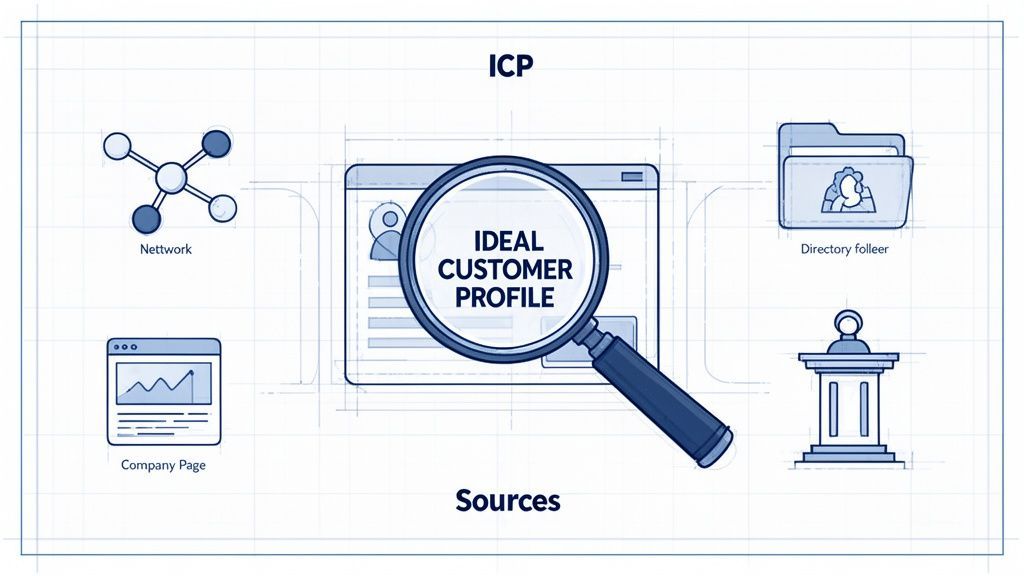
Before you collect at scale, you need a blueprint. Without one, large-scale lead scraping turns into large-scale lead clutter. A good blueprint defines who you want, where they appear, and how those contacts will be grouped once they are collected.
Start With a Volume-Safe Ideal Customer Profile
At smaller volumes, loose targeting may feel manageable because you can manually review more of the output. At larger volumes, poor targeting creates too much cleanup work later. That makes a clear Ideal Customer Profile (ICP) even more important when scaling.
A useful ICP for scale should include:
- role or seniority: for example VP Sales, Head of Partnerships, Senior Recruiter
- industry or company type: such as SaaS, agencies, ecommerce, FinTech
- company size: especially important if your process will span multiple account segments
- region: needed for routing, market segmentation, or campaign ownership
- source context: such as event pages, directories, search results, or company team pages
The more precise the ICP, the less cleanup is required after extraction.
Choose Sources That Can Support Volume
Not every source is equally useful for scale. When the goal is sustained lead collection, you want sources that are both relevant and repeatable.
Strong source types include:
- professional networks: especially when filtered search results can be repeated across segments
- industry directories: useful for category-based prospecting across larger lists
- company team pages: useful for account mapping and stakeholder extraction
- event speaker, sponsor, or attendee pages: useful for building campaign-specific lists at volume
- search-result style pages: useful when one page contains many relevant profiles at once
The goal is to focus on sources that allow repeatable batch collection rather than one-by-one contact gathering.
When working at scale, it is better to choose sources that support structured, repeated extraction than sources that require too much manual filtering after the fact.
Design the Collection Logic Before You Scrape
One of the biggest differences between small-scale and large-scale lead scraping is that larger workflows need pre-defined list logic. Before you collect, decide how leads will be grouped.
Examples:
- by territory: North America, UK, DACH, APAC
- by campaign: Q4 outreach, webinar promotion, ABM expansion
- by segment: enterprise, mid-market, SMB
- by source: LinkedIn search, event page, company team page
This keeps larger collections usable later and reduces the need to reorganize large files after export.
No-Code vs Manual Scraping at Scale
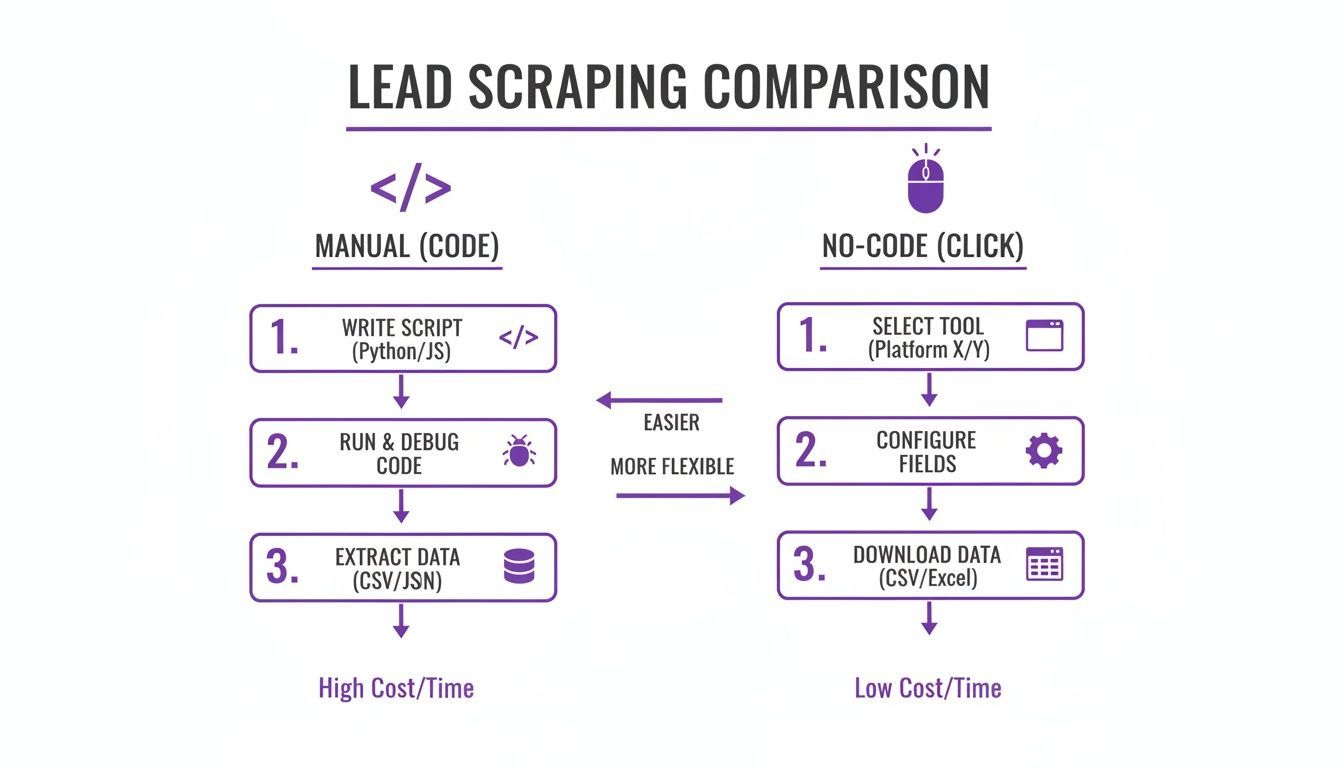
When teams start thinking about larger-volume scraping, they usually face two options: build or maintain custom scripts, or use a no-code tool designed for business users. For scale operations, the decision matters because maintenance overhead grows along with lead volume.
The Limits of Script-Heavy Workflows
Custom-coded scrapers can be powerful, but they also introduce more moving parts. At scale, those moving parts become operational dependencies: code maintenance, layout changes, debugging, proxies, and ongoing technical monitoring.
That may be justified for specialized data projects, but for day-to-day prospecting or recruiting workflows, it often creates more complexity than most teams want to carry.
Typical issues include:
- a target site changes layout
- the script fails or extracts poorly
- the workflow pauses until someone fixes it
- lead collection becomes dependent on technical resources instead of campaign teams
At larger volumes, this can become a recurring bottleneck.
Why No-Code Tools Work Better for Operational Scale
No-code tools reduce that dependency by moving extraction closer to the end user. Instead of building and maintaining scripts, the user works directly from the browser and captures data from relevant pages as needed.
That is especially useful when teams need to:
- collect data across multiple campaigns
- batch process many source pages
- revisit source types regularly
- organize leads during collection, not only after export
For larger-scale business workflows, the advantage is less about “scraping without code” and more about lowering the maintenance burden around repeated collection.
Lead Scraping Methods Compared
| Feature | Manual Coding Workflow | No-Code Operational Workflow |
|---|---|---|
| Skill Requirement | Requires technical setup and maintenance | Usable by non-technical teams |
| Adaptability | May require code updates when sources change | Designed to reduce maintenance for the end user |
| Speed to Launch | Slower to operationalize | Faster to use for live campaigns |
| List Management | Often separate from extraction | Can be handled during collection |
| Operational Overhead | Higher over time | Lower for recurring business workflows |
| Scale Use Case | Better for custom engineering projects | Better for repeated team-led collection workflows |
For many teams, a tool like ProfileSpider is useful here because it supports repeated browser-based extraction, list organization, and local lead management without turning scale into a technical project. For a deeper look at this approach, read our guide on automating web scraping with no-code tools.
A Practical Workflow for Scraping Leads at Scale
Scaling lead collection successfully usually comes down to workflow discipline. The mechanics of extraction matter, but the bigger question is how the output is managed once the leads start coming in.
The most effective large-scale workflows follow the same sequence repeatedly: identify a repeatable source, extract in batches, segment immediately, clean early, and only then move the data downstream.
Step 1: Work in Batches, Not One-Off Pages
If your goal is scale, think in batches. Instead of collecting a few leads from a single page and stopping, define a broader collection unit such as:
- a sequence of filtered search result pages
- a set of conference pages across a niche
- multiple company team pages in one account list
- a category directory with many paginated pages
This lets the workflow scale through repetition rather than through ad hoc manual effort.
Step 2: Capture Profiles Into Predefined Lists
As leads are collected, they should immediately be assigned to lists that reflect how they will be used later. That may mean list names such as:
- Enterprise Prospects – Q4
- UK FinTech Accounts
- Conference Sponsors – Data Infrastructure
- Recruiting – Senior Backend Engineers
This is one of the simplest ways to preserve usability at volume. Instead of exporting one very large mixed file, the workflow produces grouped datasets that align with real use cases.
Step 3: Segment During Collection
When scraping at scale, segmentation should happen as early as possible. Waiting until after a large export often turns organization into a spreadsheet problem.
Useful segmentation labels include:
#enterprise#mid-market#decision-maker#event-source#priority-account#follow-up-q1
Applying this structure early makes large lead sets easier to route, review, and export later.
Step 4: Clean and Deduplicate Before the List Grows Further
The larger the list gets, the more expensive cleanup becomes. That is why duplicate detection and early review are essential in scale workflows.
At scale, cleanup is easiest when it happens continuously, not after thousands of records have already piled up.
That means reviewing for:
- duplicate profiles across source pages
- obvious extraction errors
- missing fields that affect routing or qualification
- list assignments that no longer match the campaign structure
This prevents large datasets from becoming harder to manage each week.
Step 5: Enrich Selectively, Not Indiscriminately
At scale, enrichment should be prioritized rather than applied blindly to every record. If the workflow supports it, enrich the leads that matter most first: top accounts, high-fit segments, or leads closest to outreach readiness.
This keeps resource use more efficient and helps teams avoid over-processing contacts that are not yet worth the additional effort.
Turning High-Volume Lead Data Into Usable Output
Large lead sets become valuable only when they can be activated without creating new operational problems. That means the export stage must preserve enough structure for the downstream system to use the data cleanly.
Prepare the Export Around the Destination
Different downstream tools require different structures. A CRM, ATS, or outreach tool may not need every field collected during scraping. At volume, it is usually better to export only the fields that support real action.
Common export fields include:
- full name
- job title
- company name
- location
- phone
- company domain
- source list
- campaign tag
This reduces clutter and makes larger imports easier to manage.
Choose Formats That Fit Existing Workflows
For most teams, that means exports such as:
- CSV: useful for CRM and general data transfer
- Excel: useful for spreadsheet-based review or collaboration
- JSON: useful for more technical downstream workflows
The important point is not the format itself. It is whether the exported structure still reflects the segmentation and source logic built during collection.
Do Not Let Volume Destroy Context
One of the most common mistakes in large-scale lead scraping is losing source context. If a list is exported without source labels, campaign grouping, or segmentation tags, the downstream team often has to reconstruct that logic later.
That is avoidable. If leads were collected by campaign, region, segment, or source, those labels should travel with the export.
That way, the receiving system does not just get contacts. It gets usable, contextualized records.
Staying Responsible While Operating at Scale
High-volume scraping does not remove the need for responsible use. If anything, scale makes discipline more important. Teams should focus on publicly available professional information, stay aware of applicable laws and platform terms, and avoid aggressive or careless collection behavior.
Use a Privacy-Aware Workflow
A privacy-aware process helps reduce unnecessary exposure while collecting and managing larger lead sets. One practical advantage of a local-first tool is that it keeps the working dataset under the user’s control during review, organization, and export.
With ProfileSpider, extracted lead data is stored locally in the browser’s IndexedDB. That does not remove legal obligations, but it does make it easier to control how lists are managed before they move into other systems.
Respect Source Platforms
Working at scale does not mean scraping recklessly. Review source terms where relevant, avoid disruptive collection behavior, and stay focused on professional use cases tied to legitimate sales, recruiting, or marketing workflows.
If you want a broader legal overview, read our guide on whether website scraping is legal.