Why Lead Enrichment Fails: 9 Data Quality Problems & How to Fix Them
Learn why lead enrichment fails, from bad source data and missing emails to stale CRM records, weak workflows, and poor verification.
by Adriaan 19 min read
Share
Adriaan
19 min read
Share this article
Your lead enrichment pipeline isn't failing because of one bad field or one bad vendor. It usually fails because several small problems stack up: stale CRM records, weak source data, missing emails, duplicate contacts, poor verification, disconnected tools, and enrichment workflows that happen too late.
The result is predictable. Sales reps waste time chasing dead contacts. Marketing campaigns target the wrong segments. Email bounce rates increase. Good leads get ignored because nobody has the right contact path. And leadership starts questioning why your enrichment tools are not producing better pipeline.
This guide explains the most common reasons lead enrichment fails, how to diagnose the root cause, and how to rebuild a cleaner process for sourcing, enriching, verifying, and activating leads.
This article is part of our broader guide to lead scraping. If you want the complete end-to-end workflow—including lead sources, scraping methods, enrichment, data quality, CRM activation, and compliance—see: Lead Scraping Guide: How to Scrape, Enrich, and Convert Leads at Scale.
Quick Diagnosis: Why Your Lead Enrichment Is Failing
If your enrichment process is not producing usable leads, start with the failure pattern. The symptom usually tells you where the pipeline is breaking.
Failure Point
Common Symptom
How to Fix It
Bad source data
Low match rates, wrong companies, missing job titles.
Improve lead sources before enrichment. Capture cleaner names, domains, titles, and profile URLs.
Missing emails
You have name and company, but no direct contact path.
Use email finding, email pattern generation, and verification before outreach.
Stale CRM records
High bounces, old job titles, people no longer at company.
Refresh records before campaigns and remove decayed data from active lists.
Duplicate records
Multiple reps contact the same lead or records conflict.
Deduplicate contacts and accounts before enrichment and before export.
Weak domain data
Email discovery fails because the company website is missing or wrong.
Normalize company domains and verify current websites.
No email verification
Bounce rates increase after enrichment.
Verify generated or enriched emails before sending campaigns.
Tool coverage gaps
Some industries, regions, or small companies return no data.
Use multiple sources or collect fresh profile data from public websites.
Broken integrations
Clean data gets stuck in CSVs and never reaches sales.
Connect enrichment, verification, CRM, and outreach workflows.
No sales feedback loop
Bad data keeps recurring from the same sources.
Let reps flag bad records and review failure patterns regularly.
The Real Cost of a Broken Lead Enrichment Strategy
Lead enrichment is not just a data-cleaning task. It is part of the supply chain for your revenue engine. When enrichment fails, the impact is felt across marketing, sales, RevOps, recruiting, and customer acquisition.
A broken enrichment process does more than produce bad records. It creates a cycle where every team works harder for worse results.
The Ripple Effect of Failed Enrichment
Wasted ad spend: Marketing targets the wrong people because firmographic, role, or company data is inaccurate.
Lower sales productivity: Reps waste time researching leads manually, chasing dead emails, or contacting the wrong person.
Higher bounce rates: Stale or guessed emails damage deliverability and reduce campaign performance.
Missed opportunities: Good leads are ignored because records lack emails, phone numbers, domains, or context.
Poor personalization: Wrong job titles, company names, or industries make outreach look careless.
Bad forecasting: Leadership makes pipeline decisions based on incomplete or inflated lead data.
When enrichment is off, lead scoring also becomes unreliable. A scoring model is only as good as the data behind it. If job titles, company sizes, industries, and intent fields are wrong, the score will prioritize the wrong accounts.
A broken enrichment process is more than an inconvenience. It forces your team to operate with incomplete intelligence, making every campaign and every outreach sequence less predictable.
1. Your Source Data Is Too Weak
The biggest reason lead enrichment fails is simple: the starting data is not good enough. Enrichment tools need reliable identifiers. If your input list only contains vague names, outdated company names, missing domains, or incomplete profile URLs, match rates will suffer.
Think of enrichment like navigation. If you give the system the wrong starting point, it may still return something, but it might not be the right person or company.
Common Source Data Problems
Only a name and no company: Too many people share the same name.
Company name but no domain: The enrichment tool must guess which company you mean.
Old employer data: The prospect changed jobs, but your list still points to the previous company.
Generic company names: Names like “ABC Group” or “Pioneer Consulting” can match multiple businesses.
No profile URL: Without a LinkedIn, GitHub, website, or public profile URL, identity matching is weaker.
Messy imported fields: First name, last name, company, title, and location are mixed together or inconsistently formatted.
Before blaming the enrichment vendor, audit the fields you send into the tool. Strong enrichment starts with clean identifiers: full name, current company, company domain, profile URL, title, and location where available.
Even good data decays. People change roles, switch companies, get promoted, leave industries, change email formats, and move between regions. Company domains change after rebrands, mergers, acquisitions, and website migrations.
If you enrich an old list without checking whether the person and company are still current, the output may look complete but still be wrong.
Signs Your CRM Data Has Decayed
Recent campaigns show rising bounce rates.
Sales reps say many contacts are no longer at the company.
Job titles no longer match LinkedIn or public profiles.
Company domains redirect, fail, or belong to a rebranded entity.
Records have not been updated in 6–12 months.
Lead sources are old purchased lists or past event exports.
For a deeper look at how quickly B2B contact data becomes unreliable, read our guide to email decay rates in B2B.
How to Fix Stale Lead Data
Segment old records: Separate leads by last updated date.
Re-check current company: Verify whether the person still works there.
Refresh company domains: Normalize and update account websites.
Re-enrich before campaigns: Do not send to old records without a refresh.
Archive dead records: Remove inactive, bounced, or outdated contacts from active outreach lists.
Do not treat enrichment as a one-time cleanup project. Treat it as an ongoing freshness process that happens before important outreach, routing, scoring, and reporting.
3. You Have Names and Companies, But No Usable Emails
One of the most common enrichment failures is not a lack of leads. It is a lack of contact paths. You know the person’s name and company, but you do not have a verified business email address.
This is where many workflows stall. Reps start guessing email formats manually, searching Google, checking LinkedIn, or giving up on otherwise strong prospects.
Common Email Discovery Problems
The lead record has no email address.
The CRM contains only a generic email like info@ or sales@.
The email bounced because the person changed roles.
The company changed domain after a rebrand or acquisition.
The enrichment provider does not cover small companies or niche industries well.
The email format is unknown.
If you have the person’s name and current company domain, you can often generate likely email formats and then verify them before outreach. The ProfileSpider Email Pattern Generator helps you create likely formats such as first.last@domain.com, first@domain.com, and f.last@domain.com.
Common Email Patterns Worth Testing
Pattern
Example
When It Often Appears
first.last@domain.com
jane.smith@company.com
Common in enterprise and mid-market companies.
first@domain.com
jane@company.com
Common in startups, agencies, and smaller teams.
f.last@domain.com
j.smith@company.com
Useful when companies need scalable uniqueness.
firstlast@domain.com
janesmith@company.com
Sometimes used by SMBs and founder-led companies.
first_last@domain.com
jane_smith@company.com
Less common, but still worth checking in some sectors.
Email pattern generation is not a replacement for email verification. It is a faster way to create a focused shortlist of likely addresses so you can verify the right one.
Where Email Pattern Generation Fits
Confirm the person: Make sure the lead is still relevant and in the right role.
Confirm the company: Check the current company website and domain.
Generate likely email patterns: Use the person’s name and company domain.
Verify generated addresses: Use email verification before sending.
Update your CRM: Add the verified email and note the source or method.
Route for outreach: Send only verified contacts into campaigns.
Another reason lead enrichment fails is poor prioritization. Many teams enrich every record in a database, even when many of those records are low-fit, outdated, duplicated, or not ready for outreach.
This wastes credits and creates noise. Enrichment should focus on records that have a realistic chance of becoming pipeline.
Bad Enrichment Prioritization Looks Like This
Enriching every lead from a purchased list without filtering for ICP fit.
Refreshing old records that have never engaged.
Appending phone numbers to contacts who are not decision-makers.
Running expensive enrichment on leads with missing company domains.
Enriching before deduplication, which means paying for the same lead multiple times.
A Better Prioritization Model
Before enrichment, divide records into practical groups:
High-fit and incomplete: Enrich first.
High-fit and stale: Refresh before outreach.
Low-fit but complete: Do not enrich unless there is a strong reason.
This keeps enrichment spend focused on records that sales or recruiting can actually use.
5. Your Tools Do Not Cover Your Market
Even strong enrichment tools have coverage gaps. A provider may perform well for US enterprise software companies but poorly for small agencies, European consultancies, local businesses, creators, candidates, or niche B2B directories.
This is why relying on one enrichment database can produce inconsistent results. Your best prospects may live outside the provider’s strongest data coverage.
Common Coverage Gaps
Small companies and agencies.
Non-US markets.
Recently founded companies.
Independent consultants and creators.
Technical candidates with GitHub or portfolio profiles.
Niche directories, conference lists, partner pages, or community sites.
When database coverage is weak, fresh web-sourced data can help. Tools like ProfileSpider let you extract visible profile data directly from current pages such as directories, team pages, event lists, and public profile sources. Then you can enrich, verify, and export the records you actually want to use.
Good data can still fail if it reaches the sales team too late. Enrichment is only valuable if it supports timely action.
This is where speed to lead matters. A prospect who just filled out a form, downloaded a resource, visited pricing, or appeared in a target directory may be valuable now. If enrichment, verification, routing, and outreach take days, the opportunity cools down.
Common Workflow Bottlenecks
Manual CSV transfers: Lists are exported from one tool and manually uploaded to another.
Manual email guessing: Reps waste time trying possible email patterns by hand.
No verification gate: Generated or enriched emails go straight into campaigns.
Slow routing: Enriched leads sit in queues before a rep follows up.
Siloed tools: CRM, enrichment, scraping, verification, and outreach tools do not talk to each other.
No ownership: Nobody is responsible for fixing bad records or failed enrichments.
Map Your Lead Management Process
Trace a lead’s journey from source to outreach:
Entry point: Where does the lead come from? Form fill, list import, web scraping, directory, event page, or manual research?
Initial validation: Do you check whether the person and company are current?
Enrichment trigger: Does enrichment happen instantly, in batches, or manually?
Email discovery: What happens when the lead has no direct email?
Verification: Are enriched or generated emails verified before outreach?
Routing: How does the lead reach the right rep or workflow?
Time to first contact: How long does it actually take from lead capture to outreach?
Your enrichment tool is only one part of the system. If the handoff between tools and teams is broken, even high-quality data will fail to create revenue.
The fix is a repeatable workflow where source data, enrichment, email discovery, verification, CRM updates, and outreach are connected. Our guide on web scraping for CRM integration explains how to connect scraped lead data to the rest of your pipeline.
7. You Are Skipping Verification
Lead enrichment should not push unverified data straight into outreach. This is especially true for email addresses. If enriched or generated emails are not verified, your campaigns can create bounce problems, harm sender reputation, and reduce deliverability.
Verification should happen before activation, not after a campaign fails.
What to Verify Before Outreach
Email validity: Is the mailbox likely deliverable?
Company domain: Is the domain current and correctly spelled?
Role relevance: Is the person still in the target role?
Duplicate status: Has this person already been contacted?
Compliance status: Is this contact appropriate for the campaign and region?
This is especially important when using email pattern generation. Generated candidates should be treated as possibilities until verified.
Not all enrichment tools solve the same problem. Choosing the wrong category of tool is one of the fastest ways to waste budget.
Understanding Key Data Types
Firmographic data: Company size, industry, revenue, location, and account fit.
Technographic data: Software and technology a company uses.
Intent data: Signals that a company may be researching a relevant topic or solution.
Contact path data: Emails, phone numbers, social profiles, and verified ways to reach a person.
Fresh profile data: Current information extracted from public profile pages, team pages, directories, and event lists.
A strong enrichment strategy often uses more than one approach. A CRM enrichment platform may be useful for firmographics. An email finder may be useful for missing contact paths. A browser-based scraper may be better for fresh leads from niche sources.
Comparing Enrichment Approaches
Approach
Best For
Main Limitation
Traditional enrichment database
Bulk appending firmographic and contact data to existing records.
Coverage gaps and stale records in fast-changing markets.
Contact finder
Finding emails or phone numbers for known prospects.
Can be expensive at scale and may miss niche contacts.
AI profile scraper
Collecting fresh leads from public websites, directories, and profile pages.
Works best when relevant profile data is visible on the page.
Email pattern generator
Recovering possible business emails from name + domain.
Must be paired with verification before outreach.
CRM-native enrichment
Keeping CRM records updated and usable for routing/scoring.
Less useful for discovering fresh leads outside your CRM.
Tools like ProfileSpider are useful when your team needs fresh lead data from the web. The Email Pattern Generator is useful when your record has a name and domain but no usable email. Traditional enrichment tools are useful when you already have a large database and need bulk appends.
9. You Do Not Have a Sales Feedback Loop
The final reason enrichment fails is organizational. Sales reps see bad data every day, but many teams do not capture that feedback in a structured way.
If reps simply ignore bad records, the same data quality problems keep coming back. If they flag what failed, RevOps and marketing can improve the source, vendor, enrichment rules, or routing logic.
Useful Feedback Fields
Email bounced
Wrong person
No longer at company
Wrong company
Wrong title
Duplicate record
Bad phone number
Not ICP-fit
Review these fields weekly or monthly. Look for patterns by source, enrichment provider, campaign, geography, company size, or persona.
The best enrichment systems improve over time because sales feedback becomes part of the data quality loop.
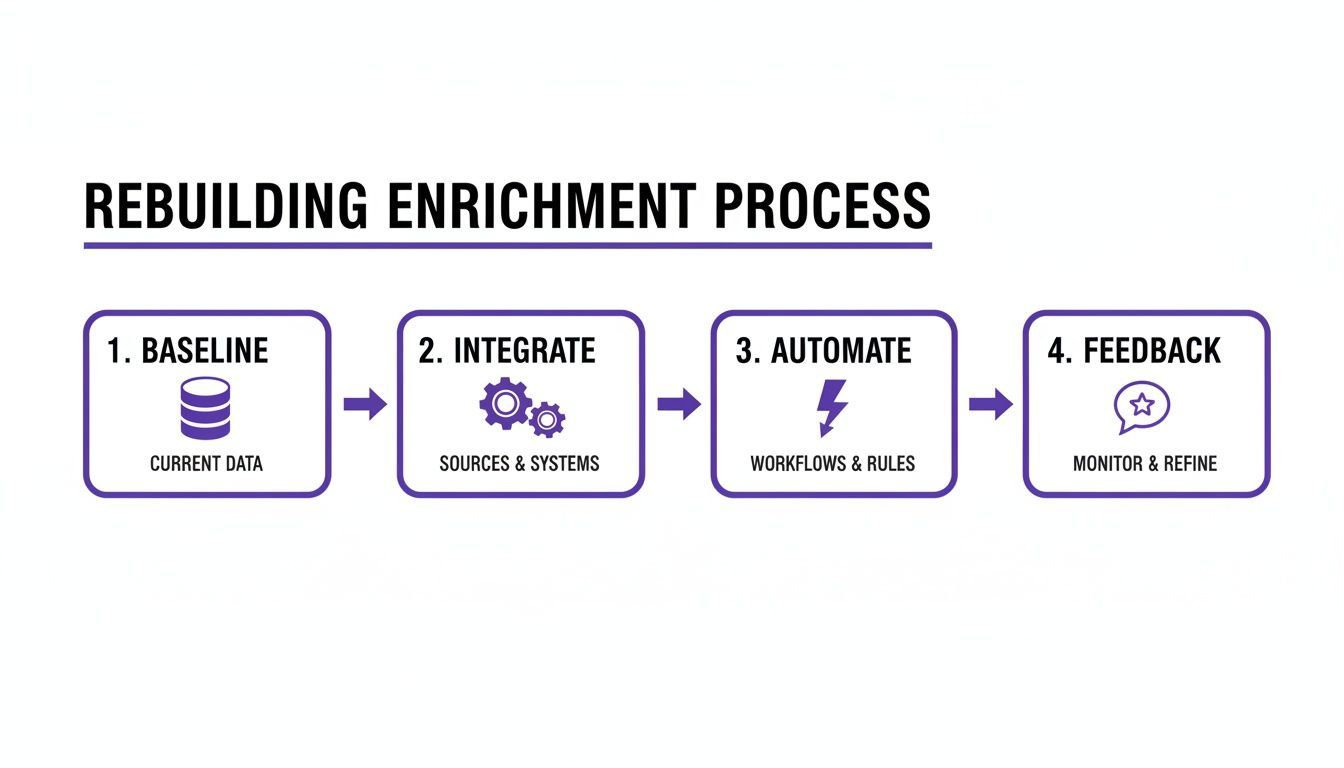
A Practical Framework for Rebuilding Your Enrichment Process
Once you know why enrichment is failing, you can rebuild the process in a more reliable way. The goal is not to enrich everything. The goal is to enrich the right records with the right fields at the right time.
Stage 1: Establish a Data Hygiene Baseline
Deduplicate contacts and companies: Merge duplicate records before enrichment.
Standardize key fields: Normalize job titles, company names, locations, and domains.
Archive dead records: Remove old, bounced, irrelevant, or inactive leads from active campaigns.
Identify missing fields: Measure missing emails, domains, titles, phone numbers, profile URLs, and company data.
Rank data problems by revenue impact: Fix the issues that most directly block outreach and conversion.
For more structure, see our guide on building a clean prospect database.
Stage 2: Improve the Source Before Enrichment
Do not enrich low-quality lists blindly. Improve your sources first.
Use relevant directories, profile pages, company websites, and event lists.
Capture current company domains where possible.
Save profile URLs for stronger identity matching.
Separate high-fit leads from low-fit records.
Avoid enriching stale purchased lists without validation.
If your lead source is the open web, ProfileSpider can help you collect cleaner starting records from pages you already review.
Stage 3: Add Email Discovery and Verification
When a lead has no direct email, do not let it become a dead end. Add a clear email discovery branch:
If the lead has a verified email: route to sales or outreach.
If the lead has no email but has a name and domain: generate likely email patterns.
Verify generated candidates: keep only addresses that pass validation.
If no valid email is found: route to another channel, such as LinkedIn, phone, or manual research.
This turns missing emails into a recoverable workflow instead of a manual research problem.
Stage 4: Connect Enrichment to CRM and Outreach
A disconnected tech stack is one of the biggest causes of failed enrichment. Map how data moves between your scraping tool, enrichment tool, email finder, verification tool, CRM, and outreach platform.
Look for manual export/import steps. Every manual CSV handoff is a point where leads can get delayed, duplicated, or lost.
A reliable enrichment workflow does not end when data is appended. It ends when clean, verified, usable data reaches the right sales or recruiting workflow.
Stage 5: Create a Feedback Loop
Finally, make it easy for reps to flag bad records inside the CRM. Review those failures regularly and use them to improve source quality, enrichment rules, vendor selection, and campaign targeting.
This cycle of sourcing, enrichment, verification, activation, and feedback is what turns enrichment from a one-off cleanup project into a reliable revenue process.
Measuring Success and Proving ROI
Fixing lead enrichment is not only about clean data. It should create measurable business impact. To prove ROI, track metrics that connect data quality to pipeline performance.
Key Metrics That Matter
Verified email coverage: What percentage of target records have a verified business email?
Email bounce rate: Does bounce rate drop after better discovery and verification?
Lead-to-opportunity conversion rate: Are enriched leads converting at a higher rate?
Time to first contact: Are reps reaching usable leads faster?
Sales cycle length: Are better-enriched leads moving faster?
Cost per usable lead: How much does it cost to produce one verified, ICP-fit, contactable lead?
Rep research time saved: How many manual research hours are removed?
Duplicate rate: Are duplicate records decreasing over time?
Stop reporting only on enrichment match rate. Report on usable records, verified contact coverage, bounce rate reduction, sales productivity, and pipeline impact.
From Cost Center to Revenue Engine
When you fix source data, refresh stale records, recover missing emails, verify contact paths, connect your tools, and create a sales feedback loop, enrichment stops being a frustrating cleanup task. It becomes part of a predictable revenue workflow.
Reps trust the CRM more. Marketing segments become more accurate. Bounce rates fall. Good leads do not die just because a direct email is missing. And leadership can see the connection between data quality and pipeline.
Tools like the ProfileSpider Email Pattern Generator are not magic. They are practical workflow tools. Used correctly—with current domains, structured pattern generation, and email verification—they help recover contact paths, reduce manual guessing, and make enrichment more reliable.
If your enrichment problem starts earlier—at the lead collection stage—try ProfileSpider to extract visible profiles from websites, save leads into lists, enrich missing details, find emails, and export clean records when you are ready.
Got Frequent Questions About Lead Enrichment? We've Got Answers.
Even after you’ve rebuilt your enrichment strategy, some practical questions always seem to pop up. Here are some quick, straightforward answers to the things we get asked most often.
How Often Should I Re-Enrich My Lead Database?
For B2B data, a good rule of thumb is to refresh your active contacts every 90-120 days. People change jobs and move companies, so this cadence helps you stay ahead of natural data decay.
But that’s just for general upkeep. For high-value accounts or leads hitting a critical sales stage, you can't rely on static updates. Your team needs to be able to run on-demand, real-time enrichment right before a big call to make sure they’re working with the absolute latest info.
What Is The Difference Between Lead Enrichment And Lead Generation?
Simple: lead generation is about creating new interest and getting that initial contact info, like a name and email. Think of it as opening the door at the top of your funnel.
Lead enrichment, on the other hand, takes an existing lead and adds all the crucial context around it—their job title, the company's size, the industry they’re in, you name it. It’s what turns a simple contact into a qualified prospect your sales and marketing teams can actually work with.
Can I Fix My Enrichment Without Buying New Tools?
Absolutely. You can get a lot of mileage just by focusing on your internal processes first. Start with the basics: clean up your CRM, standardize your data fields, and take a hard look at your lead routing workflows. These foundational steps can make a massive difference.
But you'll eventually hit a wall if your current enrichment tool is consistently feeding you stale or flat-out wrong data. Once you’ve cleaned up your own house, if the data is still bad, it’s time to look at a modern, real-time alternative to see a real return on your efforts.
What Is A Good Data Match Rate For Lead Enrichment?
Most people will tell you a "good" match rate for B2B data is somewhere between 60-80%. While that’s not a bad benchmark, it’s not the whole story.
Here's what really matters: The accuracy and freshness of the data you do get is far more important than the match rate itself. A 90% match rate is completely useless if the information is wrong. Always prioritize quality over quantity.