

Using AI for outbound sales means using smart technology to improve how you find, qualify, score, personalize, and contact potential customers. Instead of manually building prospect lists, researching accounts, writing generic emails, and guessing who is worth contacting, AI helps outbound teams create cleaner lists, rank prospects by fit and intent, generate account summaries, and write more relevant messages at scale.
The best use of AI in outbound is not simply “send more emails.” It is building a better outbound system: find the right accounts, collect the right contacts, validate the list, enrich missing data, prioritize the best prospects, personalize outreach with real context, and optimize when and how you follow up.
This guide shows how to use AI for outbound prospecting step by step, from building an outbound-ready prospect list to scoring leads, improving messaging, and measuring what actually drives pipeline.
The Problem with Traditional Outbound Sales

Every sales team knows the grind of staring at a massive, messy list of leads. The old-school outbound model feels like casting a wide net and hoping for the best. It is a numbers game that burns time, resources, and morale. This “spray and pray” mindset is built on a foundation of weak targeting, shallow research, and generic messaging.
The Manual Grind of Old-School Outreach
Sales development reps and founders often get stuck in repetitive tasks that do not directly create revenue. They spend hours searching for prospects, checking company websites, copying profile details, guessing email addresses, validating data, and sending outreach that sounds like everyone else’s.
Common pain points include:
- Wasted time: Hours are spent researching and contacting people who have no need, no authority, or no timing.
- Weak prospect lists: Lists are often built from broad filters instead of real buying signals, role fit, or account context.
- Generic messaging: Without useful data, outreach becomes impersonal and easy to ignore.
- Low engagement: Prospects are used to mass outreach and quickly tune out emails that do not feel relevant.
- Poor list quality: Bad emails, outdated titles, irrelevant contacts, and duplicate records damage campaign performance.
A Smarter Way to Sell with AI
AI changes outbound by making the workflow more precise. Instead of treating every lead the same, AI can help you identify better accounts, rank contacts by relevance, summarize company context, find missing data, and personalize your message around the prospect’s role, company, and likely priorities.
Think of AI as your outbound research and prioritization layer. It handles the repetitive, data-heavy work so your sales team can focus on judgment, conversation quality, and closing deals.
This guide will walk you through using AI to build better outbound lists, write outreach that gets replies, and create a more predictable sales motion. But any strong AI outbound strategy starts with strong data. Foundational tools that gather, structure, and enrich prospect information are the essential first step.
For example, a no-code tool like ProfileSpider lets teams extract profiles from public websites, directories, team pages, event pages, and other lead sources. That gives your AI workflow cleaner input data for scoring, enrichment, personalization, and export.
How AI for Outbound Sales Actually Works
To understand what AI for outbound sales really does, think of it as a connected engine with five parts: prospect list building, enrichment, scoring, personalization, and outreach optimization. Each part improves the next one.
When the system works well, your team does not just send more outbound. It sends better outbound to better-fit prospects at a better moment.
1. AI for Building Outbound Prospecting Lists
The first step is building the right list. Traditional outbound often starts with a broad filter such as “VP of Marketing at SaaS companies.” That can produce a large list, but not necessarily a good one.
AI helps by combining multiple signals: job title, seniority, department, company size, location, industry, public profile data, website content, hiring activity, technology usage, funding news, and other account context. Instead of simply collecting names, the goal is to create an outbound-ready list of people and accounts that match your ICP.
- The old way: A sales rep searches for “VP of Marketing” at SaaS companies and exports a broad, unfiltered list.
- The AI way: The workflow identifies marketing leaders at SaaS companies that are hiring sales roles, recently launched a new product, or show other signs of growth. These are not just contacts; they are prospects with context.
If your best leads appear on public websites, directories, event pages, partner lists, community pages, or company team pages, an AI profile extraction tool can help turn those sources into structured prospect lists before enrichment and outreach.
2. AI for Scoring and Ranking Outbound Prospects
Once you have a list, the next question is: who should you contact first? AI can help score and rank outbound prospects based on fit, intent, and relevance.
Useful scoring signals include:
- Role fit: Does the person’s title match your target buyer or influencer?
- Seniority: Is the prospect a manager, director, VP, founder, or C-level decision-maker?
- Department: Does the person work in the function your product serves?
- Company fit: Does the company match your target size, industry, geography, or business model?
- Buying signals: Is the company hiring, expanding, launching, fundraising, changing tools, or investing in a relevant area?
- Source quality: Did the lead come from a high-intent source such as an event page, partner directory, niche community, or target account list?
This helps outbound teams stop treating every lead equally. A small list of highly relevant, well-scored prospects usually performs better than a large list of weak matches.
3. Automated Data Enrichment
You have identified a list of promising prospects. But what good is it if the contact information is incomplete or inaccurate? Bounced emails, wrong titles, missing company domains, and outdated records damage outbound campaigns before they even start.
AI-powered enrichment helps fill in missing information and validate your list. It can find company domains, social profile URLs, job titles, seniority, firmographic data, and business emails where available. This ensures your carefully crafted outbound messages are sent to the right people with enough context to be useful.
An AI outbound engine is only as good as the data you feed it. Clean, accurate, enriched data is the fuel that powers prospect scoring, personalization, and campaign performance.
For teams starting to build these foundational lists, understanding the nuances of AI-powered lead sourcing can provide a significant advantage.
4. AI for Creating Outbound-Ready Account Summaries
Outbound works better when reps understand the account before they send a message. AI can turn public company information into short account summaries that explain what the company does, who it serves, what signals are visible, and why the account might be relevant.
An outbound-ready account summary might include:
- Company description in plain language
- Target buyer or department
- Recent news, launches, hiring, or expansion signals
- Relevant product, service, or technology clues
- Possible pain points based on the company’s public information
- Suggested personalization angles for outreach
This is especially useful for account-based outbound. Instead of asking reps to manually research every account from scratch, AI can prepare concise research briefs that make personalization faster and more consistent.
5. Hyper-Personalization with Better Data
Generic outbound emails are easy to ignore. Real connection comes from relevant context: the prospect’s role, the company’s situation, a recent trigger, a specific page, a hiring signal, a product launch, or a problem the company is likely dealing with.
AI helps by turning structured data and account research into message drafts, opening lines, subject lines, talking points, and follow-up angles. But the quality of the message depends on the quality of the data.
Instead of asking AI to “write a cold email,” a better prompt includes:
- The prospect’s job title and department
- The company’s business model
- The source where you found the lead
- The trigger or reason for outreach
- The pain point your product solves
- The desired call to action
This is how AI improves outbound messaging with data. It does not replace sales judgment. It gives your team a better first draft, stronger personalization hooks, and more relevant follow-up ideas.
6. Predictive Outreach and Send-Time Optimization
You can have the right prospect and the right message, but timing still matters. AI can help optimize when to send emails, when to follow up, and which channel to use based on historical engagement patterns.
Predictive outreach tools can analyze open rates, reply rates, time zones, sequence performance, and previous engagement to suggest better send times and follow-up timing. This does not guarantee replies, but it helps remove guesswork from the process.
For outbound teams, the goal is simple: reach the right person with the right message at a time when they are more likely to see it.
Key AI Capabilities in Modern Outbound Sales
| AI Capability | What It Does | Primary Business Value |
|---|---|---|
| Outbound Prospecting List Building | Finds and structures prospects from databases, public websites, directories, profile pages, and target account sources. | Creates cleaner starting lists for outbound campaigns. |
| Prospect Scoring and Ranking | Scores leads based on role fit, seniority, company fit, buying signals, source quality, and relevance. | Helps reps prioritize the prospects most likely to be worth contacting. |
| Data Enrichment | Finds, verifies, and updates contact, company, profile, and firmographic information. | Improves deliverability, personalization, and list quality. |
| Account Summaries | Turns public company information into short research briefs and outbound-ready context. | Reduces manual account research time and improves message relevance. |
| Message Personalization | Uses prospect and account data to draft relevant opening lines, emails, and follow-ups. | Improves reply quality by making outreach feel more specific. |
| Send-Time Optimization | Optimizes send times, follow-up timing, and sequence pacing based on engagement data. | Improves campaign timing and reduces manual follow-up work. |
Building Your AI-Powered Sales Workflow: A Step-by-Step Guide
Transitioning from a manual outreach process to one supported by AI is more about workflow design than technical complexity. The goal is to build a repeatable system where AI handles repetitive research, enrichment, scoring, and first-draft writing, while your team keeps control over targeting, judgment, and relationship-building.
The whole process rests on one important truth about AI for outbound sales: the quality of your output is a direct result of the quality of your input.
Step 1: Build a Clean Outbound Prospecting List
Before you choose an AI outreach platform or launch an automated sequence, you need a strong prospect list. A poorly targeted or inaccurate list will sabotage your campaign from the start, leading to high bounce rates, low engagement, poor replies, and wasted credits.
A good outbound list should answer five basic questions:
- Who is the prospect?
- What company do they work for?
- Why are they relevant?
- What source or signal explains why they are on the list?
- What data is still missing before outreach?
The traditional method: Sales reps spend hours manually searching LinkedIn, browsing company websites, checking conference attendee lists, or combing through industry directories. They copy and paste names, titles, companies, and links into a spreadsheet. The process is slow, error-prone, and difficult to repeat.
The one-click method with ProfileSpider: With a tool like ProfileSpider, you can navigate to a company team page, directory, event speaker page, search result, or public profile list, click “Extract Profiles,” and turn visible profiles into a clean, structured list. The tool’s AI identifies names, job titles, companies, websites, social links, and related details where available.
Because ProfileSpider stores saved profiles, lists, notes, and tags locally in your browser, you keep direct control over your prospect data. This first step gives your AI sales engine better input for enrichment, scoring, account research, and personalization. You can learn more by checking out our guide on creating an efficient lead scraping workflow.
This flow chart illustrates how high-quality data moves through the engine to power enrichment and personalization at a scale that is impossible to achieve manually.
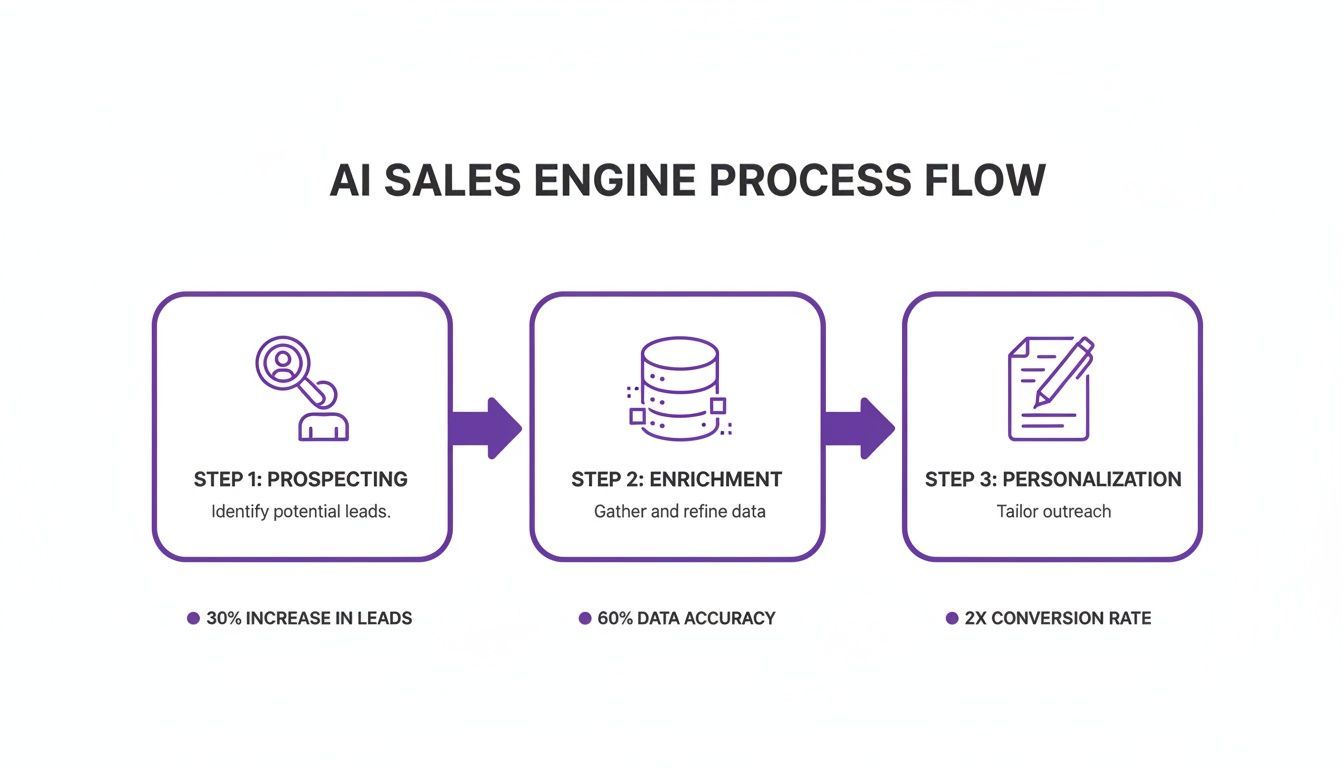
The key takeaway is that successful AI outreach is not a one-off action. It is a connected system where each step improves the next.
Step 2: Validate and Enrich Your Outbound List
Before you write a single email, validate the list. AI can help identify missing fields, duplicates, irrelevant contacts, weak-fit prospects, outdated titles, and records that need enrichment.
A practical validation checklist includes:
- Remove obvious mismatches: Exclude contacts with irrelevant roles, industries, regions, or company types.
- Check seniority: Separate decision-makers, influencers, users, and low-priority contacts.
- Verify company fit: Confirm the account matches your ICP before spending time on personalization.
- Find missing data: Add domains, profile URLs, job titles, company descriptions, and emails where possible.
- Deduplicate records: Remove repeated prospects before syncing to your CRM or outreach tool.
- Flag risky records: Avoid sending to questionable, personal, outdated, or low-confidence email addresses.
This is one of the most useful applications of AI for outbound prospecting: improving the quality of the list before the campaign starts.
Step 3: Score and Rank Prospects Before Outreach
Once the list is validated, use AI to score and rank your prospects. This helps your team focus on the highest-value contacts first instead of treating every row in a spreadsheet as equal.
You can create a simple scoring model based on:
- ICP fit: Industry, company size, location, business model, and market.
- Role fit: Job title, seniority, function, and likely buying authority.
- Intent or timing: Hiring, funding, new product launches, website changes, or relevant events.
- Source quality: Whether the prospect came from a high-context source such as a conference, niche directory, partner page, or target account list.
- Data completeness: Whether the record includes enough information for a relevant message.
The result does not need to be complicated. Even a simple high, medium, and low priority score can help reps spend more time on the right accounts.
Step 4: Create Outbound-Ready Account Summaries
After scoring the list, AI can help prepare short account summaries. These summaries give reps the context they need to write better messages without spending 10 minutes researching every company manually.
A useful outbound account summary can include:
- What the company does
- Who the likely buyer is
- Relevant trigger events or public signals
- Possible pain points
- Why your product might be relevant
- Suggested personalization angles
This is especially useful for account-based outbound, founder-led sales, agency prospecting, and smaller teams that need to move quickly without sacrificing relevance.
Step 5: Choose Your AI Sales Platform
Once your data is clean and ready, choose the right AI platform to manage your outreach. The market is crowded, so focus on tools that fit your workflow and budget. Look for platforms with intelligent sequencing, reply detection, A/B testing, CRM sync, analytics, and personalization features that are simple to control.
The goal is not to find the tool with the most features. It is to find the tool that automates the specific repetitive tasks that are slowing your team down.
Essential features include automated follow-ups, reply detection so you do not keep contacting someone who already responded, personalization tokens beyond First Name, sequence analytics, and clear deliverability controls.
Step 6: Improve Outbound Messaging with AI
With clean data, account summaries, and a prioritized list, it is time to write your outbound messages. This is where a human-AI workflow works best.
AI can generate a useful first draft, but a human should refine the tone, check accuracy, remove exaggeration, and make sure the message sounds natural. The best outbound emails are specific, short, and relevant. They do not need to sound like AI wrote them.
A strong AI prompt for outbound messaging should include:
- The prospect’s role and company
- The source where the lead was found
- The reason you are contacting them
- The problem your product solves
- The desired call to action
- The tone you want to use
For example, instead of asking “write a cold email,” ask AI to write a short outbound email to a specific buyer persona at a specific type of company, using a specific trigger and a clear, low-friction CTA.
Step 7: Optimize Send Times and Follow-Up Timing
AI can also help optimize outbound timing. Instead of sending every message at the same time, some tools analyze historical engagement, time zones, campaign performance, and prospect behavior to suggest better send windows and follow-up timing.
Send-time optimization is not a magic fix for bad targeting or weak messaging, but it can improve performance when the list and message are already strong.
Step 8: Analyze Performance and Refine Your Strategy
An AI-powered workflow is not a “set it and forget it” machine. Its real power lies in the feedback loop. You need to monitor what is working, what is not, and which inputs are producing the best results.
Track open rates, reply rates, positive reply rates, meetings booked, lead-to-meeting conversion, bounce rates, source quality, and campaign-level performance. Then use that data to improve your prospect sources, scoring rules, messaging, and timing.
This continuous feedback loop is what turns a basic outbound campaign into a repeatable system for pipeline growth.
Real-World Plays from Top Sales Teams
Theory is useful, but seeing AI for outbound sales in action makes the value clearer. Here are practical workflows that sales teams, recruiters, and marketers can adapt.
The B2B Account Executive Play
Imagine a B2B Account Executive at a SaaS company who needs to find businesses that are more likely to buy now. Her key trigger is a recent round of funding combined with visible hiring for sales and operations roles.
The challenge: Manually searching tech news, checking company websites, and identifying the right decision-makers takes too much time. Even after she finds a promising account, she still needs contacts, emails, context, and messaging.
The AI workflow: The AE uses AI to monitor relevant funding announcements and hiring signals. When a company matches her criteria, she uses AI to create a short account summary and identify likely buyer personas.
Next, she opens the company’s team page and uses ProfileSpider to extract visible leadership and department profiles into a clean list. She enriches the missing fields, scores contacts by role fit, and uses AI to draft personalized outreach based on the funding event and the company’s growth context.
The outcome: The AE spends less time researching cold accounts and more time contacting prospects with a clear reason for outreach.
The Recruiter Play
Now, consider a technical recruiter tasked with finding senior software engineers, a group that is often passive and difficult to engage.
The challenge: The best engineers are not always on job boards. Sourcing them requires finding where they are active online, understanding their project history, and writing a message that does not sound generic.
The AI workflow: The recruiter identifies a niche online community where engineers showcase projects. Using ProfileSpider, she extracts visible profiles, names, skills, and portfolio links into a structured list.
She then uses AI to summarize each candidate’s public project context and generate a personalized opening line. Instead of “I saw your profile and thought you might be interested,” the message can reference a specific project, technology, or contribution.
The outcome: The recruiter sends fewer generic messages and more relevant outreach to candidates who actually match the role.
The ABM Marketing Play
Finally, let’s look at a marketing team launching an Account-Based Marketing campaign targeting 50 enterprise accounts.
The challenge: Identifying the buying committee inside a large organization is complex. Coordinating personalized messaging for multiple stakeholders across departments is difficult to do manually.
The AI workflow: The team inputs target accounts into an AI workflow. The system helps identify likely departments, personas, and messaging angles. Then the team uses ProfileSpider on leadership pages, team pages, and relevant company pages to collect visible contacts and context.
The list is enriched, segmented by department, and scored by relevance. AI then helps prepare persona-specific message angles for IT, Finance, Operations, Marketing, or leadership contacts.
The outcome: The campaign becomes more targeted because each account and persona receives messaging based on actual context instead of a generic company-level pitch.
Measuring What Matters in AI-Driven Sales
Using AI for outbound sales requires rethinking your metrics. In the past, teams often celebrated the sheer volume of emails sent or calls made. But AI should not only increase activity. It should improve targeting, list quality, personalization, timing, and conversion.
The true value of AI lies in efficiency and impact, not just raw output. To measure ROI accurately, focus on performance indicators that reflect the quality and intelligence of your outbound motion.
Moving Beyond Vanity Metrics
The old outbound playbook was a numbers game where more activity was treated as the path to more results. AI changes this by making each action more targeted. Instead of tracking raw activity alone, your team should focus on more meaningful KPIs.
- Positive reply rate: Tracks how many prospects respond with genuine interest, questions, buying intent, or willingness to speak.
- Lead-to-meeting conversion rate: Measures whether your list quality, targeting, scoring, and messaging are producing real conversations.
- Bounce rate: Shows whether your contact data and email validation process are strong enough.
- Source-to-meeting conversion: Helps identify which lead sources produce the best outbound results.
- Time saved per qualified meeting: Measures whether AI is actually reducing research and list-building workload.
- Pipeline created per campaign: Connects outbound activity to business outcomes.
You can dive deeper into the most important B2B lead generation metrics to build a more robust reporting dashboard.
Shifting your focus to smarter KPIs lets you measure the ROI of your AI tools. It is the difference between saying “we sent 10,000 emails” and “we booked 50 qualified meetings from the right accounts.”
The New KPIs for an AI-Powered Outbound Workflow
As you integrate AI more deeply into your process, your metrics should reflect the full workflow: list quality, enrichment quality, scoring quality, message quality, and campaign outcomes.
Essential KPIs for AI-Powered Outbound Sales
This table breaks down the key performance indicators you should track to measure the effectiveness and ROI of your AI sales initiatives.
| KPI | What It Measures | Why It Matters for AI |
|---|---|---|
| Positive Reply Rate | The percentage of prospects who respond with genuine interest or a relevant next step. | Shows whether AI-assisted targeting and messaging are actually improving relevance. |
| Lead-to-Meeting Conversion Rate | The percentage of contacted leads that become booked meetings. | Validates whether your scoring, enrichment, and outreach workflow are producing real sales conversations. |
| Data Accuracy Rate | The percentage of contacts with correct and usable emails, titles, company data, and profile information. | High accuracy ensures your AI workflow is not wasting effort on bad data. |
| Bounce Rate | The percentage of outbound emails that fail to deliver. | Highlights list quality and email validation issues before they damage performance. |
| Source-to-Meeting Conversion | Which sources produce the most meetings: directories, events, databases, team pages, referrals, or communities. | Helps you improve future prospecting by doubling down on the best sources. |
| Pipeline Velocity | How quickly qualified leads move from first contact to meeting, opportunity, and closed deal. | AI should reduce research time, improve prioritization, and shorten the path to useful conversations. |
| Cost Per Qualified Lead | The total cost of prospecting divided by the number of truly qualified leads generated. | AI should reduce manual research cost and focus effort on high-potential prospects. |
Ultimately, tracking these KPIs gives you a clearer view of how AI is impacting your bottom line, moving you from busywork to real business results.
Navigating Data Privacy in the AI Era
When you use AI for outbound sales, you also take on responsibility for handling prospect data carefully. Powerful tools require careful data handling, especially when your workflow involves enrichment, email finding, CRM exports, and outreach automation.
Transparency is key. Every lead you source and every data point you use should have a clear, defensible origin. This is not only about compliance. It is also about protecting your sender reputation and building trust.
The Common Pitfall of Cloud-Based Scraping Tools
A common workflow with many sales tools involves uploading prospect lists to external cloud platforms. That can be useful for enrichment and outreach, but it also creates more responsibility. Once your data leaves your system, you need to understand how the third party stores, processes, secures, and uses that information.
This matters even more when you combine scraping, enrichment, AI research, and automated outreach. The more tools in your workflow, the more important data governance becomes.
A Privacy-First Alternative: Local Processing
A privacy-by-design approach gives teams more control by keeping saved prospect data closer to the user.
ProfileSpider follows a local-first model for saved profiles, lists, tags, and notes. Extracted lead data is stored in the user’s browser storage instead of being stored as saved lead lists on an external prospecting cloud by default.
This local-first model can simplify data handling because users keep direct control over their saved lists and exports. It does not remove the need to follow applicable laws, platform rules, and outreach requirements, but it does reduce unnecessary exposure of saved prospect data.
For a deeper look at this, our lead scraping compliance checklist is a useful resource.
To keep AI-powered outbound both effective and responsible, follow these best practices:
- Source transparently: Know where your prospect data comes from and why each person is on your list.
- Validate before outreach: Remove poor-fit, outdated, duplicate, or low-confidence records before sending.
- Keep data minimal: Collect only the information needed for relevant outreach and follow-up.
- Respect opt-outs: Make it easy for people to unsubscribe and process those requests promptly.
- Review platform terms: Understand the rules of the websites and tools you use.
- Use human judgment: AI can assist with targeting and messaging, but your team is still responsible for the campaign.
Turn AI Into a Better Outbound Workflow
AI for outbound sales works best when it improves the entire workflow, not just the email copy. Start with a clean prospect list, validate and enrich your data, rank prospects by fit and intent, create account summaries, write more relevant messages, and measure the campaign by qualified conversations and pipeline.
If your outbound workflow starts with public websites, directories, team pages, event pages, or profile lists, try ProfileSpider. Open a relevant source, extract the visible profiles, save them into lists, enrich missing details, find emails where possible, and export when you are ready.