

Deduplicating your lead data isn't just a technical task; it's a strategic move that directly impacts your sales and marketing effectiveness. The process involves standardizing your information, choosing the right method to identify matching records (exact, fuzzy, or rule-based), and merging duplicates into a single, reliable "golden record." This cleanup prevents wasted resources, ensures accurate reporting, and makes sure every piece of outreach hits its mark.
The Hidden Costs of Duplicate Lead Data
Duplicate leads are more than a minor annoyance in your CRM; they are a silent saboteur, quietly undermining your sales and marketing efforts. They create a ripple effect of inefficiency that impacts your budget, team morale, and professional reputation. Ignoring them is like trying to build a house on a shaky foundation—eventually, things start to break.
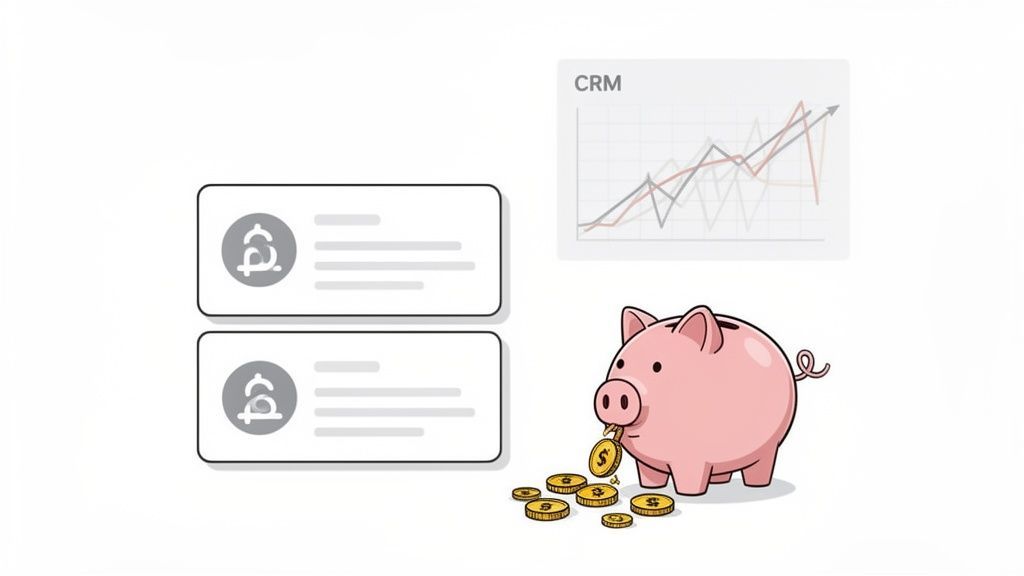
The problem is compounded by how quickly contact data decays. B2B contact information degrades at a staggering 70% per year, far outpacing the 30% decay rate for general business data. This means valuable leads sourced from platforms like LinkedIn can become outdated quickly, creating duplicates the moment new information is added. This data clutter warps your marketing attribution, inflates contact-based subscription costs, and splits engagement histories into useless fragments, leading to misguided decisions and wasted ad spend.
The Financial Drain and Wasted Resources
Every duplicate contact has a price tag. Most CRM and marketing automation platforms bill based on the number of records in your database. If just 15% of your 10,000 contacts are duplicates, you are paying for 1,500 useless entries every single month—cash that could be invested in effective campaigns or better tools.
Beyond subscription fees, the human cost is significant:
- Wasted Sales Time: Sales reps burn valuable hours trying to identify the correct "John Smith" or manually cleaning lists instead of selling.
- Inefficient Marketing Campaigns: Your marketing team wastes budget sending materials to multiple email addresses for the same person, skewing open rates and other key metrics.
- Data Storage Overages: For larger organizations, storing massive amounts of redundant data can lead to significant and unnecessary infrastructure costs.
Damaged Reputation and Poor Customer Experience
Nothing says "you're just a number" like receiving the same email twice from different salespeople at the same company. Or worse, a sales rep calls a lead who is already deep in conversation with a colleague. These mix-ups destroy trust and make your organization look completely disorganized.
A clean, deduplicated database is the foundation of effective personalization. It ensures every touchpoint is informed by a lead's complete history with your brand, creating a seamless and respectful customer journey.
When a lead’s interaction history is scattered across multiple records, you lose the full picture. Conversations become disjointed, opportunities are missed, and your ability to build genuine relationships plummets. Trying to calculate your lead generation ROI with flawed data becomes practically impossible.
Laying the Groundwork with Data Normalization
Before you can effectively hunt for duplicates, you need to ensure all your data is speaking the same language. This process, known as data normalization, is the critical first step of standardizing your information so you can make accurate comparisons. If you skip this, you’ll be comparing apples to oranges, and many duplicates will slip through the cracks.
Imagine one record lists a job title as "VP of Sales," while another has "Vice President, Sales." To a human, they are the same, but most software sees them as completely different. Normalization fixes this.
The goal is to create consistency across every data field—from names and phone numbers to company domains—and eliminate the minor variations that prevent your tools from identifying a true match.
Key Areas for Data Standardization
Applying a consistent set of rules across your entire dataset is essential. Focusing your initial cleanup efforts on these common trouble spots will make a massive difference in your accuracy.
- Case Consistency: Convert all text fields, especially names and emails, to a single case (e.g., lowercase). This prevents 'jane.doe@example.com' and 'Jane.Doe@example.com' from being treated as two separate contacts.
- Job Title Standardization: Create a master list of approved job titles. Systematically replace variations like 'VP', 'V.P.', or 'Vice-Pres' with a uniform term like 'Vice President'.
- Phone Number Formatting: Remove all parentheses, hyphens, and spaces. Standardize every number to a single format, such as
+15551234567, to guarantee perfect matching. - Address Cleanup: Decide on a standard for state and country names. For example, always use 'CA' instead of 'California' and 'USA' instead of 'United States'.
- Removing Extraneous Characters: Trim leading and trailing spaces from every cell. These invisible characters are a classic cause of failed matches.
Here’s a quick look at how this process transforms a messy lead list:
Common Data Normalization Rules for Lead Lists
| Data Field | Messy Example (Before) | Normalized Example (After) |
|---|---|---|
| Jane.Doe@AcmeCorp.com | jane.doe@acmecorp.com | |
| Job Title | SR MGR, Marketing | Senior Manager, Marketing |
| Phone | (555) 123-4567 | +15551234567 |
| State | California | CA |
| Company | Acme Corp. | Acme Corp |
Normalization is the foundational work that makes deduplication possible. Investing 30 minutes in standardizing your data can save hours of frustration and prevent countless outreach errors later on.
Establishing Your Single Source of Truth
Once your data is consistently formatted, you must choose a unique identifier. This is the non-negotiable field that definitively identifies a specific person, acting as your 'single source of truth' for each contact. For sales, recruiting, and marketing professionals, two options stand out:
- A Verified Work Email Address: This is typically the gold standard, as it's unique to an individual within a company.
- A LinkedIn Profile URL: In the modern business world, a LinkedIn profile is an incredibly reliable and unique identifier tied directly to a professional's identity.
Choosing one of these as your primary key simplifies the entire process of how to deduplicate lead data. It provides a final tie-breaker when evaluating potential duplicates. This is also where the best data enrichment tools can provide immense value by filling in missing identifiers.
Of course, starting with high-quality, structured data from the outset dramatically reduces the normalization workload. A modern, no-code tool like ProfileSpider extracts clean data like names, job titles, and LinkedIn URLs directly from the source, giving you a unique identifier from day one and making the subsequent steps far more efficient.
Picking Your Deduplication Strategy
With your data cleaned and standardized, it’s time to choose your method for finding duplicates. There is no single "best" approach; the right strategy depends on your data's quality and your specific goals. Picking the wrong one can be as damaging as doing nothing, leading you to miss obvious duplicates or, worse, merge records that should remain separate.
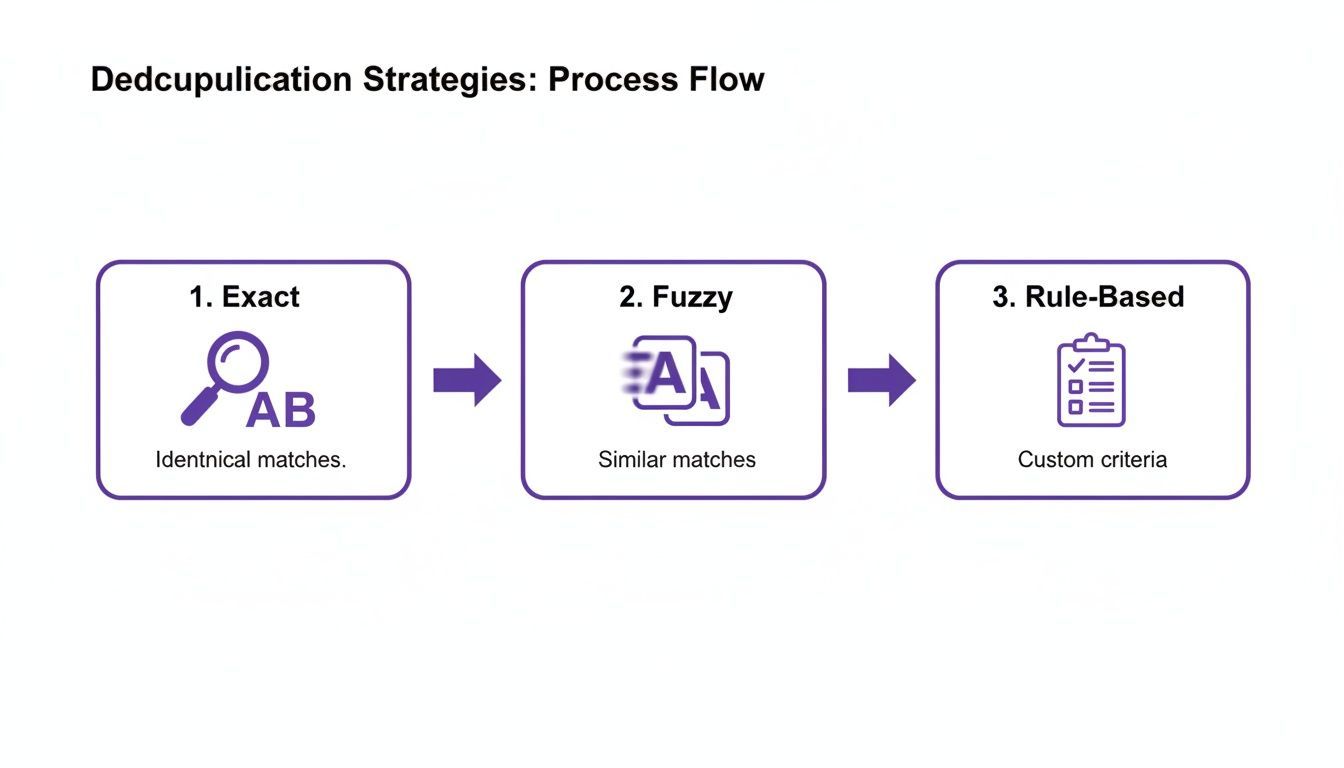
Let’s explore the three main strategies to help you make a practical choice for your lead list.
Exact Matching: The Unforgiving Filter
Exact matching looks for a perfect, character-for-character match between two fields. It is the most straightforward method and works best when you have a unique identifier you can trust completely.
- Email Address:
john.smith@acme.comwill only match anotherjohn.smith@acme.com. - LinkedIn Profile URL: The unique string for a profile will only match an identical URL.
This method is fast, accurate, and produces virtually zero false positives (incorrectly identified duplicates). However, it is completely inflexible. A single typo or minor variation, like 'Jon' vs. 'Jonathan', will cause it to miss a duplicate.
When to use it: Exact matching is perfect for a quick, high-confidence first pass. Run it on a normalized email field to eliminate easy, identical duplicates before moving on to more complex cases.
Fuzzy Matching: The Intelligent Detective
Fuzzy matching uses algorithms to find records that are similar but not necessarily identical. It can identify that "Jon Smith" and "Jonathan Smyth" are likely the same person, catching the human errors and natural variations that exact matching misses.
- Names: It can connect 'Robert' to 'Rob' or 'Bob'.
- Company Names: It can identify 'Acme Inc.' and 'Acme Corporation' as the same business.
- Addresses: It can match '123 Main St.' with '123 Main Street'.
The key is to set an appropriate similarity threshold. A low threshold (e.g., 70%) risks grouping unrelated contacts, while a high one (e.g., 95%) behaves like a slightly more lenient exact match. For most lead data, a threshold between 85-90% is the sweet spot.
Rule-Based Matching: The Custom Playbook
Sometimes, a single field isn’t enough. Rule-based matching allows you to create custom logic by combining multiple fields to define what constitutes a duplicate for your business. This approach offers ultimate control and is ideal when you lack a perfect unique identifier for every record.
Here are a few effective rules:
- Rule 1 (High Confidence): Match if
First Name+Last Name+Company Domainare all identical. - Rule 2 (Medium Confidence): Match if
Last Name+Phone Numberare identical. - Rule 3 (Broader Search): Match if
Email Domain+Job Titleare the same (requires manual review).
This strategy provides a balance between the rigidity of exact matching and the potential guesswork of fuzzy matching. You can stack your rules—run high-confidence rules first, followed by medium-confidence ones—to clean your list in controlled, progressive waves.
A Practical Workflow: From Manual to Modern
Understanding the theory is one thing, but applying it is another. Let's compare the traditional, manual workflow with a modern, automated approach to see the massive efficiency gains available today.
The Traditional Method: Manual Work in Spreadsheets
For years, the go-to method for small-scale deduplication has been the humble spreadsheet. Tools like Microsoft Excel or Google Sheets have built-in features for basic cleanup. The ‘Remove Duplicates’ function is fast and simple, zapping rows that are perfect carbon copies based on the columns you select.
However, spreadsheets rely on perfect data. They cannot handle fuzzy matches and require significant manual normalization beforehand. A single typo or formatting difference will cause a clear duplicate to be missed entirely. This process is time-consuming, prone to human error, and doesn't scale.
The Modern Method: An Automated, One-Click Workflow
The most effective way to manage duplicates is to prevent them from becoming a major problem in the first place. This starts with sourcing clean, structured data from the beginning. Instead of manually copying information into a messy spreadsheet, a modern tool like ProfileSpider changes the entire workflow.
When you use ProfileSpider to extract profiles, it captures structured data points like names, job titles, and unique identifiers (LinkedIn URLs, emails). This clean foundation dramatically cuts down on manual cleanup. The workflow becomes truly efficient when you use its built-in ‘Merge Duplicates’ feature.
Here’s a real-world example:
- You scrape a list of sales managers from a LinkedIn search and save it.
- Later, you visit a target company’s website and scrape their leadership team page.
- Instead of ending up with two overlapping lists, you simply run the merge function inside ProfileSpider. It instantly identifies and consolidates records for the same individuals based on their unique profile data.
This pre-cleaning step ensures the data you export to your CRM is already significantly cleaner. When you finally import the list into a system like HubSpot or Salesforce, their native deduplication tools can focus on the final critical check: matching new leads against your entire historical database. This streamlined, multi-stage process—extract, pre-clean, import—is the key to maintaining a pristine database without the manual headaches. For more tips on this initial phase, see our guide on how to clean lead lists.
Establishing Your Golden Record and Merge Rules
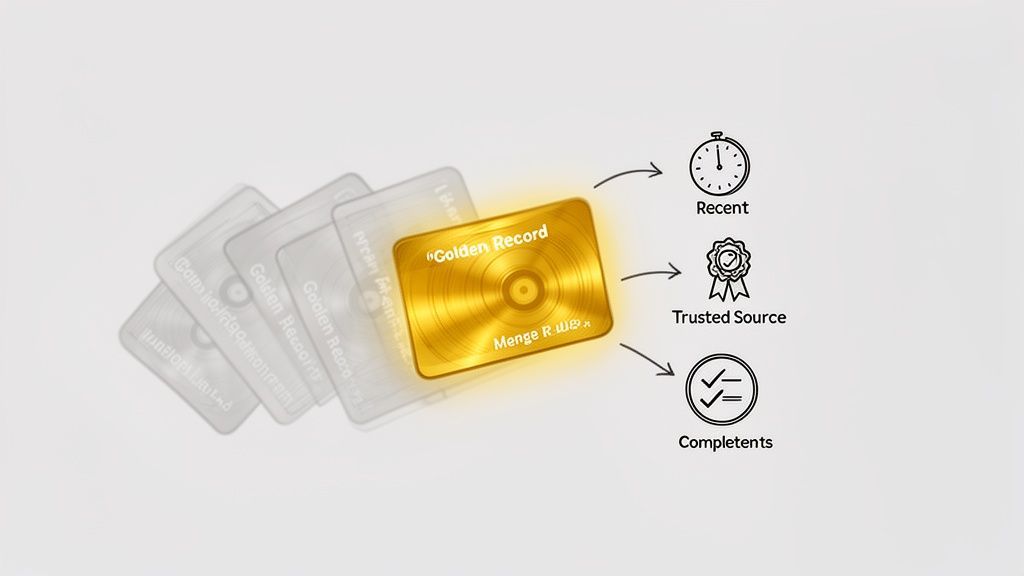
After flagging potential duplicates, the next step is to intelligently merge them into a single, definitive profile—the "Golden Record." This record should be the most accurate, complete, and up-to-date version of that contact.
Creating it requires a clear, logical framework for combining data. Without solid merge rules, you could easily overwrite a new, verified phone number with an old one or replace a current job title with an outdated one.
Deciding Which Data Wins
When you have multiple records for the same person, you need a hierarchy to decide which information makes it into the Golden Record. Consider these criteria when building your merge logic:
- Most Recently Updated: The record with the most recent activity is more likely to have current information.
- Most Complete Record: Prioritize the record with the fewest blank fields.
- Data Source Trustworthiness: Data extracted directly from a LinkedIn profile using a tool like ProfileSpider is generally more reliable than data from an old third-party list.
A hybrid approach is often best. You might take the job title from the most recent record but the phone number from your most trusted source. This field-by-field logic builds a truly powerful Golden Record.
Creating Your Field-by-Field Merge Rules
Turn those priorities into actionable rules. This playbook ensures anyone on your team—or your deduplication software—can produce consistent results.
A Practical Framework for Merge Rules
Here is a simple set of rules you can adapt for your process:
| Data Field | Winning Rule | Rationale |
|---|---|---|
| First Name | Keep the version from the most recently updated record. | This can capture a preference for a nickname (e.g., "Mike" instead of "Michael"). |
| Last Name | Keep the version from the most recently updated record. | This ensures you capture any recent name changes. |
| Email Address | Prioritize the email from the most trusted source first, then the most recent. | A verified work email is gold. Protect the one you know is accurate. |
| Phone Number | Keep the value from the record with the most complete data. | If one record has a direct dial and another doesn't, you want to keep the more detailed one. |
| Job Title | Keep the value from the most recently updated record. | People change roles frequently; recency is the most important factor here. |
| Company Name | Keep the value from the most recently updated record. | This ensures you have their current employer, which is critical for sales and recruiting. |
| Notes/History | Append, do not overwrite. | This is crucial. Combine all notes, activities, and conversation logs from all records into the final Golden Record. |
That final point is non-negotiable. Merging should consolidate a contact's entire history with your company. Overwriting past interactions erases valuable context that your sales and support teams rely on daily.
Keep Your Database Clean for Good
Deduplication isn't a one-time project; it's an ongoing discipline. The key to maintaining a powerful lead database is shifting from reactive cleaning to proactive prevention. Otherwise, you'll find yourself repeating the same tedious work every few months.
Starting with a solid foundation makes this process much easier. Using a tool like ProfileSpider to extract clean, structured data from the start means you're feeding your CRM high-quality information, which drastically reduces the chances of duplicates appearing in the first place.
Let Your CRM Be the Gatekeeper
Your CRM should be your first line of defense. Most modern CRMs have built-in features to catch redundant entries as they are created. Activate and configure these settings to act as a gatekeeper for your data. A common setup is to flag any new entry that shares an identical email address or LinkedIn URL with an existing contact, preventing a team member from manually adding a lead that is already being worked.
The Power of Regular Data Audits
Even with the best automation, some duplicates will inevitably slip through. That's why scheduling regular data audits is a non-negotiable part of good data hygiene.
A quarterly audit is a great starting point for most teams. If you're in a high-growth phase and adding thousands of leads monthly, consider a monthly audit.
These audits don't have to be a massive undertaking. It can be as simple as running a duplicate check report in your CRM and quickly reviewing the matches. Consistency is what matters. For a deeper dive, check out our guide on effective lead list maintenance.
Establish Clear Data Governance Policies
Technology can only do so much; your team's habits are the other half of the equation. A clear data governance policy sets the rules for how everyone interacts with lead data. This policy should outline simple standards, including:
- Mandatory Fields: Specify which fields (e.g., email, company name) must be filled out before saving a new contact.
- Formatting Rules: Document your normalization standards (e.g., "CA" vs. "California").
- Search-Before-Creating: Make it a firm rule that every team member must search for a contact before creating a new one.
Combining smart CRM automation, regular audits, and clear team policies creates a robust system that keeps your data clean and your teams effective.