

Cleaning a lead list is about more than just tidying up a spreadsheet. It’s a strategic overhaul—auditing, standardizing, deduplicating, and validating your data to sharpen its accuracy and supercharge your campaigns. You’re turning a messy, unreliable file into a high-value asset, ensuring every contact is correct, complete, and actually relevant. This directly fuels your outreach ROI.
The High Cost of a Dirty Lead List
Every dirty lead list is a story of wasted time and money. It's the countless bounced emails that torpedo your sender score. It's the sales reps dialing disconnected numbers, and marketing campaigns built on a foundation of flawed data.
Cleaning your list isn't just another task on the to-do list; it's a critical strategy for boosting conversion rates, keeping team morale high, and driving revenue. When outreach falls flat, it's easy to blame the messaging or the offer. But more often than not, the real culprit is poor data hygiene. Bad data poisons your entire sales and marketing funnel before you even send a single email.
The Pillars of Data Hygiene
So, what does a "clean" list actually look like? It all comes down to three core pillars that transform a chaotic spreadsheet into a tool for predictable growth.
- Accuracy: Is the information correct? An accurate list means names are spelled right, job titles are current, and email addresses actually work. Without accuracy, your message is dead on arrival.
- Completeness: Do you have the whole picture? A complete record isn't just a name and email. It might include a job title, company name, and LinkedIn URL. Missing data leaves gaps that make effective personalization and segmentation impossible.
- Consistency: Is the data formatted the same way across the board? Inconsistent entries like "VP" versus "Vice President" or "Intl." versus "International" wreak havoc. They create duplicate records and break your segmentation logic, leaving you with a fuzzy, unreliable view of your audience.
Ignoring these pillars sets off a domino effect of problems. For instance, a single bad email address does more than just fail to deliver. It adds to your bounce rate, signaling to providers like Google and Outlook that your campaigns might be spam. Over time, this erosion of your sender reputation makes it harder to reach even your most interested prospects.
A smaller, highly engaged lead list will always outperform a large, unengaged one. The goal isn't just to have more leads; it's to have more of the right leads. Data hygiene is how you get there.
The financial hit is real. Just look at the booming cleaning services industry, which lives and dies by the quality of its lead lists. That market was valued at USD 451.63 billion in 2025 and is expected to hit USD 859.20 billion by 2034. For businesses in a competitive space like that, every wasted call or bounced email is a direct loss of potential revenue. You can dig into the numbers in this comprehensive industry analysis.
Ultimately, a real commitment to clean lead lists pays off everywhere. Sales teams get more productive, marketing campaigns deliver stronger results, and your business builds a solid foundation for growth. Your lead generation ROI calculation becomes a whole lot clearer when you can trust the data you're starting with.
Building Your Foundation with Data Standardization
After seeing just how much a dirty list can cost you, the first real hands-on step is standardization. You can't even think about finding duplicates or enriching contacts until you've built a clean, uniform foundation. This whole process is about turning a chaotic jumble of inconsistent entries into a predictable, reliable dataset that your systems can actually work with.
Think about it from your CRM's perspective. It has no idea that 'Jon Smith' and 'Jonathan Smith' are the same person. It also doesn’t recognize that 'VP of Sales' and 'Vice President, Sales' refer to the exact same role. These tiny inconsistencies are what create massive headaches down the line, leading to duplicate records, broken segmentation, and personalization that just falls flat.
This is all part of establishing good data hygiene. The goal is to get your data to a state of accuracy, completeness, and—most importantly for this step—consistency.
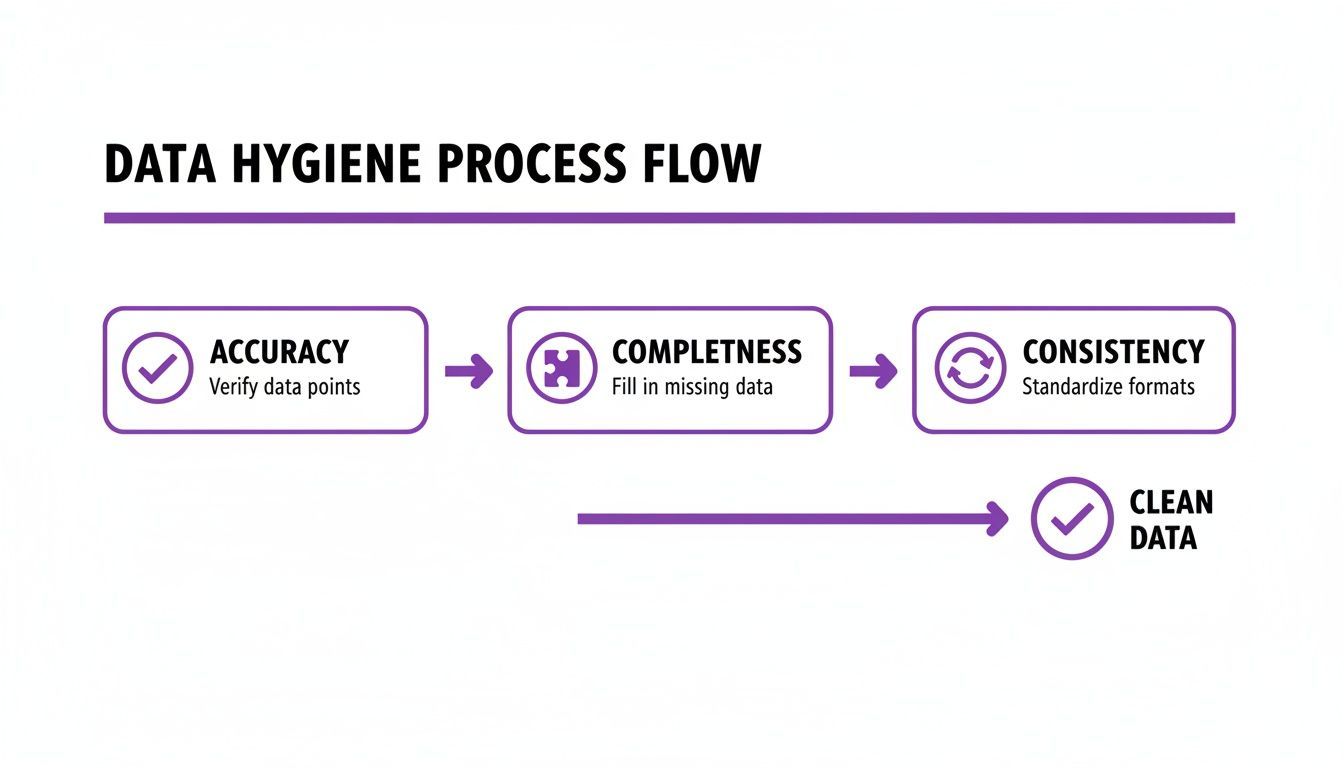
As you can see, clean data isn't a one-and-done task. It’s a process, and getting the consistency right through standardization is the bedrock that everything else is built on.
The Manual Method: Fixing Formatting Messes in a Spreadsheet
Let's get practical. You don't need to be a data wizard to make a huge impact on your list quality. Most of this initial cleanup can happen right in a spreadsheet with a few simple formulas.
Here are the functions that will become your new best friends:
- TRIM: This one is an absolute lifesaver. It zaps extra spaces from the beginning, end, and middle of text. That lead who accidentally hit the spacebar twice between their first and last name?
TRIM()fixes it instantly. - PROPER: This function is perfect for cleaning up names and titles. It capitalizes the first letter of each word, turning messy entries like
john SMITHorJANE doeinto a professional-lookingJohn SmithandJane Doe. - SUBSTITUTE: This is your go-to for replacing specific bits of text. You can use it to swap all instances of "VP" with "Vice President" or change "&" to "and" in company names to keep everything consistent.
These aren't just cosmetic tweaks. Consistent naming conventions and job titles are crucial for accurate segmentation. When your data is uniform, you can confidently build a segment for all "Vice Presidents" without worrying that you missed half of them because their titles were abbreviated.
To give you a quick reference, here’s a table of some of the most frequent formatting issues I see and the simple ways to fix them in Excel or Google Sheets.
Common Data Formatting Issues and Fixes
| Data Issue | Example | Solution (e.g., Excel/Sheets Formula) |
|---|---|---|
| Extra Spaces | " John Smith " |
=TRIM(A2) |
| Inconsistent Case | "jane DOE" or "JANE DOE" |
=PROPER(A2) |
| Abbreviations | "VP of Marketing" |
=SUBSTITUTE(A2, "VP", "Vice President") |
| Mixed Phone Formats | 555-123-4567 |
=SUBSTITUTE(SUBSTITUTE(A2,"-",""),".","") |
| State Name Variations | "Calif." or "California" |
Use a VLOOKUP table to map to "CA" |
This table covers the low-hanging fruit, but tackling these small issues adds up to a massive improvement in your data's reliability.
The No-Code Solution: Get Standardized Data in One Click
For sales pros, recruiters, and marketers who don't have the time to wrestle with spreadsheets, this is where a no-code tool becomes a game-changer. An AI-powered tool like ProfileSpider, for example, automatically extracts data in a structured format right from the start.
When its AI engine pulls data from a webpage, it delivers organized fields for names, titles, and companies. This means the data is standardized the moment you collect it, letting you bypass most of the manual cleanup. Instead of running a bunch of formulas, you get a clean, export-ready list in one click. That lets you focus on outreach, not data janitorial work. Getting this foundational step right makes every other task—like deduplication and validation—infinitely easier and more effective.
Removing Duplicates to Create a Single Source of Truth
Once your data is standardized, it's time to hunt down the duplicates. This isn't just about deleting a few extra rows; it’s about building a single, reliable profile for every lead. We call this the single source of truth. When you have duplicate records, you're not just cluttering your CRM—you're wasting resources, skewing your analytics, and creating awkward situations, like when a prospect gets the same email from two different reps.
The problem goes deeper than just exact matches. You'll run into "fuzzy" duplicates, where small differences make two records look unique to a machine. Think 'Jon Doe' at 'Example Co' versus 'Jonathan Doe' at 'Example Company.' To your software, these are two different people. To your sales team, it's a recipe for confusion and missed opportunities.
The Manual Method: Identifying and Merging Records in a Spreadsheet
The easiest place to start is with the low-hanging fruit: exact duplicates. Most spreadsheet programs have a built-in "Remove Duplicates" function. Running this on columns like an email address or LinkedIn profile URL is a quick first pass to clean up the most obvious copies.
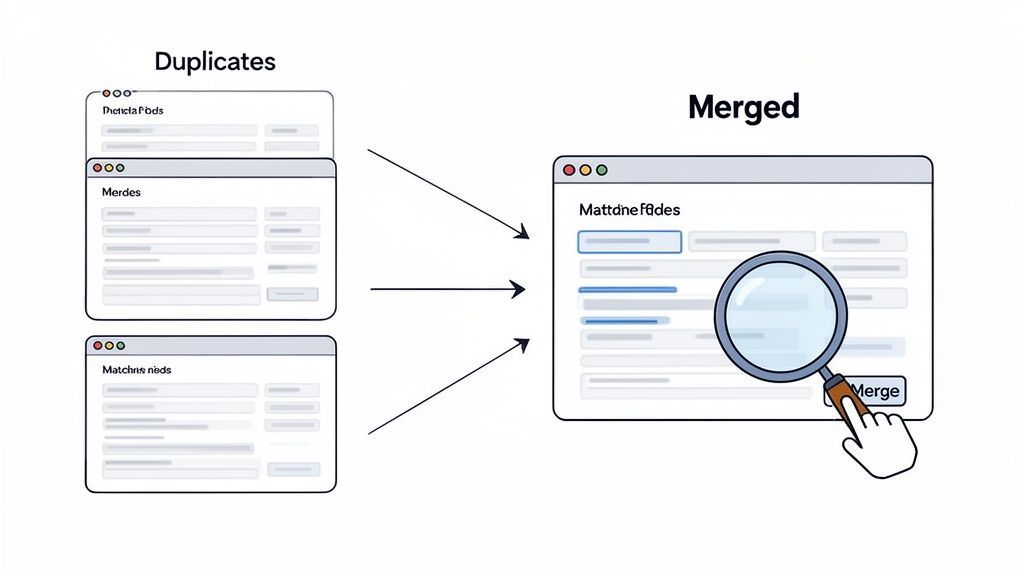
But simply deleting records is a rookie mistake. A smarter approach is to merge them. Why? Because one duplicate might have a phone number, while another has the correct job title. If you just delete one, you’re throwing away valuable intel.
Your real goal is to combine the best bits of information from all duplicate entries into a single, comprehensive master record. In a spreadsheet, this is a pretty manual job. It usually involves a lot of sorting, careful copying and pasting to consolidate info, and then deleting the now-redundant rows.
This level of detail is crucial for teams trying to break into high-growth markets where every single lead is gold. For example, the Asia Pacific cleaning services market is expected to see a 74.37% growth rate by 2033. For sales and recruiting teams targeting this explosive growth, having complete, merged lead profiles is non-negotiable for effective outreach. You can dig deeper into this trend in this market research on cleaning services.
The No-Code Solution: Automated Merging for a Cleaner Database
Let's be honest: the manual merge process, while thorough, is a massive time sink and a magnet for human error, especially with big lists. It demands meticulous filtering and cross-referencing—work that pulls your team away from actually selling or marketing.
This is where a dedicated tool changes the game completely. Instead of losing hours in a spreadsheet, you can lean on an intelligent system to handle deduplication for you.
Merging duplicates isn't about data deletion; it's about data consolidation. The aim is to build the most complete and accurate profile for every single lead by combining fragmented information into one powerful record.
Take a tool like ProfileSpider, for instance. It's built to manage contacts intelligently right from the start. Its contact management features let you merge duplicate profiles with a single click. The system flags potential duplicates, allowing you to combine them while preserving all the unique information. You get that single source of truth without any of the spreadsheet gymnastics.
This shifts a tedious, multi-step chore into a quick, efficient action, ensuring your prospect database stays clean and reliable. By moving from manual cleanup to an automated workflow, you're not just saving time; you're building a more robust and accurate lead list that empowers your team to personalize their outreach and, most importantly, trust the data in front of them.
Validating Contacts to Maximize Deliverability
You've standardized your formats and cleared out the duplicates. Your list is looking sharp. But an organized list doesn't mean your messages will actually land in anyone's inbox. Now comes the real test: validation. This is where we find out if your contact info is actually usable.
Think about it. A perfectly clean and deduplicated list is useless if 25% of the emails are dead ends. Sending messages to bad addresses isn't just a waste of time—it actively poisons your sender reputation.
Every time an email bounces, it sends a little red flag to providers like Gmail and Outlook. Rack up too many of those, and they start thinking you're a spammer. Suddenly, even your legitimate emails struggle to get through to your most interested prospects.
What Real Validation Looks Like
Email validation isn't just one simple check. It’s a multi-layered inspection that confirms an address is both technically sound and currently active. It’s the final quality control checkpoint before you hit "send."
A solid validation process will typically run these checks:
- Syntax Check: This is the first-pass, catching the obvious stuff. It looks for typos like a missing "@" symbol, weird characters, or misplaced spaces (e.g.,
jane.doe @company.com). - Domain Verification: Next, it checks if the domain (
@company.com) is even real. It looks for valid MX records, which are the technical signposts that tell the internet where to deliver mail for that domain. No MX records, no email. - Mailbox Confirmation: This is the deepest check. The service gently pings the mail server to see if the specific mailbox (
jane.doe) actually exists and is set up to receive mail.
You can handle a basic syntax check with a few spreadsheet formulas, but for the other two, you really need a dedicated validation service. These tools do the heavy lifting that’s impossible to do manually, giving you a clear verdict on which emails are safe to use. Keeping that data in good shape is an ongoing job. We dive deeper into that in our guide on ensuring lead data freshness.
The Smarter Way to Collect Clean Data
The old way of doing this is a real grind. You export your data, upload it to some third-party validation tool, wait for the results, download them, and then try to re-import everything back into your system. It's slow, clumsy, and creates tons of opportunities for errors. You're basically fixing bad data after you've already collected it.
There's a much more efficient approach: making sure the data is clean the moment you get it. This is where a one-click scraper like ProfileSpider completely changes the game. Instead of you manually copying and pasting profiles and then stressing about validation later, ProfileSpider's engine pulls structured, clean data right from the source.
While it doesn't perform deep email validation itself, it hands you the data in a standardized format that’s ready to go straight to a validation service. If you already have names and company domains but no direct emails yet, the ProfileSpider Email Pattern Generator can help you create likely email combinations before you verify them. This completely cuts out the tedious "pre-cleaning" you'd otherwise have to do. You can move right to the important steps of validating and enriching your list, letting you focus on what really matters—connecting with prospects.
Enriching and Segmenting for Smarter Outreach
Alright, you've done the hard part. Your lead list is now standardized, deduplicated, and validated. It’s clean. But a clean list isn't the same as a powerful one. This is where we shift gears from cleaning to building—transforming that list into a strategic asset through enrichment and segmentation.
Think about it: having accurate contact info is table stakes. To make your outreach truly connect, you need context.
Data enrichment is all about filling in the blanks. It’s the process of turning a basic entry—just a name and an email—into a full-color profile complete with a job title, company size, industry, and maybe even a few social media links. You're moving from a flat list to a three-dimensional view of your ideal customers.
Once you have that richer data, you can start segmentation. This is the art of grouping your contacts into smaller, hyper-relevant buckets. It's the difference between shouting a generic message into a crowd and having a tailored conversation with exactly the right people.
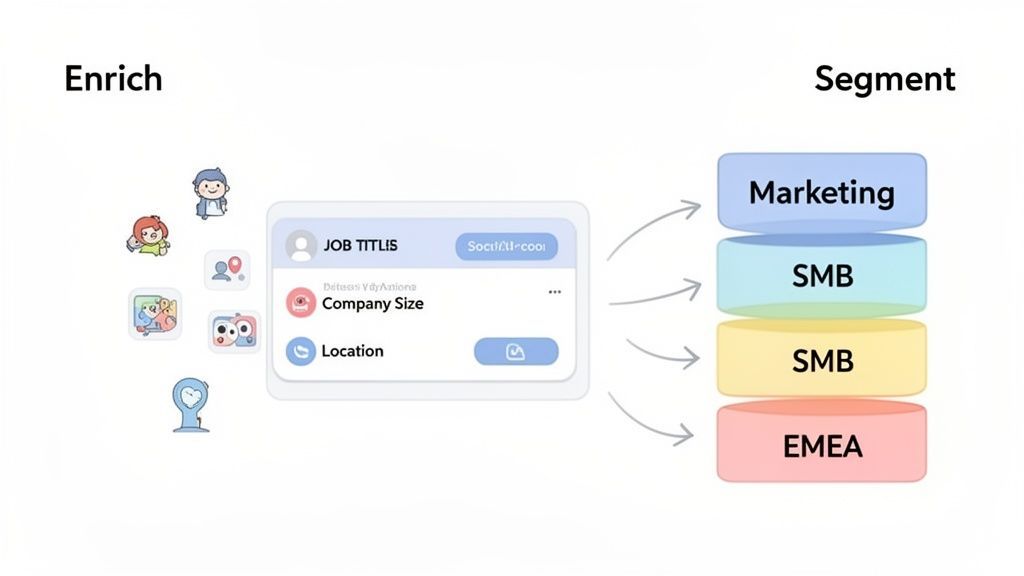
This is what it looks like in practice—taking a broad list and breaking it down into focused groups that allow for incredibly targeted campaigns. The kind that actually drives engagement.
Adding Depth with Data Enrichment
Let's be honest, manually enriching a lead list is a soul-crushing task. It means endless hours spent trolling LinkedIn, digging through company websites, and copying and pasting information one field at a time. For any busy sales or marketing team, that's a monumental waste of time.
This is where automated tools completely change the game. They can take a list of names or profile URLs and, in minutes, fetch all the missing data points you need to build a complete picture of each lead. We've got a great rundown on the best data enrichment tools if you want to explore more options.
A lead list without enrichment is like a map without street names. You know the general direction, but you lack the specific details needed to navigate effectively and connect with your audience on a personal level.
The No-Code Solution: One-Click Data Enrichment
Instead of manual research, a modern no-code tool can automate this entire workflow. ProfileSpider’s "Enrich" feature, for instance, was built for this exact purpose. If you have a list of LinkedIn profile URLs, you can use it to automatically visit those pages and pull in critical information like current job titles, company details, or other social profiles. What used to be a multi-hour manual slog becomes a one-click workflow.
Creating Laser-Focused Segments
With an enriched list in hand, you can now slice and dice your data to create segments for highly personalized outreach. The goal here is simple: stop the one-size-fits-all messaging and start speaking directly to the unique context of each group.
Your segmentation strategy can hinge on a few key data types:
- Firmographics: This is all about the company—think industry, company size, annual revenue, and geographic location.
- Demographics: This focuses on the individual, like their job title, seniority level, or specific department (e.g., Marketing, Engineering).
- Technographics: This one is super useful for B2B tech. It segments companies based on the technologies they use, like a specific CRM or marketing automation platform.
For industries with a heavy commercial focus, firmographic data is king. Take the cleaning products market, which was valued at a staggering USD 315.9 billion in 2024. The commercial segment alone accounts for 56.5% of that, largely driven by a demand for sustainable solutions. A B2B provider in this space could create a segment of "facility managers" at companies in the "hospitality industry" with over 200 employees to offer them highly relevant, targeted solutions.
By moving beyond basic cleaning and fully embracing enrichment and segmentation, you transform your lead list from a simple directory into your most powerful strategic asset. Every email, every call, every touchpoint becomes more relevant, more personal, and ultimately, more effective at driving conversions and building real relationships.
Keeping Your Data Clean and Compliant for the Long Haul
Let's be real: cleaning up a lead list isn't a one-and-done task. It’s more like regular maintenance for your most valuable outreach asset. Contact data just naturally goes stale over time—people switch jobs, companies get acquired, and old email addresses eventually get abandoned.
If you don't keep up with it, even a perfectly polished list will degrade, and your campaign performance will sink right along with it. A good rule of thumb is to schedule a deep clean every quarter. But if you're in a fast-moving industry like tech or recruiting where people jump ship frequently, you'd be smart to review your most important contacts every month.
Staying on the Right Side of Privacy Laws
Beyond just keeping your data fresh, you have a serious responsibility to handle it legally and ethically. Regulations like GDPR in Europe and CAN-SPAM in the U.S. aren't just gentle suggestions—they're laws with hefty fines for anyone who ignores them.
Here are a few practices that are absolutely non-negotiable:
- Honor Opt-Outs Instantly: The second someone unsubscribes, they need to be removed from all your active lists. No delays, no friction.
- Source Your Contacts Ethically: Only add people who have a legitimate reason to hear from you. Buying lists is a fast track to spam complaints and a torched sender reputation. Just don't do it.
- Be Transparent: Always be clear about who you are and why you're reaching out. Trying to trick someone with a deceptive subject line is a direct violation of laws like CAN-SPAM.
This is another spot where your choice of tools really makes a difference. Some platforms will store all your scraped data in the cloud, which can quickly turn into a compliance nightmare.
Your approach to data privacy says a lot about your brand's integrity. Putting privacy first not only builds trust with prospects but also shields your business from some serious legal heat.
A tool like ProfileSpider, for example, was built from the ground up with a privacy-first mindset. All the data you extract is stored locally on your own machine, never on a central server. This puts you in complete control, massively simplifying your compliance efforts by making you the sole custodian of the data you collect.
At the end of the day, consistent data hygiene isn’t just about bumping up your metrics. It's a fundamental part of building a sustainable, responsible business.