

If your cold email campaigns are falling flat, it's almost never just one thing. It’s usually a toxic mix of poor data quality, weak targeting, and dodgy deliverability. To get things back on track, you have to play detective and figure out if your list is stale, your message is bland, or if you're just screaming into the spam folder void.
And there’s one especially common failure point most teams overlook: they have names and companies, but no reliable email path. That’s where an email pattern workflow becomes useful. If you know a prospect’s name and company domain, a tool like the ProfileSpider Email Pattern Generator can generate likely business email formats, which you can then verify before sending.
Why Most Cold Email Campaigns Fail to Convert
Staring at a dashboard with zero replies is a feeling every sales professional and marketer knows well. But here's the hard truth: when your cold email lists aren't converting, you're not the exception—you're the norm. Before jumping into fixes, let's ground ourselves in reality and look at the common tripwires. This isn’t to discourage you; it’s about swapping guesswork for a clear, actionable plan.
You spend hours, maybe even days, putting together what you think is a killer list. You hit send, then... crickets. This is the reality for most. The average conversion rate for cold email is a dismal 0.215%. Let that sink in. That means you need to send 464 emails just to get one deal.
With a staggering 376.4 billion emails sent every year, your message is a tiny drop in an overflowing ocean. Without sharp, personalized outreach, you're just contributing to the noise. You can dig into these cold email benchmarks to see just how fierce the competition for inbox attention really is.
Pinpointing the Root Cause of Failure
To fix a failing campaign, you first have to diagnose it. Different symptoms point to different problems. A high bounce rate screams "bad data," while a low open rate might mean your deliverability is shot or your subject lines are putting people to sleep.
Let's break down how to read the signs. If you're seeing any of these symptoms, here’s what’s likely going on under the hood.
Diagnosing Your Failing Cold Email Campaign
This table will help you connect the symptoms you're seeing in your campaign data to the most likely root cause. It's a quick way to focus your troubleshooting efforts where they'll have the biggest impact.
| Symptom | What It Means | Potential Root Cause |
|---|---|---|
| High Bounce Rate (Over 5%) | The email addresses on your list are no good. | Stale, invalid, guessed, or poorly scraped email data. |
| Low Open Rate (Under 20%) | Your emails aren't even being seen. | Poor sender reputation, weak subject lines, or spam-folder placement. |
| High Open Rate, Low Reply Rate | You got them to open it, but the conversation died right there. | Generic messaging, weak relevance, or an unclear call to action. |
| No Clicks on Your Call-to-Action | Your offer isn't landing or you're asking for too much, too soon. | Unclear value proposition or a CTA that creates too much friction. |
| Good ICP Fit, But Missing Emails | You found the right people but cannot contact them directly. | Incomplete enrichment workflow; missing domain-based email pattern generation and verification. |
Once you start looking at your campaign metrics this way, they stop being just numbers and become diagnostic tools.
You can stop guessing what's wrong and start surgically addressing the weak spots in your strategy. This is how you turn a frustrating, failing campaign into a predictable lead generation engine.
Your Lead List Is the Real Problem
You can write the most brilliant email in the world, but if you send it to the wrong person, it’s just digital noise. When open and reply rates are tanking, the real culprit often isn’t your witty subject line or killer offer—it’s the list itself. The success of any cold email campaign is decided long before you write a single word. It all comes down to the quality of your lead data.
Too many sales professionals are working with 'dead lists'—stale data purchased from a vendor or scraped months ago. This is a huge mistake. B2B data decays at a staggering rate of 22.5% per year. That means nearly a quarter of your list could be useless within 12 months as people change jobs, companies get acquired, and old email addresses are shut down.
If you want to understand how quickly B2B contact data goes stale, read our guide to email decay rates in B2B.
From Quantity to Quality
The old "more is better" mindset is a surefire recipe for failure in cold outreach. A massive, untargeted list of 10,000 generic contacts will almost always get smoked by a hyper-focused list of 100 ideal customer profiles (ICPs). When your cold email lead lists are not converting, it's a flashing red light telling you to shift from sheer volume to genuine relevance.
This means digging deeper than basic firmographics like company size or industry. High-converting lists are built on behavioral and contextual signals. For example, instead of blasting a generic lead list, you should be proactively leveraging intent data to find prospects who are already out there researching solutions like yours.
The Modern Approach to List Building
So, how do you build a fresh, accurate, and relevant list without sinking days into manual research? The old-school method of copy-pasting from professional networks is painfully slow and riddled with errors. It just doesn't scale.
This is where modern, no-code workflows completely change the game. Instead of buying stale data, you can build your own lists from current sources. A tool like ProfileSpider, for instance, lets you run a targeted search on a professional network and then pull all the relevant profiles with a single click.
But extraction is only the first step. If you capture names, titles, companies, and domains but do not yet have direct emails, the next step is to infer likely company email formats. That is where the ProfileSpider Email Pattern Generator helps. You enter the person’s name and company domain, generate common B2B email patterns, and then validate the likely addresses before outreach.
The real power here is freshness and control. You’re capturing profiles as they exist today, generating likely email formats from current company domains, and verifying those emails before sending. That is far better than relying on a stale list someone else scraped months ago.
This approach turns list building from a tedious chore into a strategic advantage. You can spin up new lists for different campaigns, test out new market segments, and make sure every single email you send has the best possible chance of hitting the right inbox at the right time. For a deeper look, check out our complete guide on how to build a lead list automatically.
At the end of the day, a high-quality list is your foundation. Without it, even the most persuasive copy and perfect deliverability setup will fall flat. Fix the core issue—your data—and you’ll fix what’s holding your campaigns back.
Finding Contact Paths Without Guessing Blindly
One of the most frustrating cold email problems is simple: you have the right prospect, but no usable email address. You know their name. You know their company. You know they fit your ICP. But your outreach stalls because the contact path is missing.
The old way to solve this was messy. Sales reps would manually try a few guesses in a spreadsheet:
first@company.comfirst.last@company.comfirstinitiallast@company.comfirst_last@company.com
That might work for one or two leads, but it breaks down fast when you have a list of 100 or 500 prospects. It also creates risk if you start sending to guessed addresses without validating them first.
The Smarter Way: Generate Patterns, Then Verify
A better workflow separates email discovery from email sending. You do not guess and blast. You generate likely patterns, run them through verification, and only send to addresses that pass.
The process looks like this:
- Start with a verified prospect: name, company, role, and domain.
- Generate likely email patterns: use a tool like the ProfileSpider Email Pattern Generator.
- Verify the generated addresses: run candidates through an email verification service.
- Keep only valid emails: remove invalid, risky, or catch-all results unless your team has a separate low-risk workflow for them.
- Add source context: keep the original profile URL, company domain, and collection date for future auditing.
Email pattern generation is useful because it gives structure to the discovery process. Email verification is what makes that process safe enough for real outreach.
Common B2B Email Patterns to Test
Most companies use a relatively small number of standard business email formats. A pattern generator helps you create these quickly without writing formulas by hand.
| Pattern | Example | When It Often Appears |
|---|---|---|
first.last@domain.com |
jane.smith@company.com |
Common in mid-market and enterprise companies. |
first@domain.com |
jane@company.com |
Common in startups and smaller teams. |
f.last@domain.com |
j.smith@company.com |
Common in larger organizations with many employees. |
firstlast@domain.com |
janesmith@company.com |
Sometimes used by SMBs and agencies. |
first_last@domain.com |
jane_smith@company.com |
Less common, but still worth testing in some industries. |
The goal is not to send to every possible version. The goal is to create a short, structured set of candidates so your verification step can identify the real one.
Securing Your Spot in the Inbox
Even the most perfectly crafted email is completely worthless if it lands in a spam folder. If your cold email campaigns are falling flat, there's a good chance poor deliverability is the silent killer. Your messages aren't even getting a chance to be seen.
Getting this right is a mix of nailing the technical setup and adopting some smart sending habits.
Think of the technical part as your email's passport. When you send an email, internet service providers check your credentials to make sure you are who you say you are. If your passport is missing or looks forged, your emails get flagged as suspicious and rerouted straight to junk.
There are three key records you absolutely need to have in place:
- SPF (Sender Policy Framework): This is basically a public list of the servers you’ve authorized to send emails from your domain.
- DKIM (DomainKeys Identified Mail): This adds a digital signature to your emails, which acts as a tamper-proof seal, proving the message hasn't been altered in transit.
- DMARC (Domain-based Message Authentication, Reporting & Conformance): This tells receiving servers what to do if an email fails the SPF or DKIM check—like reject it or quarantine it.
Don't let the acronyms intimidate you. You don't need to be a network engineer to sort this out. Most email providers have simple, step-by-step guides, and there are plenty of free online tools that can check your domain’s setup in seconds. A clean technical record is non-negotiable for good deliverability.
The Human Side of Deliverability
Beyond the technical stuff, your actual sending behavior plays a massive role. Email providers are constantly watching how you act to figure out if you're a legitimate sender or just another spammer blasting out junk.
For example, abruptly sending hundreds of emails from a brand-new account is one of the biggest red flags you can raise.
This is exactly why warming up your email account is so critical. You have to start slow. Send just a small handful of emails each day, and then gradually ramp up the volume over a few weeks. This process patiently builds a positive sender reputation, showing providers like Google and Microsoft that you're a trustworthy source.
A strong sender reputation acts like a VIP pass for the inbox. It tells providers that your messages are wanted and expected, dramatically increasing the chances they'll be delivered to the primary inbox instead of getting buried in spam or promotions.
Another common mistake is littering your emails with spam trigger words. Phrases like "free," "limited time," or "guaranteed" can instantly set off spam filters. You need to keep your language natural and professional to fly under the radar.
Similarly, a high bounce rate absolutely tanks your reputation. This is where using fresh, verified contact info is non-negotiable. If you need a refresher on sourcing high-quality contacts, our guide on how to find business email addresses has some practical strategies that work.
Ultimately, landing in the inbox requires a two-pronged attack. First, get your technical foundation (SPF, DKIM, DMARC) rock-solid. Then, behave like a human—warm up your account, keep your sending volume reasonable, and only use clean, relevant, verified lists. This simple pre-flight check ensures your messages actually reach their destination.
Writing Emails People Actually Want to Read
Let's be honest. Even with a perfect list and flawless deliverability, your campaign will tank if your message sounds like it was written by a robot. Generic templates are the fastest way to get your email deleted—or worse, marked as spam.
This is where we get back to the human element of outreach. It's the part that turns a cold prospect into a warm conversation.
The gap between an email that gets ignored and one that gets a reply almost always comes down to one thing: personalization. The response rates for generic, shotgun-blast cold emails are dismal, hovering around 1% to 8.5%. On the flip side, well-researched, personalized campaigns can see response rates as high as 50%.
When your lead lists aren't converting, personalization is your single greatest advantage. A truly compelling cold email nails three things: a subject line that sparks curiosity, an opening line that proves you’ve done your homework, and a clear, low-friction call-to-action (CTA).
Crafting an Irresistible Subject Line
The only job of your subject line is to get the email opened. That's it. The best ones are short, specific, and feel like they came from a real person. Ditch the clickbait and aim for genuine curiosity.
- Vague (Bad): "Quick Question"
- Specific (Good): "Question about [Prospect's Company] podcast"
- Generic (Bad): "Boosting Your Sales"
- Personalized (Good): "[Mutual Connection] suggested I reach out"
Think of the subject line as the headline for your entire pitch. If it doesn't immediately signal that what's inside is relevant, the recipient will never even see the brilliant email you wrote.
The Power of the Personalized Opening Line
Your first sentence is your only shot to prove this isn't a mass email. It has to connect with the recipient's world, right now. This is where enriched data becomes your secret weapon.
Generic Opening: "I saw you're the Head of Sales at [Company Name] and wanted to connect."
Personalized Opening: "Congrats on the recent feature in TechCrunch for your Series B funding. Scaling the sales team must be a top priority right now."
See the difference? The second example works because it's timely, specific, and shows you actually did some research. You're not just another salesperson blasting through a list; you're a professional who understands their context. This is what turns a cold prospect into a potential warm lead.
Leveraging Enriched Data with ProfileSpider
This is where tools like ProfileSpider are absolute game-changers. By extracting detailed profile information in one click, you find personalization hooks that generic lists could never give you.
You can instantly reference things like:
- Recent Activity: A post they shared or a comment they left on LinkedIn.
- Shared Connections: A mutual contact you both know and trust.
- Company News: A recent product launch, award, or company milestone.
- Past Roles: Experience at a company you're familiar with or have worked with before.
- Current Domain: The company website you can use to generate and verify a likely business email pattern.
This level of detail makes your message impossible to ignore because it’s uniquely about them.
Creating a Low-Friction Call-to-Action
Finally, your CTA needs to be crystal clear and incredibly easy to say "yes" to. A classic mistake is asking for too much, too soon—like a 30-minute demo right out of the gate.
- High-Friction (Bad): "Are you free for a demo next week?"
- Low-Friction (Good): "Would you be open to a 15-minute call to see if this is even relevant for you?"
The goal of the first email isn't to close a deal. It's just to start a conversation. Make your "ask" small and focused on exploring whether there's a potential fit. For some great ideas on how to frame your messages and CTAs, check out these B2B email marketing examples that convert for inspiration.
Building an Efficient Lead Generation Workflow
If your cold email lists are falling flat, the problem is almost always a broken or outdated workflow. I see it all the time: sales and marketing professionals clinging to old-school methods that just burn time and deliver garbage results. Let’s break down that traditional, painful approach and compare it to a modern, efficient one that actually gets replies.
The old way is a manual nightmare. It usually starts with buying some stale, pre-packaged list that’s probably decayed and irrelevant by the time it hits your inbox. The alternative isn't much better—spending hours manually scraping professional networks, tediously copying and pasting names, titles, and company details into a spreadsheet. Then, if direct emails are missing, reps manually guess patterns in a separate sheet. It’s slow, riddled with human error, and the data is incomplete from the get-go.
This manual grind is a direct pipeline to all the problems we’ve been talking about: high bounce rates, dismal open rates, and messages that completely miss the mark because you have nothing to personalize them with. It's a workflow built on quantity over quality, and frankly, it's a recipe for frustration.
The Modern No-Code Alternative
There’s a much, much better way. Modern tools let you build a high-quality list from fresh data sources in minutes, not days, without touching a single line of code. This new workflow puts accuracy and relevance first, right from the very beginning.
Take ProfileSpider and the Email Pattern Generator, for instance. The process becomes dead simple:
- Pinpoint Your Target: Start with a hyper-specific search on a professional network like LinkedIn. Filter for the exact job titles, industries, and locations that match your Ideal Customer Profile (ICP).
- Extract in One Click: Instead of the soul-crushing copy-paste routine, use a one-click profile scraper. The tool instantly grabs rich profile data—names, titles, companies, profile URLs, and context—and organizes it for you.
- Generate Likely Email Patterns: When you have a name and company domain but no confirmed email, use the Email Pattern Generator to create common business email formats.
- Verify Before Sending: Run generated email candidates through a verifier and keep only valid results.
- Personalize Immediately: Use the profile context you extracted to write a message that actually feels relevant.
This workflow transforms lead generation from a resource-draining chore into a quick, strategic activity. You’re no longer working with questionable data; you’re creating fresh, campaign-ready lists on demand for B2B outbound lead generation.
The diagram below breaks down the anatomy of an effective cold email—something that’s only possible when you’re working with high-quality lead data.
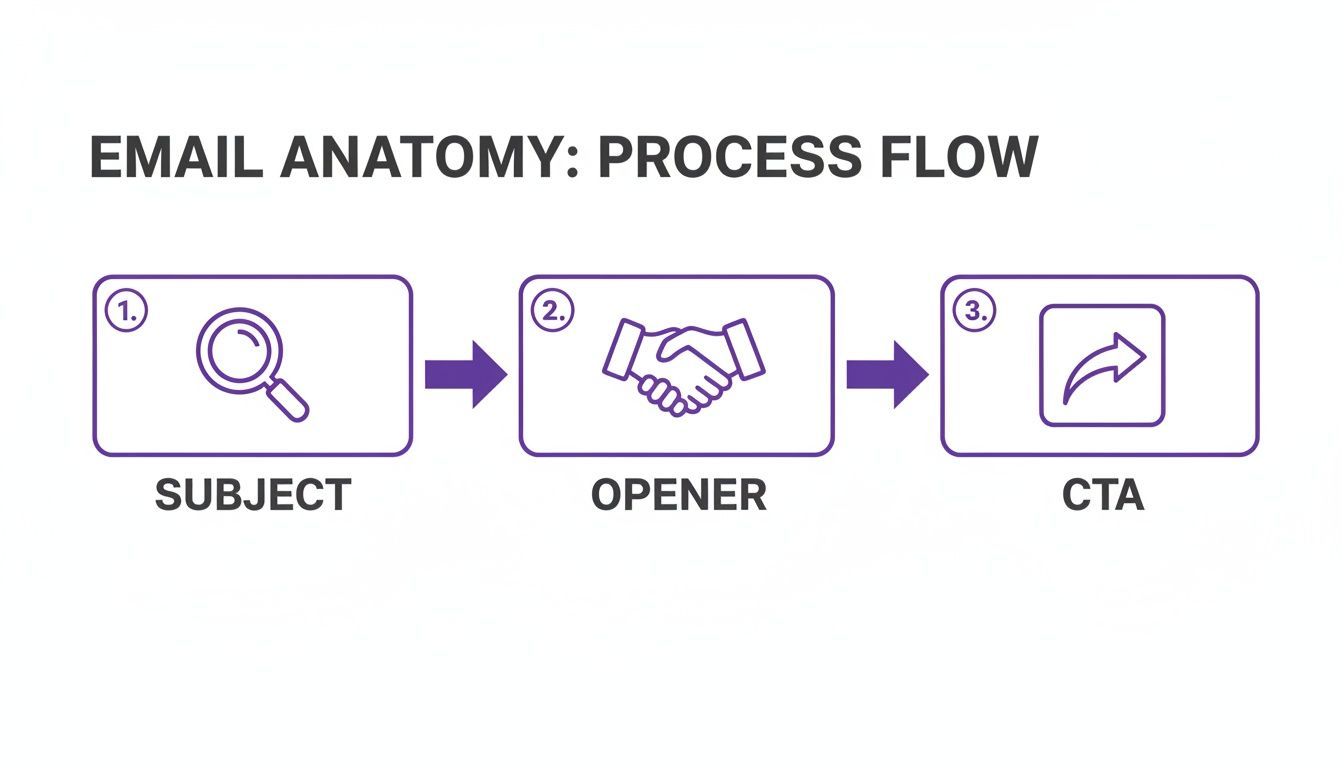
Every single stage, from the subject line to the call-to-action, depends on having accurate, fresh information to make your message resonate with a real person on the other end.
This modern approach is the go-to for busy professionals who need high-quality leads without the technical headaches or wasted hours. By automating the most tedious parts of list building and email discovery, you free yourself up to focus on what truly matters: writing compelling messages and starting real conversations.
To dive deeper, check out our guide on 7 lead generation automation workflows that actually convert. Seriously, adopting an efficient workflow like this is the single most effective step you can take toward fixing your conversion problem for good.
Tracking Metrics That Actually Drive Revenue
If you can't measure it, you can't improve it. It’s an old saying, but it holds true. When it comes to cold email, it's easy to get lost in metrics that feel good but don't actually move the needle. Open rates and click rates are interesting, sure, but they are ultimately vanity metrics. They don’t pay the bills.
When your cold email lead lists are not converting, it's time to shift your focus from email activity to actual business outcomes.
The only numbers that truly matter are the ones that trace a direct line to revenue. These are the key performance indicators that show your campaign is generating real business, not just inbox noise.
You'll want to zero in on these core metrics:
- Bounce Rate: If this is high, your email data is bad or your pattern generation is not being verified properly.
- Reply Rate: This is your first real signal of genuine interest. Forget opens—how many people are actually engaging in a conversation with you?
- Positive Response Rate: Not all replies are created equal. A "take me off your list" isn't a win. You need to track how many of those replies express interest, ask for more information, or agree to a next step.
- Meetings Booked: This is where outreach turns into a tangible sales opportunity. How many of those positive conversations are converting into actual scheduled calls or demos?
- Valid Email Discovery Rate: If you use generated patterns, track how many prospects result in a verified business email. This tells you whether your domain and pattern workflow is working.
Unpacking the Sales Funnel Math
The ultimate proof of a failing list isn't a low open rate; it's the brutal reality of the sales funnel math. Even with decent opens, a low-quality list will cause the entire funnel to crumble right before your eyes. The average cold email campaign yields a global conversion rate of just 0.7%. Ouch.
This happens because poor list quality—stale data, wrong segments, bad fits, invalid emails—creates a domino effect of failure. A typical breakdown shows that for every 100 emails sent, only 55 might be opened. That leads to maybe three replies, which turns into one booked meeting, and ultimately, less than one closed deal. This stark reality, explored in Breakcold's 2025 conversion analysis, highlights just how critical every single step in the process is.
Focusing on the right metrics allows you to stop guessing and start making data-driven decisions. If your bounce rate is high, fix your data and verification workflow. If your reply rate is low, fix your targeting and messaging. If your meeting rate is low, fix your CTA and follow-up process.
By tracking these revenue-centric metrics, you can diagnose the precise point of failure in your outreach. Tiny improvements at each stage—a cleaner email discovery workflow here, a slightly better reply rate there, a clearer value prop that books more meetings—compound to create a massive impact on your final conversion number.
It’s about optimizing for real business outcomes, not just email opens.
Frequently Asked Questions
Why are my cold email lead lists not converting?
Usually because the list is not fresh, not targeted, or not deliverable. If your emails bounce, the data is bad. If they open but do not reply, your messaging is probably generic or irrelevant. If they never open, your deliverability or subject line may be the problem.
Can email pattern generation fix a bad list?
No. It can help you create likely email candidates when you already have a good prospect name and company domain, but it cannot fix poor targeting. Start with a relevant ICP list first, then use pattern generation and verification to fill missing contact paths.
Should I send to generated email patterns directly?
No. Generated patterns should be verified before outreach. Sending to unverified guessed emails can increase bounce rates, damage your sender reputation, and hurt future deliverability.
What is the safest workflow for missing business emails?
Start with a fresh profile, confirm the company domain, generate common email patterns using the ProfileSpider Email Pattern Generator, verify the candidates, and only send to addresses marked valid.
What should I fix first if my campaign is failing?
Start with the list. Clean it, verify it, and confirm it matches your ICP. Once the data is trustworthy, then optimize deliverability, subject lines, personalization, and follow-up cadence.