


Need to identify a company’s executives, owners, operating managers, or other senior decision-makers? Company leadership pages, executive biographies, investor-relations pages, and press releases often contain the names, job titles, public profiles, and sometimes contact details you need.
You can collect this information manually, but that quickly becomes slow when a company has dozens of executives or spreads its leadership information across multiple pages. A faster approach is to find the relevant public leadership pages and use an AI-powered extraction tool to turn the available information into a structured list for sales, recruiting, research, or marketing.
Why Accurate Executive and Leadership Information Matters
In sales, marketing, and recruiting, timing and accuracy are everything. Having a precise, current list of a company’s leadership team is not just useful; it helps you identify the people who are most likely to influence a buying decision, hiring process, partnership, or strategic initiative.
The challenge is that corporate leadership is always changing. Promotions, new hires, expanded responsibilities, and departures happen regularly. A list that was accurate several months ago may already contain outdated titles or former employees.
The Problem: Leadership Is Constantly Changing
Leadership information changes frequently. Executives are promoted, move to new companies, take on expanded responsibilities, or leave their positions. Company websites, press releases, and investor-relations pages are therefore often more useful than static contact databases when you need to confirm who currently holds a role.
This also means that an executive list should be treated as a snapshot rather than a permanent record. The closer your information is to the original company source, the easier it is to verify names, titles, and responsibilities before beginning outreach.
The real problem is not simply finding names. It is finding current, relevant, and verifiable information from public company sources at the moment you need it.
The Solution: A Modern, No-Code Approach
Instead of manually copying each executive’s name, title, biography, and profile link into a spreadsheet, you can use a no-code AI extraction tool such as ProfileSpider to structure the information already available on a company website.
By automating the initial extraction step, you can:
- Build targeted executive lists faster than copying every field manually.
- Improve accuracy by extracting information directly from current company pages rather than relying only on static purchased lists.
- Spend more time on verification, research, and outreach instead of repetitive data entry.
Ultimately, creating and owning your lead data gives you more control over its source, structure, and freshness. In this guide, we will walk through the manual research process and then show how a one-click extraction workflow can reduce the repetitive work.
Part 1: Finding Key Decision-Makers (The Manual Way)
Before you can extract a list of company leaders, you need a clear research plan. A company’s homepage or standard “About Us” page is usually the starting point, but leadership information may also be spread across executive biographies, investor-relations pages, press releases, annual reports, and contact pages.
Building a useful list of C-suite leaders, owners, operating managers, and other senior contacts is about knowing where to look and how to verify what you find.
Beyond the Standard “About Us” Page
The “About Us,” “Team,” “Management,” or “Leadership” page is usually the first place to check. However, the most useful information may appear elsewhere, especially when a company has recently appointed a new executive or reorganized its management team.
Think like a researcher. Look for the parts of a company’s website where it discusses strategy, corporate governance, appointments, financial reporting, and organizational changes.
Where to Find Executive and C-Suite Profiles
To build a more complete company leadership list, check multiple public sources. Each source may reveal different information, from official board members to owners, operating managers, department heads, or newly appointed executives.
| Source | What to Look For | Pro Tip |
|---|---|---|
| Investor Relations | Board members, C-suite executives, senior financial officers, and corporate governance information. | Public companies often publish detailed and regularly maintained leadership information here. |
| Leadership, Team, or Management Pages | Executives, company owners, operating managers, department heads, job titles, biographies, profile links, and any publicly listed contact details. | Check whether the page links to individual biography pages. These often contain additional role information, social profiles, or direct contact details. |
| Press Release Archives | New hires, promotions, departures, and leadership changes. | Search for words such as “appointed,” “promoted,” “joins,” or “named Chief.” These announcements often include an executive biography. |
| Contact and Location Pages | General company phone numbers, office details, departmental contacts, and occasionally direct executive contact information. | Do not assume a general company number belongs to a specific executive. Keep company-level and person-level contact details in separate fields. |
| Company Newsroom or Blog | Interviews, quotes, thought-leadership articles, and announcements involving executives. | These pages can help confirm an executive’s current responsibilities, priorities, and areas of expertise. |
| Annual Reports and SEC Filings | Senior executives, board members, ownership information, governance roles, and compensation disclosures. | These documents are dense, but they often contain the most formally verified information about top-level leadership. |
By combining information from these sources, you can build a more complete executive profile than you would get from a single page.
Using Advanced Search to Pinpoint Leaders
Advanced search operators can help you find leadership pages and executive profiles that are difficult to locate through a company’s navigation.
For example, use site:company.com "leadership" to find pages mentioning leadership on a specific company website. You can also search for a particular role, such as site:company.com "chief marketing officer".
Other useful searches include:
site:company.com ("leadership" OR "management" OR "executive team")site:company.com ("owner" OR "operating manager")site:company.com "chief executive officer"site:company.com "appointed" "chief"site:company.com filetype:pdf ("executive team" OR "board of directors")
These searches can uncover leadership pages, biography pages, press releases, annual reports, and PDF documents that may not be linked prominently from the homepage.
Search context is valuable. A press release announcing a promotion may be more current than an executive biography page that has not yet been updated.
For a deeper look at finding professionals online, our guide to LinkedIn advanced search techniques covers additional ways to identify and verify professional profiles.
Part 2: The Old Way vs. The New Way
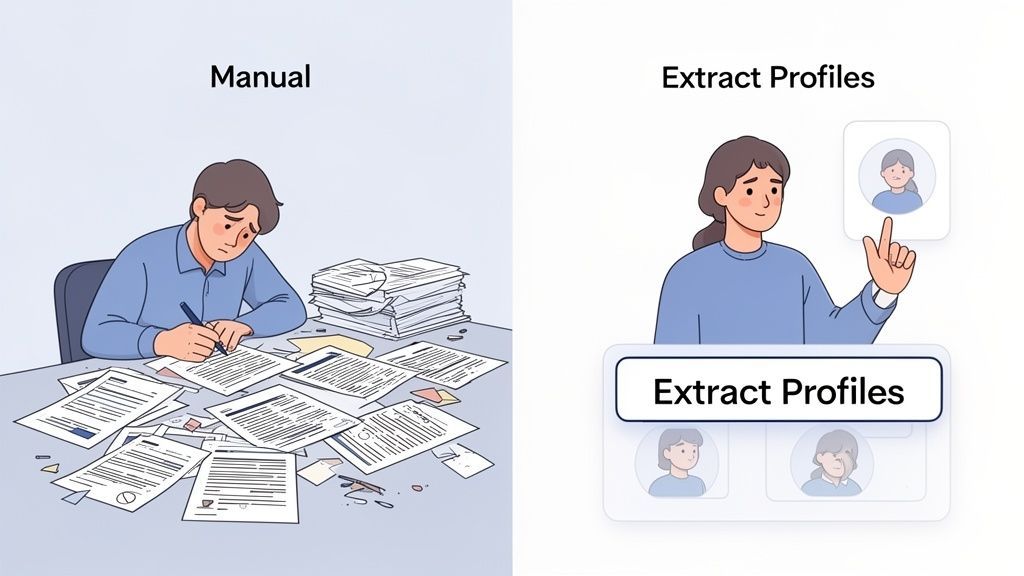
When you need to compile a list of company executives, you can either collect each field manually or use an extraction tool to structure the information already present on the page.
The Manual Method: A Recipe for Burnout
Manually trying to extract a company leadership list usually starts with finding the relevant leadership page, opening a spreadsheet, and copying each person’s details one field at a time.
You copy the name, paste it into the spreadsheet, return for the title, and then search for a public profile or contact detail. Each additional executive repeats the same cycle. This is slow, difficult to scale, and prone to errors such as mismatched names and titles, skipped profiles, or duplicated records.
The cost of manual data entry is not only the time spent copying information. It is also the time you are not spending verifying the data, researching the account, or preparing relevant outreach.
Manual extraction may be manageable for a company with three executives. It becomes far less practical when a company lists dozens of leaders across multiple pages.
The One-Click Workflow: How ProfileSpider Simplifies Everything
With ProfileSpider, you can open the company’s leadership or management page in Chrome and run the extension directly on that page.
Select “Extract Profiles”, and the extension analyzes the information available in the document and converts it into structured rows.
Depending on what the company publishes, the extracted fields may include names, job titles, company information, biography text, profile URLs, social links, visible email addresses, phone numbers, and source URLs.
The result still needs a quick review. Company pages can contain outdated biographies, duplicated profiles, generic company contact details, or information belonging to former executives. ProfileSpider reduces the manual extraction work, but the original source should remain your reference for verification.
The benefit is not only speed. It shifts your work from repetitive copying to higher-value tasks such as validating roles, qualifying executives, and preparing outreach. You can learn more about the extraction process in our complete ProfileSpider deep-dive.
Part 3: Turning Your Raw List into a Strategic Asset
Once you have extracted the initial leadership list, the next step is to review, enrich, and organize it. This is where a basic collection of names and titles becomes a more useful research, recruiting, or prospecting dataset.
Go Deeper with Profile Enrichment
A company leadership page may list only a name, title, and short biography. Additional professional information may be available on linked executive biographies, company pages, websites, or public professional profiles.
This is where Data Enrichment can help. If the leadership page links to individual executive biographies, company pages, websites, or public professional profiles, ProfileSpider can open selected URLs and extract additional information from those pages.
Depending on what is publicly available, enrichment may add biography details, locations, social links, website information, visible email addresses, or other professional data. It does not guarantee that every missing field will be found, and each URL opened for enrichment uses one credit.
How ProfileSpider Handles Common Page Layouts
Modern company websites often use interactive page elements. Whether information can be extracted depends on whether the website has already loaded it into the page document.
- Accordion Menus: Information already present in the page document may still be available for extraction even when it is visually collapsed.
- Tabbed Sections: When tab content is already loaded in the document, ProfileSpider may be able to extract profiles from sections that are not currently visible. Content loaded only after clicking a tab may need to be opened first.
- Infinite Scroll Pages: Scroll through the page before extracting so that additional profiles are loaded into the document. ProfileSpider can only extract information that the website has loaded into the page.
For pages with interactive content, review the page first and open any relevant tabs, filters, or sections before starting the extraction.
Organize and Segment Your Executive List on the Fly
A long, unorganized list is difficult to use. ProfileSpider allows you to organize saved profiles in the extension before exporting them.
You can:
- Tag Profiles: Apply custom tags such as “C-Suite,” “VP-Level,” or “Tier-1 Target” to categorize and filter executives.
- Add Notes: Record relevant context, such as a recent promotion, company acquisition, area of responsibility, or shared connection.
- Review and Merge Duplicates: When profiles collected from multiple pages contain matching information, ProfileSpider can help identify and merge duplicates within your saved profiles.
This in-browser organization reduces the amount of manual cleanup required after export.
Verify Executive Details Before Outreach
Extraction creates the initial dataset, but verification turns it into a dependable executive list. Before contacting anyone, compare the extracted information with the original company source and confirm that:
- The executive is still listed by the company.
- The job title belongs to that person rather than another profile on the page.
- The contact detail is person-specific rather than a general company address or switchboard number.
- The source URL and extraction date are retained for future checks.
- Press releases or biographies do not describe a former position.
This review is particularly important when identifying company owners or operating managers, because smaller businesses may use informal titles or list contact information at company level rather than person level.
Part 4: Putting Your C-Suite List into Action
Once you have built and reviewed your executive list, you can export it for use in a spreadsheet, CRM, Applicant Tracking System, or internal research workflow.
The process follows three main steps: extract the available information, enrich selected profiles where useful, and organize the results into a clean dataset.
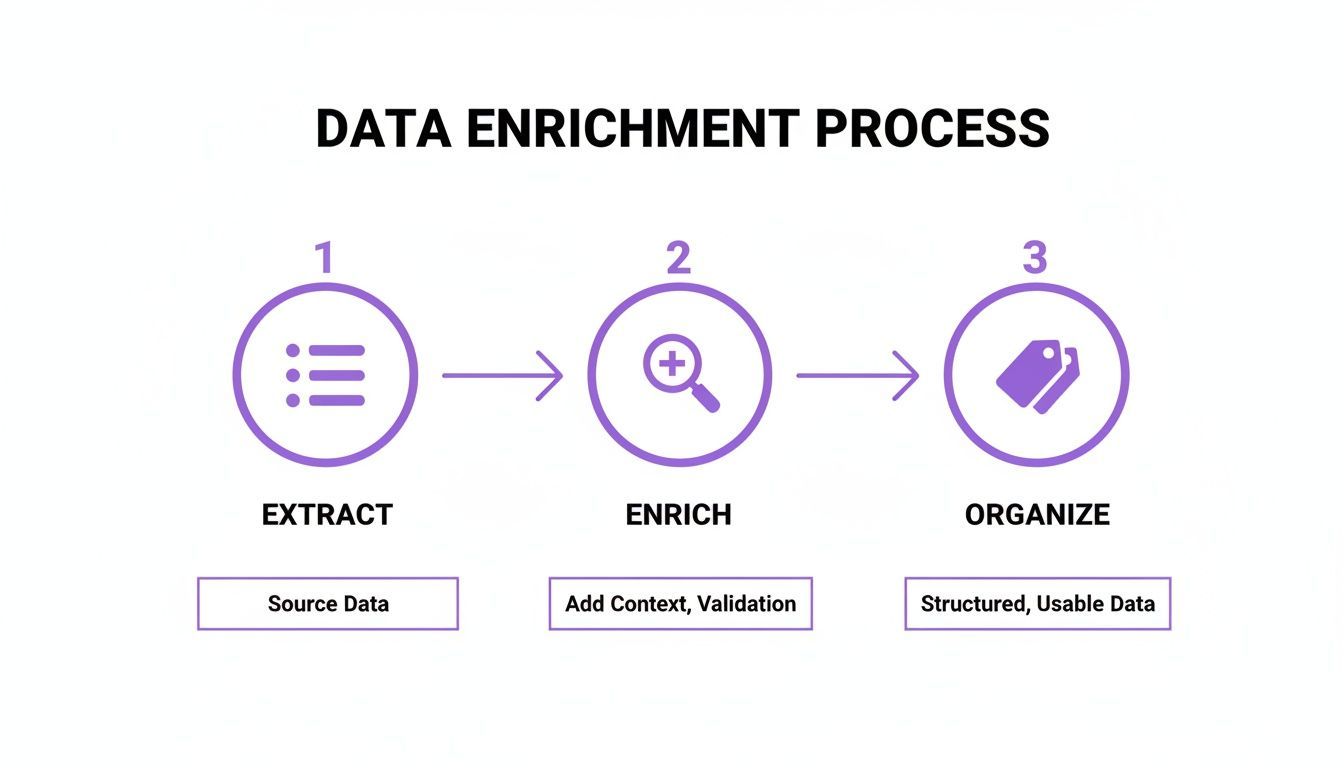
Following this process helps turn a raw page extraction into a more reliable and usable executive list.
Choosing the Right Export Format
The most suitable export format depends on where the data will be used next.
| Export Format | Best For | Example Use Case |
|---|---|---|
| CSV | Broad compatibility with CRMs, ATS platforms, and spreadsheets. | Importing a reviewed list of C-suite prospects into Salesforce or HubSpot. |
| Excel (.xlsx) | Manual review, cleanup, filtering, and internal sharing. | Reviewing names and titles before a recruiting or sales outreach campaign. |
| JSON | Technical workflows, custom scripts, and structured data processing. | Using executive profile data in a custom internal workflow or application. |
For many sales and recruiting workflows, CSV or Excel will be the most practical choice.
Customizing Columns for a Cleaner Import
Column mismatches can create unnecessary cleanup when moving data into another system. Before exporting from ProfileSpider, you can:
- Choose the export format: Export saved profiles as CSV, Excel, or JSON.
- Export all columns or only visible columns: Include only the fields needed for the next step in your workflow.
- Rename export headers: Set custom header labels once and reuse them across future exports from the same browser.
Customizing the export before downloading can reduce manual changes when importing data into a CRM, ATS, spreadsheet, or internal system.
Consistent column names and clearly separated person-level and company-level information help preserve data quality during import.
Quick Data Cleanup Before Final Import
Before importing the file into another system, open it in Excel or Google Sheets and perform a quick review.
Check for:
- Inconsistent Titles: Decide whether to preserve full titles or standardize variations such as “Chief Executive Officer” and “CEO.”
- Missing Information: Review empty fields and decide whether additional research or enrichment is worthwhile.
- Duplicate Profiles: Check whether the same executive was extracted from multiple company pages.
- General Contact Details: Keep company switchboard numbers and general email addresses separate from person-specific contact details.
- Special Characters: Remove formatting artifacts or unwanted HTML that may interfere with an import.
This final check helps ensure the exported list is suitable for its intended workflow.
Best Practices for Ethical and Compliant Data Collection
Building a company leadership list comes with responsibility. How you collect, verify, store, and use public professional information affects both data quality and privacy.
ProfileSpider uses a local-first storage model for saved profiles, lists, tags, and notes. This information is stored in the browser’s local IndexedDB rather than being saved as a lead database on ProfileSpider’s servers. Account, billing, credit, team, and AI extraction functions still use ProfileSpider’s backend services.
Because locally saved profile data is removed if you clear the browser’s data or uninstall the extension, export important lists regularly as CSV, Excel, or JSON.
Navigating Data Privacy Regulations
A local-first storage model gives you more direct control over saved profile data, but you are still responsible for how you collect and use it. Regulations such as GDPR and CCPA may apply depending on the people, locations, data, and purpose involved.
The safest approach is to collect only information that is publicly available, relevant to a legitimate professional purpose, and necessary for the intended workflow.
A person’s name, job title, company, and publicly listed business contact information may still be personal data under regulations such as GDPR. You should therefore consider your lawful basis, document the source, secure the information, and respect objections or opt-out requests.
When you extract a company leadership list, your responsibility continues into the outreach process.
- Keep It Relevant: Make sure your message relates directly to the person’s professional role or responsibilities.
- Collect Only What You Need: Avoid gathering unrelated personal information.
- Document the Source: Retain the page URL and, where useful, the date the information was collected.
- Offer a Clear Opt-Out: Make it easy for recipients to stop further communication.
- Be Transparent: Clearly identify yourself and explain the reason for contacting the person.
By combining a privacy-conscious workflow with careful verification and respectful outreach, you can build useful leadership lists while reducing unnecessary privacy and compliance risks. Our lead scraping compliance checklist provides additional practical guidance.