


This guide is your profilespider deepdive, a complete look at a modern, no-code solution that puts you firmly back in control. It’s built to deliver the professional data you need instantly and privately, so you can finally ditch frustrating, old-school data collection methods for good and focus on what matters: closing deals, hiring talent, and growing your business.
The Problem with Traditional Data Collection
For any recruiter, sales professional, or marketer, high-quality professional data is the fuel that runs the engine. The problem? Getting it has always been a painful cycle of manual copy-pasting, wrestling with complex code, or paying for expensive, inflexible data providers. These old methods create bottlenecks that slow everyone down.
All that manual effort inevitably leads to human error, wastes countless hours, and can even create data privacy risks. It’s a tedious grind that feels completely out of place in today's fast-paced world. Every minute spent on repetitive data entry is a minute you're not spending building relationships, closing deals, or finding that perfect candidate.
Breaking Free from Old, Broken Workflows
Let's be honest: for most business professionals, the traditional ways of gathering professional profiles are fundamentally broken. They usually fall into one of these frustrating categories:
- Manual Copy-Paste: This is the default for so many. You’re highlighting names, job titles, and contact details one by one. It’s painfully slow, riddled with mistakes, and doesn't scale when you need to build a meaningful list of prospects or candidates.
- Complex Scraping Tools: Many existing tools demand that you write code, understand a website's internal structure (like CSS selectors), or configure complicated "recipes" for every single site. That technical barrier immediately shuts out the very people who need the data most.
- Expensive Data Providers: Subscribing to huge databases gets pricey fast, and they often serve up generic, outdated information. You end up paying for a massive library when all you really needed was specific, real-time data from a handful of websites.
These challenges scream for a new way of doing things. This infographic drives the point home, comparing a modern, one-click tool against outdated methods on key metrics like processing speed and data accuracy.
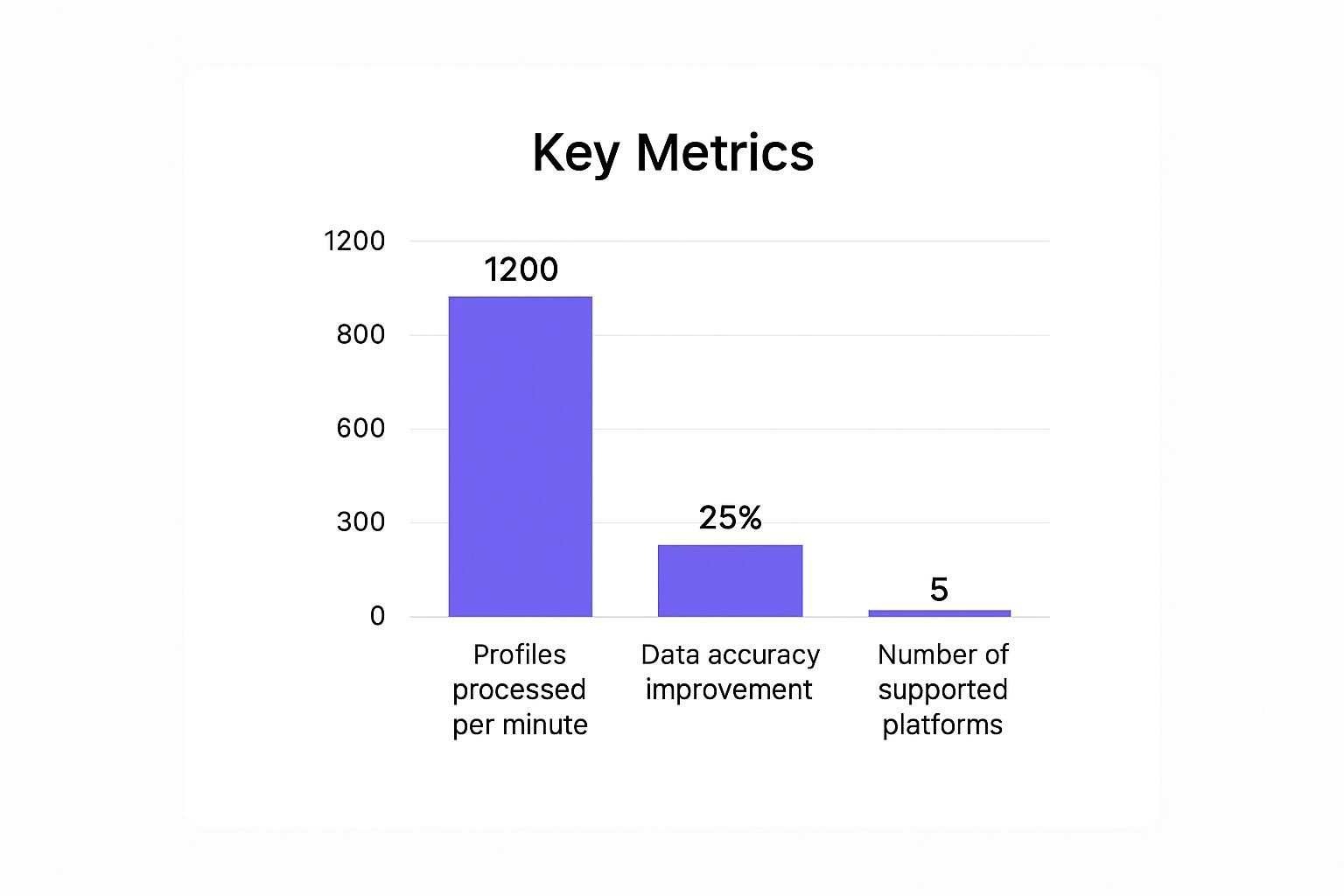
As you can see, the jump in efficiency and reliability is massive. It shows the immediate, tangible impact you get from stepping away from manual collection.
To put the strategic shift into perspective, let's compare the old grind with a modern, no-code approach.
Old Methods vs. The ProfileSpider Approach
This table breaks down the core differences between outdated data collection techniques and a modern, AI-driven tool like ProfileSpider. It’s not just about speed; it’s about a smarter, safer, and more accessible workflow for everyone on the team.
| Method | Effort Level | Technical Skill | Privacy Risk | Speed |
|---|---|---|---|---|
| Manual Copy-Paste | Very High | None | Low (but high error rate) | Extremely Slow |
| Custom Scripts (Coding) | High | Advanced (coding required) | High (if not managed well) | Fast (once built) |
| Legacy Scrapers | Medium | Intermediate | Medium | Moderate |
| ProfileSpider | Very Low | None | Very Low (private) | Instant |
The takeaway is clear: ProfileSpider was designed from the ground up to eliminate the friction, technical barriers, and risks that have plagued professional data gathering for years.
A Modern, No-Code Solution for Professionals
ProfileSpider represents a fundamental shift in how professionals gather intelligence. It isn't just another scraper—it's a one-click workflow designed to make all those old pain points disappear.
At its core, ProfileSpider is built on a "one-click" philosophy. The goal is to make sophisticated data extraction accessible to everyone, regardless of their technical skill. You find the profiles you need, and the AI does the rest.
This simple but powerful concept is what this profilespider deepdive is all about. It’s an AI-powered solution that delivers structured data instantly and privately, giving you back your most valuable asset: your time. Forget the manual grind; it's time for a smarter way to work.
What Is ProfileSpider and How Does It Work?
Picture a smart assistant who can scan any webpage and, in a flash, hand you a perfectly organized list of professional contacts. That’s ProfileSpider. It’s a no-code browser extension built for recruiters, sales teams, and marketers who need clean, accurate data without the technical headaches.
The tool completely demystifies profile extraction. Forget about wrestling with complex code or tweaking settings for every single website you visit. ProfileSpider is built on a simple "one-click" philosophy, making data gathering genuinely effortless.
The AI Engine: Your Virtual Researcher
Think of ProfileSpider’s AI engine as a highly trained researcher. The moment you land on a webpage, this AI scans the entire page structure—just like a person would, but thousands of times faster. It’s been trained to spot the specific patterns and markers that identify professional information.
This is a world away from traditional scrapers that force you to manually point them to the right data fields. ProfileSpider’s AI actually understands the context of what it’s seeing.
It knows the difference between:
- A person's name in a headline versus a company name in the footer.
- A job title listed under a profile picture versus a random piece of text.
- Contact details like an email or phone number. If you specifically want to learn how to find someone’s email from LinkedIn, we cover that workflow in detail.
- Social media links, personal websites, and company URLs.
This intelligent detection means you get clean, structured data right out of the gate, no manual cleanup required. The AI automatically finds the important details and organizes them for you.
The core idea is simple: you find the people, and ProfileSpider handles the data. It’s an AI profile extraction tool that adapts to any website, from a LinkedIn search result page to a corporate "About Us" page, with zero setup required. If you want a practical walkthrough for this exact use case, read our guide on how to extract employee lists from company websites step by step.
This smart, no-code approach saves hours of tedious work. Instead of spending your day copying and pasting, you can get back to what matters: using the data to build relationships, find candidates, or close deals.
A Simple One-Click Workflow in Action
The ProfileSpider experience is designed to be as straightforward as possible, removing the usual friction of data collection. This deep dive into ProfileSpider wouldn't be complete without walking through how it actually works.
Let's imagine a recruiter needs to build a list of potential candidates from a company's team page. The traditional method would involve hours of manual copy-pasting. Here’s how ProfileSpider turns that into a one-click task.
The Old Way:
- Open the company's team page.
- Manually copy the name, title, and social links for each person.
- Paste each piece of information into a spreadsheet, one by one.
- Repeat for every person on the page, hoping you don’t make typos.
The ProfileSpider Way:
- Navigate to the Page: Browse to the company's "Our Team" or "Leadership" page.
- Click the Extension: Open the ProfileSpider extension and click the "Save profiles" button.
- Get Instant Results: Right away, the AI analyzes the page, identifies every single profile, and extracts key info like names, job titles, and contact details.
The structured data appears instantly in the extension's interface, ready to be organized into lists, tagged, or exported. It works just as smoothly on a list of conference speakers, a directory of industry experts, or a search result page on a social network. You can explore our guide on instant data scraper techniques to see how this compares to older, more complex methods.
This workflow turns a once-complex task into a simple, repeatable action that fits perfectly into any professional's daily routine. It makes advanced data extraction accessible to everyone, not just the tech-savvy.
A Deepdive into ProfileSpider's Core Features
To truly understand what ProfileSpider can do, we need to look under the hood at its core features. Each one was built to solve a specific, nagging problem for busy professionals. Think of it as turning hours of frustrating manual work into a single, satisfying click.
The goal isn't just grabbing data—it's about making that data instantly actionable. Let's break down what makes ProfileSpider tick and see how these features translate into real-world business value.
One-Click Universal Extraction
The standout feature is ProfileSpider’s universal, AI-powered extraction engine. It's engineered to work on any website you throw at it, with zero setup or configuration on your part.
Think about all the different places you find valuable professional profiles: LinkedIn, company "About Us" pages, conference speaker lists, online directories—the list goes on. Traditional scrapers would force you to create a unique "recipe" or write custom code for every single site. ProfileSpider eliminates that headache.
Its AI scans the page structure in real-time, figuring out what's what, no matter how the information is laid out. This means you can:
- Extract a single profile from a detailed bio page.
- Grab multiple profiles at once from a search results page or team directory.
- Run batch extractions to build a large dataset in minutes, not hours.
For a sales professional, this is a game-changer. They can land on a company's team page, click once, and instantly have a clean list of key contacts. This simple action saves hours of mind-numbing data entry and ensures the information is accurate. To see how ProfileSpider's capabilities stack up in the broader market, it's worth checking out reviews of the best email finder tools.
Your Data Stays Yours with Local Storage
In a world where data privacy is a necessity, ProfileSpider takes a firm "local-first" approach. Any profile data you extract is stored directly in your browser's IndexedDB—a secure storage space right on your own computer.
This is a massive difference from cloud-based tools that send your data to their servers for processing. With ProfileSpider, your data never leaves your machine unless you explicitly choose to export it.
Your data is your property. ProfileSpider operates on a simple principle: you should have total control over the information you collect. Nothing is sent to external servers, period. This keeps your work private, secure, and helps you stay compliant.
This local-first model gives you powerful advantages:
- Complete Privacy & Data Control: By keeping everything on your device, you eliminate the risk of your data being exposed in a third-party breach.
- GDPR Compliant: You maintain full ownership and control, a cornerstone of meeting standards like GDPR.
- Offline Access: Since the data lives locally, you can access and manage your saved profiles even without an internet connection.
This commitment to privacy means you can gather professional data with confidence, knowing you are in complete control.
Smart Organization & Management
Extracting data is just step one. The real value comes from organizing it effectively. ProfileSpider includes a powerful set of organizational tools to help you manage your extracted profiles without the chaos of a messy spreadsheet.
You can create custom lists to group contacts by project, campaign, or any other category that fits your workflow. For instance, a recruiter might have separate lists for "Senior Software Engineers" and "Product Managers," while a marketer could create lists for "Tech Influencers" and "Podcast Hosts."
For even more precision, you can add custom tags to each profile. This enables advanced searching and filtering. Need to find everyone you tagged with "Follow-Up Q3," "Attended_Webinar," or "Tier-1_Prospect"? It's instant.
Professional Export Options for Any Workflow
Your valuable data shouldn't be trapped in a single tool. ProfileSpider makes it simple to move your extracted profiles into the other systems you rely on, thanks to flexible, one-click export options.
Whether you're pushing leads into a CRM, importing candidates into an Applicant Tracking System (ATS), or analyzing data in a spreadsheet, ProfileSpider has you covered. You can export your data in several standard formats:
- CSV: The universal format for spreadsheets, easily imported into most CRMs and ATS platforms.
- JSON: A structured format ideal for developers or integration with custom applications.
- Excel: A native Excel file for anyone who works within the Microsoft ecosystem.
You also get full control over what gets exported. You can select specific fields to include, ensuring the output file is a perfect match for any system you're sending it to. This seamless integration is critical for modern business workflows and a key benefit for any professional looking for efficiency.
Real-World Use Cases: ProfileSpider in Action
Features are one thing, but seeing how a tool solves real-world problems is what truly matters. Let's move from theory to practice and look at how ProfileSpider helps professionals who rely on high-quality data every day.
We’ve put together a few practical playbooks for common business scenarios. For each one, we’ll contrast the slow, manual "before" state with the fast, efficient "after" state using ProfileSpider.
For Recruiters: Build a Talent Pipeline in Minutes
The foundation of a successful recruiter is a deep, organized talent pipeline. But building one manually is a time-consuming grind of sifting through profiles, copying and pasting info into a massive spreadsheet, and trying to avoid errors.
Goal: Find and organize 50 Senior Software Developers in a specific city.
The Old Way (Manual Method):
- Run a search on a professional networking site like LinkedIn.
- Open the top 50 profiles, each in a new browser tab.
- Manually copy and paste the name, title, company, and location into a spreadsheet.
- Hunt for contact info or a personal website link.
- Repeat 50 times, losing focus and introducing typos along the way.
Estimated Time: 2-3 hours of tedious work.
The New Way (ProfileSpider's One-Click Workflow):
- Run the same search on the networking site.
- On the results page, open the ProfileSpider extension and click "Save profiles."
- The AI instantly extracts all visible profiles, capturing names, titles, and locations.
- Create a new list—like "Senior SWE Candidates - [City Name]"—and add them all.
- Export the entire list to a clean CSV, ready for your ATS.
Estimated Time: Under 5 minutes.
The difference is night and day. ProfileSpider transforms a multi-hour data entry marathon into a couple of clicks. This frees up recruiters to spend their time engaging with top candidates instead of wrestling with spreadsheets.
For Sales Teams: Accelerate Prospect Identification
In sales, speed is critical. The faster you can identify and connect with qualified leads, the better your chances of hitting your targets. Manually scraping prospect info from company websites or social media is a major bottleneck that slows down the entire sales cycle.
Goal: Identify all key decision-makers from a target company's "About Us" page for an outreach sequence.
The Old Way (Manual Method):
- Go to the target company’s team page.
- Copy each executive's name and title into your CRM one by one.
- Search for each person individually to find their LinkedIn profile or other contact details.
- Switch back to your CRM and update each record manually.
Estimated Time: 30-45 minutes per company.
The New Way (ProfileSpider's One-Click Workflow):
- Go to the company's team page.
- Click the ProfileSpider icon, then hit "Save profiles."
- Instantly, all profiles are captured—names, titles, and any available social links.
- Create a list for the account (e.g., "Target Account - Acme Corp").
- Export the list to a CSV and import it directly into your CRM.
Estimated Time: Less than 2 minutes per company.
This simple workflow dramatically shrinks the research phase of the sales process. Teams can build hyper-targeted prospect lists from dozens of sources in a fraction of the time, leading to more conversations and a healthier pipeline. For more ideas on structuring these efforts, check out our guide on lead generation best practices.
For Marketers: Build Influencer Databases with Ease
Marketers building an influencer program know the struggle of finding the right partners and keeping outreach campaigns organized. It often results in a chaotic jumble of bookmarks, random notes, and disconnected spreadsheets.
Goal: Build a database of 100 micro-influencers in a specific niche.
The Old Way (Manual Method):
- Scour hashtags and keywords on platforms like Instagram, Twitter, or TikTok.
- Manually review each profile, copying the profile URL, name, and follower count into a spreadsheet.
- Go on a scavenger hunt for a contact email or a link to their blog.
- Attempt to categorize them by niche or audience size without creating a mess.
Estimated Time: A grueling 4-6 hours.
The New Way (ProfileSpider's One-Click Workflow):
- Find a blog post, listicle, or social media page that already features influencers in your niche.
- Use ProfileSpider to extract every single profile from the page with one click.
- Create lists like "Tech Influencers" or "Lifestyle Bloggers" to keep everyone neatly sorted.
- Use tags like
#outreach_sentor#followup_neededto track your campaign's progress. - When you’re ready, export your clean, organized list to your outreach tool.
Estimated Time: Under 30 minutes.
With ProfileSpider, marketers can systematically build and manage influencer databases. What was once a messy, time-consuming chore becomes a streamlined, effective workflow that drives real results.
Your Data, Your Control: Understanding Local-First Privacy
In an era of data breaches and privacy concerns, how a tool handles your data isn't just a feature—it's everything. This is where ProfileSpider’s biggest differentiator shines: its absolute commitment to your privacy through a local-first storage model. It's a critical part of this deepdive because it directly impacts your security and compliance.
Most online tools operate on a cloud-based model. When you extract data, it's sent to their servers for processing and storage. This creates a potential point of failure. If their servers are breached, your valuable—and often sensitive—professional data is exposed.

What "Local-First" Really Means for You
ProfileSpider completely rejects the cloud-based approach. Instead of sending your data to a remote server, it uses IndexedDB, a powerful storage system built directly into your web browser. Think of it as a secure mini-database that lives exclusively on your computer.
When you save profiles, the information is written directly into this local database. It never travels across the internet to an external server. You are the sole owner and custodian of the information you collect.
This model delivers powerful advantages:
- Complete Data Ownership: Your extracted lists of candidates, leads, or contacts belong to you and you alone. No one else has access.
- Enhanced Security: By removing the central server, the risk of your data being compromised in a large-scale breach is virtually eliminated.
- GDPR and CCPA Compliance: Keeping personal data under your direct control is a cornerstone of major privacy regulations. This approach helps you stay compliant when handling information from individuals in protected regions.
The principle is simple: your data should never be held hostage. With ProfileSpider, you have the freedom to manage, export, or delete your information at any time, without ever asking for permission.
The Problem with Cloud-Based Scrapers
Contrast this secure method with the risks of many cloud-based scraping tools. When your data is stored on third-party servers, you're placing immense trust in that company's security infrastructure. You're also often bound by terms of service that might grant them rights to access or analyze your collected data.
This introduces a layer of risk that is completely unnecessary, especially for professionals handling sensitive personal information. A local-first approach removes that entire layer of vulnerability, putting control firmly back in your hands. For anyone asking "is website scraping legal", using a privacy-first tool provides a much stronger foundation for ethical and compliant practices.
Why ProfileSpider is the Modern Choice for Professionals
Throughout this guide, we've seen how clunky, slow, and error-prone the old ways of gathering professional data can be. ProfileSpider wasn't built to be just another tool; it was designed from the ground up to solve these exact problems. It’s the definitive no-code alternative for any professional who needs reliable data without getting bogged down in technical details.
The most immediate benefit? You get your time back. All those hours spent manually copy-pasting from profiles vanish with a single click. For recruiters, sales pros, and marketers, that reclaimed time is invaluable. It’s more time to focus on what actually drives business value—building relationships, talking to candidates, and closing deals.
A Tool Built for Business Users, Not Developers
What truly makes ProfileSpider stand out is its laser focus on professionals who aren't developers. The AI engine handles the complex work behind the scenes, and the local-first privacy model means your data stays your data, right on your machine. That combination of power, simplicity, and security is why it’s such a dependable choice. If you're looking at the wider market, checking out roundups of the best AI tools for recruiters can give you a great sense of the landscape and highlight just how unique ProfileSpider's approach really is.
The impact is real and immediate, no matter your role:
- Recruiters: Build clean, accurate talent pipelines in a fraction of the time and keep candidate info perfectly organized.
- Sales Teams: Find and research prospects faster than ever before, dramatically speeding up lead generation. For a broader look at how intelligent automation fits into modern prospecting workflows, read our guide to AI lead sourcing.
- Marketers: Quickly pull together lists of influencers, community leaders, or potential collaborators.
ProfileSpider turns data collection from a productivity-killing bottleneck into a simple, efficient task that runs in the background. It gives you the power to build the high-quality datasets you need to succeed, without ever compromising on privacy.
When you boil it all down, this profilespider deepdive reveals a tool that’s all about giving you more efficiency and more control. It's time to stop fighting with outdated, manual methods. Install the browser extension and experience the power of one-click profile extraction for yourself.
Frequently Asked Questions
Jumping into a new tool always comes with a few questions. Let's tackle some of the most common ones we hear, covering everything from website compatibility to data limits and legal compliance.
How does ProfileSpider handle different website layouts?
This is where the AI-powered engine shines. Instead of relying on rigid, pre-built templates for specific sites, ProfileSpider uses a universal AI that analyzes a webpage’s structure in real time.
This means it can intelligently identify and extract profile information whether it's on a standardized platform like LinkedIn or a custom-built corporate "About Us" page. The AI is trained to recognize common patterns that signal professional data—like names, job titles, and contact details—and extracts them regardless of the site's design. This adaptability is the secret behind its "works anywhere" promise.
This is especially useful on dynamic websites where profiles or listings load after scrolling, clicking, or other JavaScript interactions. If you want a more practical walkthrough of that use case, read our guide on how to scrape a dynamic website with a Chrome extension. For a broader introduction to web scraping with Chrome, we also cover the tools and workflows that make this approach effective.
What are the limits on data extraction?
The number of profiles you can extract from a single page is tied to your plan. The Free plan allows up to 10 profiles per page, which is great for getting started. Paid plans scale up to 200 profiles per page for power users.
It's important to note that our credit system is based on pages processed, not profiles saved. You use one credit to process one page, and that single page could yield anywhere from one to two hundred profiles. This makes it incredibly cost-effective for building large lists from directories or search result pages.
Key Takeaway: The limit is per-page, not a daily or monthly cap on the total profiles you can save. You can process as many pages as your credit balance allows.
Is using ProfileSpider legal and GDPR compliant?
ProfileSpider was built with privacy and compliance as a top priority. The tool is designed to extract publicly available information from websites, a practice that is generally considered legal. For a deeper dive, it's always a good idea to review guidelines on ethical data collection.
Our local-first storage model is a major asset for GDPR compliance. Since all extracted data is stored directly in your computer's browser, you maintain complete control and ownership. No personal data ever touches ProfileSpider's servers. This puts you in the driver's seat for meeting your own compliance obligations, especially when handling data of EU citizens.
Can I really use ProfileSpider on any website?
Yes, that's the goal. ProfileSpider is designed to be universally compatible. Its AI-powered extraction works on virtually any website that displays professional profile information. This includes a massive range of sites:
- Social Networks: LinkedIn, Twitter, Facebook, GitHub.
- Creative Platforms: Behance, Dribbble.
- Corporate Websites: Team pages, leadership directories, and more.
- Event and Conference Sites: Speaker lists and attendee directories.
- Online Communities and Forums.
This flexibility makes it the go-to tool for anyone doing a profilespider deepdive for lead generation, research, or recruiting across the web. It adapts to different site structures without requiring you to configure a thing.