

If your LinkedIn scraper suddenly stopped working, you're not alone. It's a frustrating but common problem for recruiters, sales teams, and marketers who rely on it for lead generation. The issue almost always points to one of two things: LinkedIn's advanced anti-scraping measures or a simple login session issue. This isn't a random technical glitch; it's a direct response to the platform detecting automated activity.
Why Your LinkedIn Scraper Is Suddenly Failing
One minute you're efficiently building lead lists, and the next, you're hit with errors, empty results, or—worst of all—a warning from LinkedIn. When your trusted scraper fails, it feels like a critical workflow has been completely cut off.
This doesn't happen by accident. LinkedIn invests heavily in protecting its user data, deploying sophisticated systems to tell the difference between a real person browsing and an automated script running in the background. When your scraper stops working, it has likely triggered one of these defense mechanisms.
The Cat-and-Mouse Game of Data Extraction
Scraping LinkedIn is a constant tug-of-war. The platform frequently updates its website structure—the very code your scraper relies on to find names, titles, and company information. A minor, invisible change to the site's layout can instantly break a tool that isn’t built to adapt.
Beyond that, LinkedIn actively monitors user behavior for signs of automation. Actions that seem harmless to you can raise red flags if they happen too quickly or too often.
- Excessive Profile Views: Visiting hundreds of profiles in an hour is a dead giveaway. No human does that, and it's a primary trigger for restrictions.
- Repetitive Search Patterns: Running the exact same type of search over and over again can signal bot-like activity to LinkedIn's algorithms.
- Flagged IP Address: If your IP address has been associated with high-volume scraping in the past, you might be automatically blocked or stuck in a loop of CAPTCHA challenges.
This visual decision tree is a great way to quickly diagnose the most common failure points.
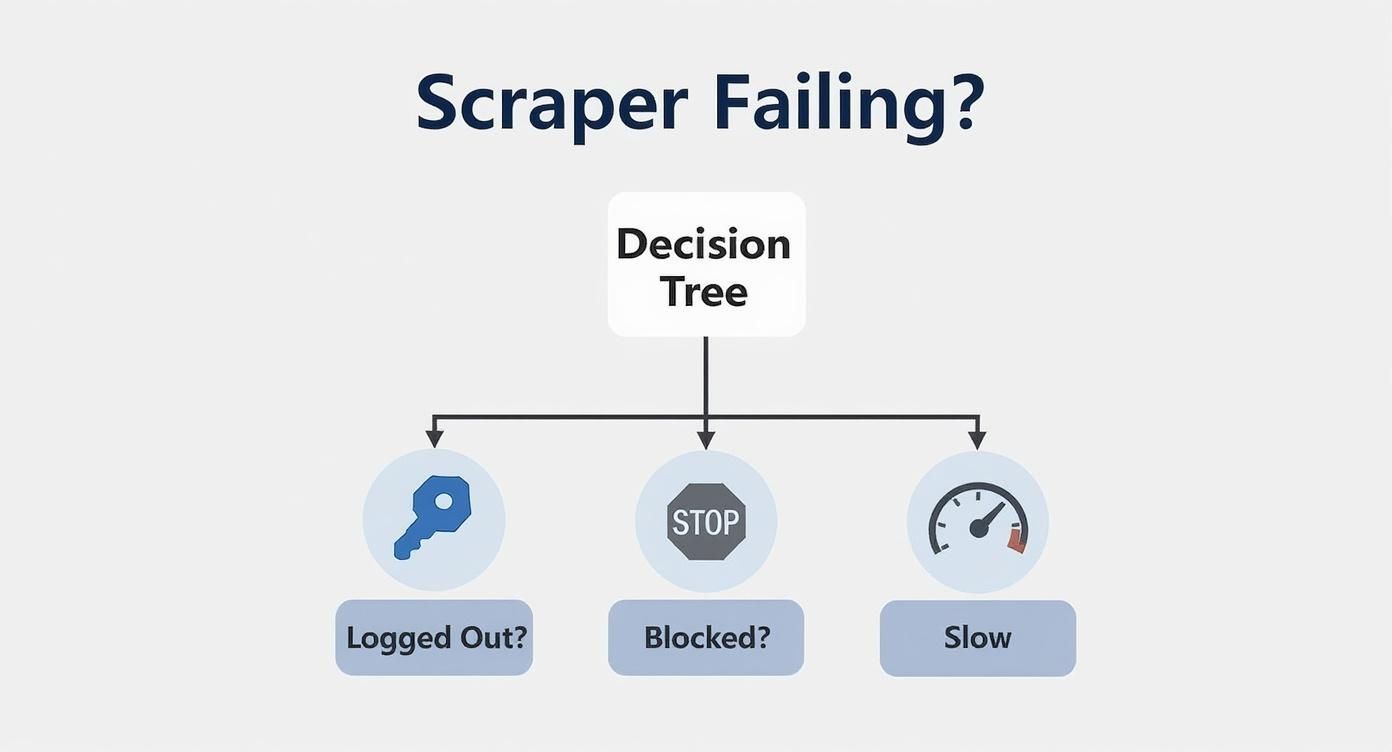
As the chart shows, troubleshooting often starts with the simplest check—confirming you're still logged in—before diving into more complex issues like platform blocks.
If you're running into issues, this quick diagnostic table can help you pinpoint the problem based on the symptoms you're seeing.
Quick Diagnostic Checklist for Failing Scrapers
| Symptom | Most Likely Cause | Immediate Action to Take |
|---|---|---|
| Scraper returns no data at all | Logged Out or Invalid Session | Log back into LinkedIn in a new tab, then restart the scraper. |
| Getting constant CAPTCHA challenges | Rate Limiting or Flagged IP | Stop all scraping, wait an hour, and consider using a proxy. |
| Error messages mention "page structure" | LinkedIn Site Update | Check if your scraping tool has a new version available and update it. |
| Receiving a direct warning from LinkedIn | Aggressive Scraping Detected | Immediately stop all automation for 24-48 hours to avoid account suspension. |
This checklist isn't exhaustive, but it covers the most frequent culprits professionals encounter. Following these initial steps can often get your lead generation back up and running without much fuss.
The Digital Footprint Problem
Every action you take online leaves a digital footprint. Many traditional scraping tools, especially those running from a central server, leave a massive, obvious one. They fire off requests from data center IP addresses that LinkedIn can easily identify and block. This is a huge reason why so many scrapers fail so often.
The core issue isn't just what data you're collecting, but how you're collecting it. An aggressive, server-based scraper is easy for LinkedIn to spot and shut down, putting your account at risk.
This is where modern, no-code tools like ProfileSpider are engineered to be smarter. By operating as a Chrome extension, it works directly inside your browser and uses your existing logged-in session. This approach mimics natural, human-like browsing because all the data extraction happens locally on your machine—not from some remote server. This massively reduces the risk of detection and helps keep your account safe.
Instead of hammering LinkedIn's servers with thousands of aggressive requests, ProfileSpider just processes the page you're already looking at. To LinkedIn, its activity is indistinguishable from your own manual browsing. This privacy-first, local-processing model is exactly why it remains a reliable tool for recruiters and sales pros who can't afford downtime or account suspension.
So, Why Did My LinkedIn Scraper Break?
To fix a broken LinkedIn scraper, you first have to play detective. Think of LinkedIn as a high-security building; your scraper is trying to get in and out with valuable information, but the platform has a sophisticated security team on constant alert. When your tool suddenly stops working, it means one of those security measures has tripped an alarm.
Let's walk through the most common reasons your lead generation has ground to a halt.
The Constant Login Problem (Session Invalidation)
Ever feel like your scraper is constantly asking you to log back into LinkedIn? That’s session invalidation in action.
Your login session is like a temporary keycard that proves who you are. If LinkedIn's system detects unusual activity—like your tool zipping through hundreds of profiles in just a few minutes—it might revoke that keycard. This forces a new login to verify you're a real human and not a bot.
For sales pros who rely on a steady flow of leads, having to re-authenticate every hour is a massive productivity killer.
The Dreaded CAPTCHA Walls
CAPTCHAs—those annoying "I'm not a robot" puzzles—are LinkedIn's front-line soldiers against bots. When they pop up, it’s a clear sign that your scraper's behavior has been flagged as non-human.
What usually triggers a CAPTCHA?
- Scraping too fast: Firing off requests way quicker than any human could ever click.
- Using a flagged IP address: Your internet connection might be on a watchlist if it's from a data center or has a history of bot-like activity.
- Repetitive actions: Running the exact same search query over and over again without any variation.
Once you're caught in a CAPTCHA loop, your scraper is basically useless until you can prove you’re not a robot, bringing your data collection to a dead stop.
IP Address Blocking and Rate Limiting
If CAPTCHAs are a warning shot, an IP block is a full lockout. This is the big one. It happens when LinkedIn decides your IP address is a source of malicious or extremely high-volume bot activity. The platform essentially blacklists your connection, cutting off access entirely.
A little less severe is rate limiting, which is like a speed limit for your account. LinkedIn only allows a certain number of profile views and actions within a given time. Exceed this invisible limit, and you could face a temporary restriction or even an account warning. It's LinkedIn's way of saying, "Slow down."
Key Takeaway: For most recruiters and marketers, the problem isn't the tool itself but the method. Traditional scrapers running from a server are incredibly easy for LinkedIn to spot. A tool that works locally from your own browser, like ProfileSpider, is far less likely to trigger these defenses because its activity looks just like your own.
The Silent Killer: Website Code Changes
Sometimes, your scraper fails for a reason that's completely invisible to you. LinkedIn's developers are constantly tweaking the website's underlying code (the HTML structure). A scraper is programmed to find data in specific places—like looking for a job title in a box labeled "current-position."
But what happens if LinkedIn changes that label to "job-title"? The scraper gets lost. It's like trying to find a book in a library where all the shelves were rearranged overnight. Unless your tool's developers push an update immediately, it’s rendered completely broken by a simple code change.
LinkedIn's anti-scraping infrastructure is incredibly robust, and for good reason. The platform handles around 310 million monthly active users and sees up to 1.77 billion site visits per month, making it a prime target. To protect this massive dataset, LinkedIn uses layers of detection systems. Research shows that these defenses are so effective that most generic scraping tools fail within hours of being used. You can learn more about the evolution of LinkedIn's anti-scraping technology to get a better sense of what you're up against.
Practical Steps to Get Your Scraper Working Again
When your LinkedIn scraper suddenly stops working, it’s tempting to think the worst. But more often than not, the fix is simpler than you'd expect. The key is to start with the most common culprits before jumping to more complex solutions. Let's walk through a troubleshooting workflow that will get your lead generation pipeline flowing again without putting your LinkedIn account on the line.
We'll begin with some basic browser and session hygiene. You’d be surprised how many "scraper errors" are really just your browser needing a quick refresh. These steps are quick, easy, and should always be your first move.
Start with the Basics: Browser and Session Health
Sometimes, the problem isn't your scraper at all—it's a stale session or a cluttered browser cache. Your browser stores temporary data (cache) and login details (cookies) to make things run faster, but this data can get corrupted or outdated over time.
Before you do anything else, try these three things:
- Log Out and Log Back In. A true classic. Manually log out of your LinkedIn account, close the browser tab completely, and then sign back in. This forces a fresh, authenticated session.
- Clear Your Browser Cache and Cookies. This is the web's version of "turn it off and on again," and for good reason. It forces your browser to grab the very latest version of LinkedIn’s site and establishes a clean session, wiping out many login-related glitches.
- Check Your Extension Permissions. If you’re using a browser extension, make sure it still has permission to read data on linkedin.com. A sneaky browser update can sometimes reset these permissions without telling you.
These initial steps take just a few minutes but solve a huge percentage of common scraper failures. If you’re still stuck, it’s time to look at how you’re scraping.
Slow Down and Scrape Like a Human
If the basic fixes didn't do the trick, your scraper's activity has likely been flagged as bot-like. LinkedIn is smart, and rapid-fire, predictable scraping is a dead giveaway. The secret to long-term success is making your automation blend in.
That means slowing down. Way down.
Instead of trying to pull thousands of profiles in one go, think more like a human. A new account, for example, should be "warmed up" with some manual activity—like a few posts, send some connection requests, and just browse around a bit—before you even think about automating.
For a deeper look at staying under the radar while collecting data safely, read our guide on how to avoid getting blocked when scraping leads.
The most reliable scraping strategy is one that flies under the radar. Aggressive, high-speed extraction is a surefire way to get blocked. A slower, more randomized approach will always yield better, more consistent results over time.
When you're up against sophisticated anti-bot systems, it pays to understand advanced strategies for bypassing firewalls and access restrictions. This goes beyond just slowing down; it's about diversifying your entire digital footprint.
Use Proxies to Avoid IP Blocking
Are you constantly running into CAPTCHAs or outright blocks? Your IP address has probably been put on a naughty list. This is where a proxy comes in. It acts as a middleman, masking your real IP and making your requests look like they're coming from somewhere else entirely.
- Residential Proxies: These are the gold standard. They use IP addresses from real internet service providers, making your activity look like it's coming from a regular home user.
- Rotating Proxies: These services are even better, as they automatically swap out your IP address after a certain number of requests or a set amount of time.
Using a rotating residential proxy is one of the single most effective ways to avoid IP-based blocks. It makes it incredibly difficult for LinkedIn to trace all that activity back to a single source.
How ProfileSpider Simplifies Troubleshooting
For those using a modern, no-code tool like ProfileSpider, a lot of this headache is handled for you. Since it runs locally right inside your Chrome browser, it naturally mimics your real activity and uses your existing, logged-in session. This design sidesteps the most common red flags that server-based scrapers trigger.
Still, a healthy browser setup is crucial. To keep things running smoothly:
- Keep Your Browser Updated: ProfileSpider needs a modern browser to work its magic—think Chrome version 114 or newer.
- Enable Permissions: When you install the extension, make sure you grant it permission to access website data. This is a must.
- Don't Worry About Wasted Credits: One of ProfileSpider's best features is how it handles credits. Credits are only used on successful extractions. If a page gets blocked or something goes wrong, you don't lose a thing. It makes troubleshooting completely risk-free.
If you’ve tried all of this and are still hitting a wall, it could point to a bigger issue. For a deeper dive, check out our comprehensive guide on what to do when your data scraper is not working, which covers a wider range of potential problems and solutions.
Why Traditional Scraping Methods Are Obsolete
If your LinkedIn scraper suddenly stops working, the problem is rarely a simple technical glitch. More often than not, it’s a sign of a much bigger issue: the old way of scraping data—using aggressive, high-volume bots hammering away from a server—is fundamentally broken. This isn’t just a temporary hiccup; it’s a permanent shift in how data extraction works.
For years, the playbook for sales and recruiting teams was pretty straightforward. You'd deploy a script, hit LinkedIn's servers with a barrage of requests, and grab as much data as you could before getting flagged. That brute-force approach is a relic. LinkedIn's detection algorithms have become incredibly sophisticated at spotting and neutralizing that kind of automation, rendering the old methods both ineffective and incredibly risky for your account.

The Diminishing Returns of Brute-Force Scraping
The whole financial model behind traditional LinkedIn scraping has been turned on its head. Tools that once promised thousands of leads for a low monthly fee now just deliver constant headaches. The time and money you burn trying to maintain fragile scripts, deal with account blocks, and juggle proxies simply isn't worth the data you get back.
The hidden costs really start to add up:
- Wasted Hours: Every hour your team spends troubleshooting a broken scraper is an hour they aren't selling or recruiting.
- Account Suspensions: One warning from LinkedIn can bring your lead generation to a dead stop. An actual suspension can be a disaster, cutting you off from your entire network.
- Unreliable Data: When a scraper fails mid-run, you're left holding a bag of incomplete or mangled lists, which poisons your outreach campaigns from the start.
The numbers just don't make sense anymore. Not long ago, it was possible to pull 2,500 or more leads a day for under $50 a month. But with LinkedIn's anti-bot measures constantly improving, those days are long gone. Many businesses are realizing that a legitimate tool like Sales Navigator offers a far better ROI than gambling with risky scrapers that lead to account lockouts.
A Smarter, Safer Approach to Data Extraction
The future of data gathering isn't about trying to outsmart LinkedIn with even more complicated scripts. It's about working smarter by staying within the platform’s natural limits. This is where modern, privacy-focused tools come in.
Instead of sending requests from a suspicious data center IP address, these tools work locally right inside your own browser. They leverage your existing login session and mimic your natural behavior, because the extraction is literally happening on your own machine. From LinkedIn's perspective, it looks just like you manually browsing profiles.
The core idea is to stop acting like a bot and start using technology that enhances your normal workflow. The goal is no longer high-volume, high-risk scraping—it's targeted, safe, and efficient data collection.
This shift from brute force to intelligent extraction marks a significant change in how professionals approach data collection. Let's break down the key differences.
Old Scraping Methods vs Modern No-Code Tools
The table below starkly contrasts the old, high-risk methods with the newer, smarter approach embodied by tools like ProfileSpider.
| Feature | Traditional Scrapers | Modern Tools (e.g., ProfileSpider) |
|---|---|---|
| Risk Level | High: Account suspension and IP blocks are common. | Low: Operates locally to mimic human behavior, reducing detection risk. |
| Data Quality | Inconsistent: Prone to errors from site changes and incomplete runs. | Reliable: Extracts data from the live page, ensuring accuracy. |
| Technical Skill | High: Often requires setup, coding, and proxy management. | None: One-click, no-code operation designed for any user. |
| Privacy | Poor: Data is often processed and stored on third-party servers. | Excellent: All data is stored locally in your browser for full control. |
As you can see, the game has changed. Tools like ProfileSpider are the new standard because they remove the technical headaches and account risks that made old scrapers obsolete. Rather than fighting against the platform, ProfileSpider works with it, transforming your browser into a powerful and safe extraction tool.
For professionals looking to build more resilient automation, it's worth exploring concepts like Robotic Process Automation (RPA), which focuses on mimicking human actions at the user-interface level. This is the same principle that makes modern browser-based scrapers so effective. The message is clear: the era of risky, brute-force scraping is over. It’s been replaced by a smarter, safer, and far more sustainable approach to lead generation.
How to Keep Your Data Extraction Running Smoothly
The best way to fix a "LinkedIn scraper not working" error is to never see one in the first place. Being proactive and smart about how you extract data is far more sustainable than constantly reacting to problems. When you adopt a few best practices, your process stays smooth and you protect the long-term health of your account.
Think of it like maintaining a car. You do the small, regular check-ups to avoid a massive breakdown on the highway. For data extraction, this means acting like a human, respecting the platform's limits, and using tools that were built with safety in mind.
Set Realistic Daily Limits
One of the quickest ways to get your account flagged is by being too aggressive. Let's be real: no recruiter, no matter how caffeinated, is manually viewing 1,000 profiles in a single hour. Setting sensible daily and hourly limits on your activity is probably the single most important preventive step you can take.
If you're just starting out or working with a newer account, start slow. A good rule of thumb is to stay well within the bounds of what a LinkedIn power user might do by hand. This simple approach helps you fly under the radar of automated systems that are specifically looking for impossibly high volumes of profile views and data requests.
Maintain a Healthy Account Status
Your LinkedIn account is an asset, and its health is directly tied to your scraping success. An account that only exists for automated extraction is a huge red flag to the platform. You absolutely have to mix in regular, manual engagement to build a trustworthy profile history.
So, what does that "healthy engagement" actually look like?
- Post Updates: Share an interesting article or a quick insight related to your industry.
- Interact with Content: Spend a few minutes liking and commenting on posts from people in your network.
- Send Manual Connection Requests: Don't automate everything. A genuine, personalized outreach message here and there is crucial.
- Respond to Messages: An active inbox tells LinkedIn that a real person is behind the screen.
All this activity creates a behavioral baseline. It makes your automated tasks look like a natural part of your workflow, not some robotic anomaly.
An account with zero manual engagement is like a digital ghost—it just looks suspicious. When you use LinkedIn for its intended purpose, you build a history of legitimate activity that provides cover for your data extraction work.
Use a Dedicated Browser Profile
Here’s a pro tip that can save you a ton of headaches: use a separate, clean browser profile just for your scraping activities. This neat trick isolates your scraping session's cookies, cache, and extensions from all your day-to-day browsing.
This separation does two things. First, it prevents other extensions from interfering with your tools. Second, it ensures your login session remains stable and dedicated to the task at hand. It’s a simple organizational step that solves a lot of those mysterious, intermittent errors before they even happen.
Why ProfileSpider Aligns with Best Practices
Modern tools are built with these principles in mind. ProfileSpider's architecture inherently encourages safer data extraction because it operates locally, right inside your browser. It doesn't use a cloud server to hammer LinkedIn with requests from a data center. Instead, it just processes the data you're already viewing, which makes its digital footprint nearly identical to your own manual browsing.
This local, one-click approach means you’re naturally working within safer boundaries. The platform's machine learning algorithms, which analyze everything from connection patterns to messaging frequency, are far less likely to flag activity that mirrors a real user. For example, research shows that accounts sending 30+ identical connection invites daily get flagged quickly, which is why a targeted, manual-like approach is so much better. You can actually explore detailed findings on their anti-scraping systems to see how deep this detection goes.
By choosing a tool that respects the platform's ecosystem and pairing it with smart, human-like usage patterns, you can build a reliable and sustainable lead generation engine. And remember, as you navigate the world of data collection, understanding the rules of the road is key. Our guide on whether website scraping is legal offers essential context for any professional.
Frequently Asked Questions About LinkedIn Scraping Errors
Even with the best tools, you’ll probably hit a snag at some point. It happens. When a "LinkedIn scraper not working" error pops up, it’s frustrating, especially when you're trying to build a prospect list on a deadline.
Let's walk through some of the most common questions and concerns that pop up for sales pros and recruiters.
Will I Get Banned for Using a LinkedIn Scraper?
This is the big one, and for good reason. The short answer? It all comes down to how you scrape.
If you’re using some aggressive, server-based tool that’s hammering LinkedIn with thousands of requests from a data center IP, your risk of getting flagged is pretty high. LinkedIn is built to spot and shut down that kind of brute-force activity.
But if you use a modern tool like ProfileSpider that runs locally in your own browser, the risk drops dramatically. Why? Because it’s designed to act like a human. It mimics your own manual browsing behavior, so your activity just blends in. As long as you keep your scraping to a reasonable, human-like pace, you should be fine.
Why Does My Scraper Only Work Sometimes?
This is easily the most frustrating issue. One minute it’s pulling data perfectly, the next it’s dead in the water. This kind of on-again, off-again problem usually points to a few usual suspects:
- Session Timeouts: Your login session with LinkedIn simply expired. The tool needs you to re-authenticate. A quick log-out and log-in is almost always the fix.
- Rate Limiting: You might have bumped into an invisible hourly or daily limit for viewing profiles. When this happens, LinkedIn just stops feeding you data until its internal timer resets.
- Network Jitters: A spotty internet connection or a temporary hiccup with your proxy service can cause things to fail sporadically.
My advice is to always start with the simplest fix—refreshing your session—before you assume it's a bigger problem.
Is It Better to Scrape a Search Results Page or Individual Profiles?
It really depends on what you're trying to accomplish and the tool you're using.
Scraping from a search results page is fantastic for building large lists fast. You can grab all the top-level info—names, titles, companies—for dozens of contacts in one go.
"Enriching" that data by visiting individual profiles is a more intensive process, but it’s where you find the gold: detailed work history, skills, and sometimes even direct contact info.
Pro Tip: I've found the most effective workflow is a two-step dance. First, use a tool like ProfileSpider for a bulk extraction from a search results page. Then, take that list of promising profiles and run an enrichment to pull in all the deeper details. It’s the perfect balance of speed and data depth.
Do I Need a Premium LinkedIn Account to Scrape Data?
Nope, you don't need a premium account like Sales Navigator or Recruiter Lite. Most scraping tools work just fine with a standard, free LinkedIn account.
That said, having a premium account gives you a massive leg up. It gets rid of the commercial use limit on search, opening up a much larger pool of profiles. This means you can build far more comprehensive and targeted lists without bumping into LinkedIn's built-in search restrictions. For anyone serious about lead gen, it's usually a worthwhile investment.
Can LinkedIn Detect Scrapers Even If I Use a Proxy?
Yes, they absolutely can. While using a rotating residential proxy is a great way to avoid simple IP-based blocks, it’s not an invisibility cloak. LinkedIn’s anti-bot tech is way more sophisticated than just checking IP addresses.
It looks at behavioral patterns, how fast you're clicking and scrolling, and the digital "fingerprint" of your browser. If your activity is still too fast or follows a predictable, robotic pattern, you can get flagged even with a perfect proxy. This is why the method of scraping is just as critical as the IP address you're using.
If you're looking for more ways to build out your contact lists, you might find our guide on how to export LinkedIn profiles to Excel or CSV helpful—it covers several other effective techniques.