

When it comes to data collection, the fundamental question is always the same: are you building a list of companies or a list of people? The answer changes everything. Scraping companies is about collecting firmographic data—industry, size, revenue—to understand the organization as a whole. Scraping people, on the other hand, zeroes in on professional details like job titles, skills, and experience to connect with specific decision-makers.
For anyone in sales, marketing, or recruiting, this distinction is critical. Your goal dictates the data you need, and choosing the right approach is the first step toward a successful outreach campaign.
This article is part of our broader guide to lead scraping. If you want the complete end-to-end workflow—including lead sources, scraping methods, enrichment, data quality, CRM activation, and compliance—see: Lead Scraping Guide: How to Scrape, Enrich, and Convert Leads at Scale.
The Critical Difference in Data Acquisition
For anyone in sales, marketing, or recruiting, data is the fuel that runs the engine. But you can't just pour any kind of fuel in and expect it to work. The type of data you need is dictated entirely by your goal, and this is where the paths of company and people scraping diverge.
Think of a sales team gearing up for an Account-Based Marketing (ABM) campaign. They need company-level intel to build a hyper-targeted list of organizations that match their ideal customer profile. It’s all about the big picture. Now, picture a recruiter hunting for a very specific engineering role. They need granular data on individuals—their skills, where they've worked, and what they've accomplished. It's about finding the right person, not just the right company.
Grasping this distinction is the first step toward creating a data workflow that actually gets results instead of just wasting time and resources.
This infographic lays out the core differences in goals, data types, and the unique challenges you'll face with each approach.
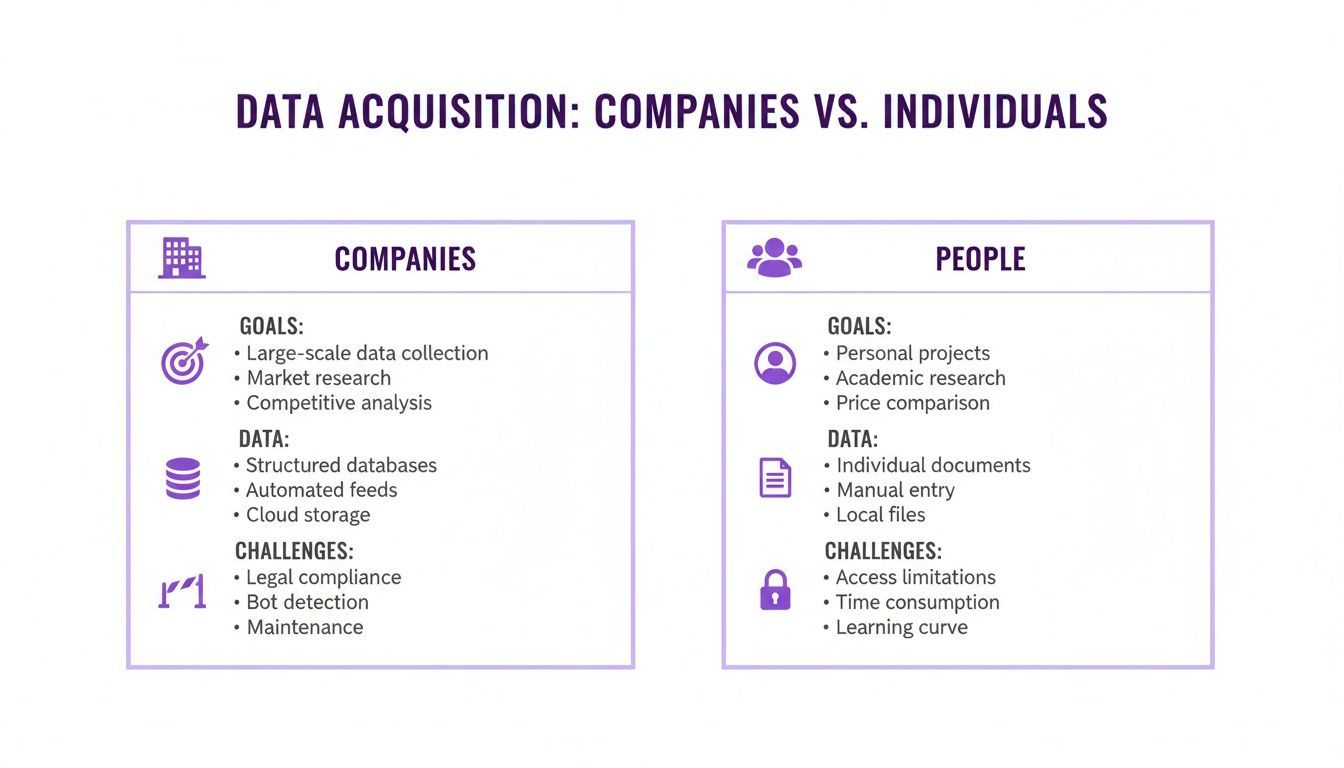
As you can see, company scraping is all about macro-level targeting, while people scraping is built for micro-level engagement. Each comes with its own technical headaches and compliance landmines.
At-a-Glance Comparison: Company Data vs. People Data
To really nail down these differences, let's put them side-by-side. The table below offers a quick breakdown of what you need to know before kicking off any data collection project.
| Aspect | Scraping Companies | Scraping People |
|---|---|---|
| Primary Goal | Building target account lists, market research, and competitive analysis. | Lead generation, candidate sourcing, and building contact lists for outreach. |
| Key Data Points | Industry, company size, revenue, location, technology stack, and founding date. | Name, job title, company, skills, work experience, and contact information. |
| Common Sources | Business directories (e.g., G2, Capterra), corporate websites, and industry databases. | Professional networks (e.g., LinkedIn), event speaker lists, and team pages. |
| Biggest Challenge | Navigating diverse website structures and parsing unstructured firmographic data. | Overcoming anti-scraping measures, login walls, and privacy regulations (GDPR/CCPA). |
This quick comparison highlights that the technical and strategic considerations are worlds apart. One requires parsing complex, varied corporate sites, while the other involves navigating sophisticated anti-bot systems and personal data regulations.
The decision isn't just about what data to collect, but how you'll collect it. Your strategy depends on whether you're targeting the organization as a whole or the specific individuals within it.
Deciding whether to build an in-house team for these tasks or to rely on outside help brings its own set of strategic questions. For a deeper dive into making that call, it's worth exploring the nuances of staff augmentation versus outsourcing. Ultimately, the smartest approach often involves a tool that can handle both scenarios seamlessly, letting you pivot from company-level research to individual prospecting without hitting a wall.
Understanding the Data You Can Extract
When you're deciding between scraping companies or people, the first and most critical question is: what data do you actually need? The answer isn't always obvious, but it dictates everything. One path gives you a bird's-eye view of target organizations, while the other zooms in on the individuals you need to connect with.
Think of it this way: company scraping is about collecting firmographic data. This is the organizational DNA—the hard facts about a business. People scraping, on the other hand, is about gathering the professional and personal details of an individual to understand who they are and what they do.
Naturally, the source you scrape from shapes the data you get. A business directory like G2 is packed with company-level info. A professional network or a conference speaker list? That’s all about the people.
What Company Scraping Delivers
If your goal is building a target account list for an Account-Based Marketing (ABM) campaign or digging deep into market research, company scraping is your best bet. You’re essentially creating a detailed dossier on a business.
This kind of information lets your sales and marketing teams qualify entire organizations at a glance, long before you ever think about who to email.
Here’s the kind of intel you can pull:
- Industry and Niche: What market are they really in?
- Company Size: How many employees do they have? This is a huge indicator of budget and complexity.
- Annual Revenue: A quick way to gauge financial health and buying power.
- Geographic Location: Essential for planning sales territories and local campaigns.
- Technology Stack: Knowing the software they use can reveal perfect integration opportunities or pain points you can solve.
This firmographic data is the foundation of any strategic outreach. It allows you to build hyper-segmented campaigns that actually resonate. To get a better handle on this, check out our guide on how to enrich company search results for a deeper dive.
What People Scraping Delivers
Now, let's flip the script. If you’re a recruiter hunting for the perfect candidate or a sales rep trying to pinpoint key decision-makers, individuals are your target. Scraping people is all about gathering the professional details needed for direct, personal engagement.
This is the micro-level data that turns a cold email into a warm conversation. It provides the context you need to stop guessing and start connecting with the right person in the right role.
You can typically extract information like:
- Full Name and Job Title: The basics for identifying and addressing someone correctly.
- Current Company and Employment History: Gives you a clear picture of their career path and current responsibilities.
- Skills and Endorsements: Helps you pinpoint specific expertise relevant to your product or job opening.
- Contact Information: The hunt for verified email addresses and phone numbers ends here.
- Social Media Profiles: A window into their professional persona and recent activities.
The core difference is clear: Company data helps you find the right organizations, while people data helps you find the right individuals within those organizations. An effective strategy often requires both.
This is where modern tools are starting to blur the lines. For instance, a no-code scraper like ProfileSpider uses an AI-powered feature called dual-profile detection. It lets you go to a single page—like a company's "Team" or "About Us" page—and pull both the company's firmographic details and the professional profiles of its key people in one shot. It’s a unified approach that gives you comprehensive coverage without making you choose one or the other.
Navigating Technical and Practical Scraping Challenges
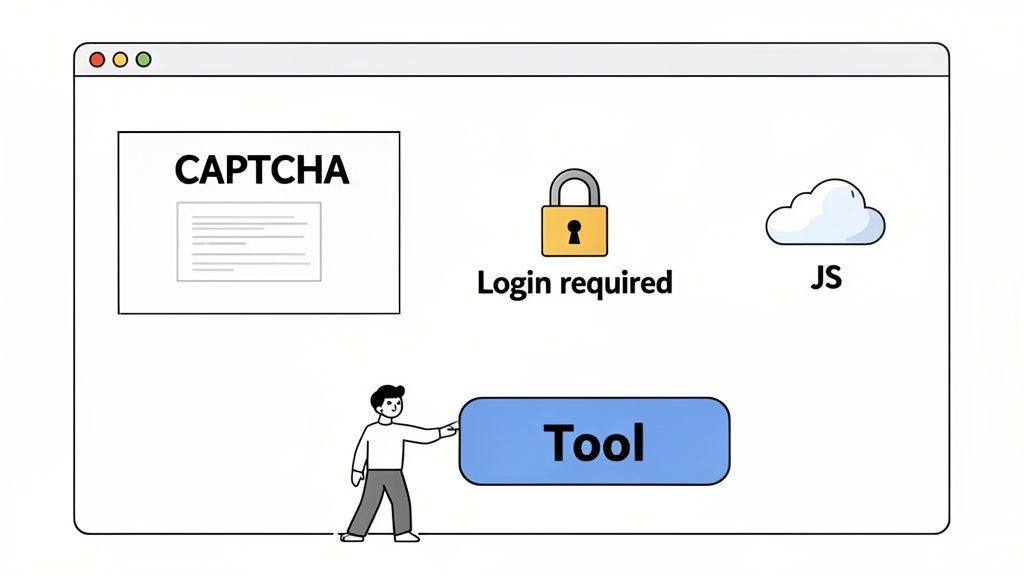
Pulling data, whether from a corporate website or a professional profile, is rarely a simple copy-and-paste job. Both paths are littered with unique technical hurdles that can stop a data collection project cold, especially if you’re not a developer.
The real challenge isn't just getting the data; it's getting it reliably, day after day, without sinking countless hours into troubleshooting.
When you’re scraping company info, the biggest headache is inconsistency. One company might lay out its leadership team in a neat table, but the next one buries the same information in a press release. This structural chaos means a simple script that works on one site will break on another.
Scraping people from professional networks or gated directories, on the other hand, is a whole different beast. These platforms are built like fortresses, armed with sophisticated anti-scraping measures designed to block automated tools at every turn.
The People Scraping Gauntlet
Trying to extract profiles from platforms like LinkedIn or specialized industry portals is like walking through a minefield of technical defenses. For anyone in sales, recruiting, or marketing, these obstacles are often complete showstoppers.
You'll almost certainly run into these roadblocks:
- Login Walls: The most valuable professional data is locked behind a login. Any scraper you use has to manage authentication, which is a surefire way to trigger security alerts.
- CAPTCHAs and Bot Detection: Websites use these to separate human visitors from automated scripts. If your tool can't solve them, it gets blocked.
- Dynamic JavaScript Content: Many modern sites load profile information dynamically with JavaScript. A basic scraper just sees a blank page because it can’t execute the code needed to render the data.
- Rate Limiting: These platforms are watching. View too many profiles in a short time, and they'll slam the door on you—either temporarily or for good.
These hurdles make manual scraping incredibly tedious. Coding a custom solution requires serious technical skills, which is totally impractical if your main job is selling or recruiting. This is exactly why so many professionals hit a wall; when their web scraper is not working, figuring out why is often way beyond their skillset.
The Company Scraping Puzzle
Scraping company websites is less about getting past security and more about solving a puzzle. While fewer sites will block you outright, the information you need is often scattered and unstructured.
Imagine a sales team needing to find the tech stack for 100 different companies. You'd need a tool that can not only visit each website but also recognize the specific HTML patterns or scripts that reveal what software they use. Checking the source code of every site by hand just isn't a scalable strategy.
The core issue here is that traditional scraping methods—manual or code-based—force business users to solve a developer's problem. You have to become a technician just to get the data you need to do your actual job.
The alternative data market, which is fueled by massive web scraping operations, hit $4.9 billion in 2023 and is expected to grow 28% every year. This market is built by businesses using automated tools to scrape millions of public profiles for lead gen and market analysis—a scale that’s simply impossible to match on your own.
The No-Code Solution: How ProfileSpider Overcomes These Challenges
For most non-technical professionals, the only practical solution is a tool that handles all this complexity behind the scenes. An AI-powered profile scraper like ProfileSpider is designed to be the universal key for these locked doors.
It automatically manages logins, renders JavaScript-heavy pages, and intelligently pinpoints profile data, whether it’s for a person or a company. A sales rep can go to a protected industry directory, click a single button, and get a clean list of leads without ever wrestling with code or CAPTCHAs. This transforms a technical nightmare into a smooth, one-click business workflow.
Beyond just getting the data out, professionals run into major data integration challenges when trying to get that information into their other systems. ProfileSpider solves this by providing clean, structured exports that are ready for any CRM or spreadsheet.
Managing Privacy and Compliance Risks
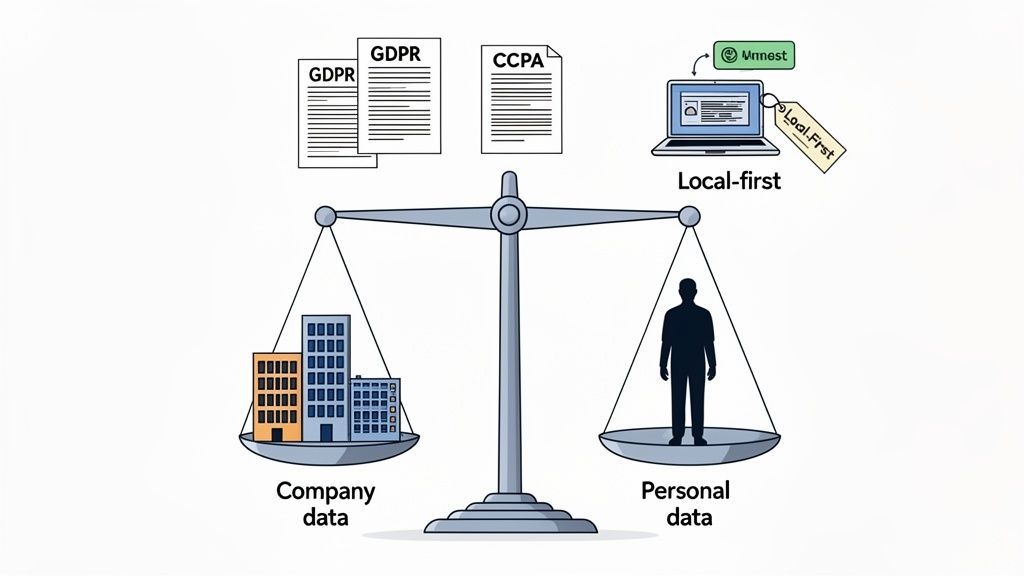
The moment you start scraping data, you’re stepping into a world governed by legal and ethical rules. When it comes to scraping companies vs people, the level of risk and responsibility you take on shifts dramatically. While gathering public company data is generally low-risk, collecting personal information comes with some serious compliance duties.
Scraping firmographic data—things like a company’s industry, size, or tech stack—is pretty straightforward. This is public-facing information that isn't personal. The game completely changes, however, once you start collecting data tied to an individual.
The Personal Data Minefield
Scraping people's profiles means you're handling Personal Identifiable Information (PII). This isn't just a technical term; it covers everything from names and email addresses to job titles and work history. This kind of data is heavily protected by privacy regulations.
For anyone in sales or recruiting, understanding these rules isn't just a good idea—it's a core part of the job. Two of the biggest regulations you need to know are:
- GDPR (General Data Protection Regulation): This one's for you if you process data from anyone in the European Union. It lays down strict rules on how personal data can be collected, stored, and used.
- CCPA (California Consumer Privacy Act): This applies if you collect information from California residents, giving them specific rights over their personal data.
These laws are built on principles like data minimization—only collecting what you absolutely need—and respecting an individual's right to privacy. Ignoring them can lead to massive fines and serious damage to your reputation. The legal side of things can feel complicated, but our detailed guide gives a helpful overview of whether website scraping is legal.
The Impact of the hiQ vs LinkedIn Ruling
A landmark legal case, hiQ Labs v. LinkedIn, brought some much-needed clarity to the scraping world. The courts ultimately confirmed that scraping data users have made publicly available doesn't violate anti-hacking laws like the CFAA. This was a huge win for data accessibility.
But don't mistake this ruling for a free pass. It green-lights the act of accessing public data, but it doesn’t let you off the hook for complying with privacy laws like GDPR once you have that data in your hands.
Key Takeaway: Just because data is public doesn't mean you can do whatever you want with it. The legality of collecting the data is a separate issue from the compliance requirements for using and storing it.
A Safer Approach with Local-First Privacy
How your scraping tool handles data is a massive factor in managing risk. Many cloud-based scraping services collect and store your extracted lists on their servers. This setup creates a potential liability; if they have a data breach, the personal information you've gathered could be exposed.
This is where a local-first privacy model makes a huge difference. Tools like ProfileSpider were designed to store 100% of your extracted data directly in your browser.
This architecture gives you:
- Full control: The data never leaves your computer unless you choose to export it.
- Reduced third-party risk: Your sensitive lead and candidate lists aren’t sitting on some company's cloud server.
- Easier compliance: Keeping data local simplifies your data governance and shrinks your exposure to external threats.
This approach puts you firmly in the driver's seat, letting you manage your data according to your own security protocols and compliance needs—an absolute must when you're dealing with valuable personal profiles.
How This Looks in the Real World
Theory is great, but let's talk about how this actually plays out on the ground. Understanding the difference between scraping companies versus people only matters when it solves a real problem. The magic happens when you know which tool to pull out of the toolbox for the job at hand.
Sometimes you'll start broad with company data to map out an entire industry, then zoom in on the key people. Other times, you'll do the reverse—start with a list of ideal candidates and then investigate the companies they work for. It's all about the workflow.
Building Targeted ABM Campaign Lists
Let's imagine a sales rep, Sarah. Her boss just tasked her with building a pipeline of 500 qualified leads for a new SaaS product. The catch? It only integrates with a specific CRM, so she needs to find companies already using it. Trying to find this manually would be a soul-crushing, week-long scavenger hunt.
This is a perfect use case for scraping companies. The traditional method is painful:
- Manually search a software review site for companies using the CRM.
- Copy and paste every single company name into a spreadsheet.
- Visit each company’s website to dig for basic details like industry and employee count.
- Hunt for an "About Us" or "Team" page and guess who the decision-makers are.
It’s slow, tedious, and a recipe for mistakes. But with a tool like ProfileSpider, Sarah's workflow becomes a single click. She navigates to the filtered search results page, hits "Extract Profiles," and instantly gets a clean, structured list of all the companies, complete with their websites and descriptions.
Sourcing Passive Candidates for Recruitment
Now, let's look at a recruiter, Mark. He needs to fill five senior software engineer roles, but they require experience in a niche programming language. The best people aren't polishing their resumes; they're busy working. He has to source passive candidates.
Mark's entire strategy revolves around scraping people. He finds a goldmine: a list of speakers from a recent tech conference focused on that exact programming language. Every person on that list is a potential home-run hire.
Doing this the old way would be a nightmare:
- Click into each speaker's profile, one by one.
- Copy their name, title, and current company into yet another spreadsheet.
- Then, the real hunt begins: scouring the web for a LinkedIn profile or personal site to find contact info.
Instead, Mark opens the ProfileSpider extension on the conference speaker page and extracts every single profile in seconds. The AI automatically identifies and pulls names, job titles, company affiliations, and social links, building an organized candidate list he can start reaching out to immediately.
This is the core advantage: turning messy, unstructured web pages—like event lists or directories—into structured, actionable data without the manual grind. Automation transforms a task that takes hours into something you can do in minutes, over and over again.
Generating Hyper-Targeted Lead Lists
Let's circle back to Sarah, our sales rep. She's got her list of 500 target companies. Great. But a list of companies isn't a pipeline. She needs to find the right people inside those businesses. Her focus now shifts from company scraping to people scraping.
She lands on the "Team" page of a high-priority company. Instead of the copy-paste marathon, she uses ProfileSpider again. Its dual-profile detection is smart enough to see both the main company profile and all the individual employee profiles on the page.
With another click, she can enrich that data. The tool dives deeper, visiting the linked social profiles to pull back contact details like email addresses. This one-two punch of company and people scraping turns a cold list of businesses into a warm list of real people she can talk to.
This is where AI-powered tools create a massive competitive gap. The AI web scraping market is growing at a 17.8% CAGR and is on track to become a $3.3 billion industry, delivering 30-40% time savings for businesses that adopt it. While an individual trying to manually copy profiles from a site like Twitter might get blocked after a few dozen attempts, a business using a tool like ProfileSpider can process millions with near-perfect accuracy. You can dive deeper into the rise of AI in web scraping on scrapingapi.ai.
How to Choose the Right Scraping Tool
Picking the right data extraction tool is one of those decisions that can make or break your workflow, budget, and ultimately, your results. The tool you choose is often dictated by whether you're scraping companies or people, so it pays to understand your options before you dive in.
For most folks, there are really only a few paths you can take, and each one comes with its own set of headaches and benefits.
Evaluating Your Options
You could, of course, just manually copy and paste everything. But let's be honest, that's painfully slow and completely useless for building a list of any real size. On the flip side, you could hire a team of developers to build custom scrapers from scratch. That's powerful, sure, but it's also incredibly expensive and takes forever to get going—a non-starter for most sales and recruiting teams who needed that data yesterday.
The sweet spot for business professionals is almost always in the middle: a dedicated, no-code tool built for the job. It cuts out the mind-numbing manual work without the massive cost and complexity of custom development.
The Modern Solution for Professionals
No-code tools have opened the floodgates for data extraction, but they aren't all created equal. A lot of the generic scrapers out there still force you to wrestle with weird configurations and technical roadblocks. If your goal is generating leads or sourcing candidates, you need something built specifically for pulling profile data, without any of the friction.
This is exactly where a tool like ProfileSpider shines. It was designed from the ground up for people in sales, recruiting, and marketing—not developers.
- One-Click Simplicity: Just navigate to a page—a company directory, an event RSVP list, a professional network—and pull down every profile in an instant.
- AI-Powered Dual Detection: It's smart enough to spot and grab both company and individual profiles on the same page, so you get the complete picture.
- Local-First Privacy: All the data you extract stays in your browser. You keep full control and sidestep a lot of compliance headaches.
- Easy Export: Get your data out into a clean CSV, Excel file, or your CRM without spending hours cleaning it up first.
In 2023, automated bots (including scrapers) were responsible for a wild 49.6% of all internet traffic. That gives you a sense of the scale at which data is being collected. You can read the full industry analysis on browsercat.com to see just how massive this has become. A tool like ProfileSpider lets you operate at that same level, pulling up to 200 profiles from a single page in seconds—a task that would easily take hours by hand.
At the end of the day, the right tool lets you get the data you need without forcing you to become a tech expert. If you want to see how ProfileSpider stacks up against the competition, check out our guide on the best tools for scraping leads.
Got Questions? We've Got Answers.
When you're digging into data extraction, a lot of questions pop up, especially around the nuances of scraping companies versus people. Let's clear up some of the most common ones we hear from pros building lead lists, sourcing candidates, or doing market research.
Is It Actually Legal to Scrape Data from a Site Like LinkedIn?
This is the big one, right? Generally speaking, scraping publicly available data is legal. This has been tested in court, most notably in the hiQ vs. LinkedIn case. But—and this is a big but—you absolutely have to be mindful of a website's terms of service and major privacy laws like GDPR, particularly when you're dealing with personal info.
That's why using a tool that's built for security, like ProfileSpider, can give you some peace of mind. It stores all the data it extracts locally in your browser. This means you keep full control over the information, helping you sidestep the privacy headaches that can come with storing data on third-party servers.
What's the Real Difference Between Scraping a Company Directory vs. a Social Media Site?
The main differences boil down to two things: the kind of data you can get and how technically difficult it is to get it. A company directory, for instance, is great for firmographic data—think company size, industry, revenue—and usually has a pretty simple site structure.
A social media network, on the other hand, is a goldmine for rich personal and professional details like job titles, skills, and work history. But it's also locked down with complex code and serious anti-scraping defenses. You'll need a specialized, no-code tool designed for this environment to get anywhere without a ton of manual work or deep technical know-how.
A classic mistake is trying to use a generic scraper for a highly specialized job. Tools built for professional profiles are designed to navigate the security hurdles that a basic company data scraper will trip over, saving you a world of time and frustration.
How Can I Start Scraping Profiles if I Don't Know How to Code?
This is where no-code scraping tools come in. You don't need to be a developer anymore. A browser extension like ProfileSpider is made specifically for people in sales, recruiting, and marketing who just need the data without the technical baggage.
The process is incredibly straightforward. You just navigate to a page with the profiles you want, click a button, and let the AI do the heavy lifting of pulling out structured data for you. From there, you can organize, manage, and push that info right into your CRM or a spreadsheet, all without writing a single line of code.